4
4
4-303
4-303
Disassembly/Assembly > Fixing System > Removing the Fixing Assembly (MF4780w/MF4770n/MF4750/MF4730) > Procedure
Disassembly/Assembly > Fixing System > Removing the Fixing Assembly (MF4780w/MF4770n/MF4750/MF4730) > Procedure
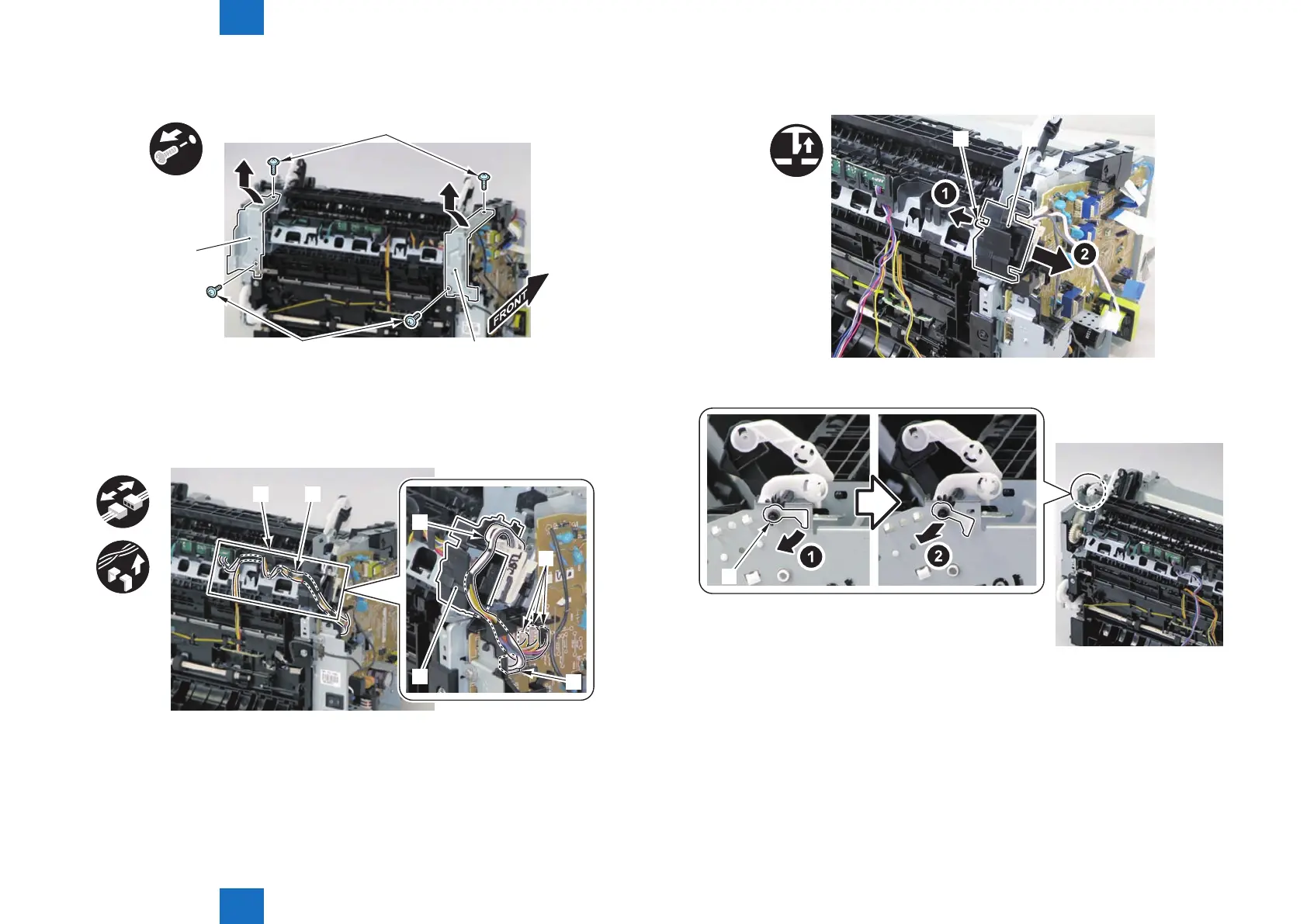
4)Remove the 2 left/right reinforcing plates[1]
• 4 screws(black TP)[2]
x4
[2]
[2] [1]
[1]
5) Remove the 4 connectors [1].
6) Disengage the harness [2] from the harness guide [A].
7) Disengage the xing harness [4] from the harness holder [3].
[1]
[1]
[4]
[3]
[A] [2]
x4
F-4-835
F-4-836
8) Remove the harness holder [1].
• 1 claw [2]
[1][2]
9) Remove the shaft support [1] of the delivery roller.
[1]
F-4-837
F-4-838










 To Next Page