4
4
4-358
4-358
Disassembly/Assembly > Pickup And Feeding System > Removing the Duplex Feed Unit (D530) > Procedure
Disassembly/Assembly > Pickup And Feeding System > Removing the Duplex Feed Unit (D530) > Procedure
Removing the Duplex Feed Unit (D530)
■
Preparation
1) Remove the left cover
2)Remove the copyboard cover and reader unit.
3)Remove the right cover
4)Remove the front cover unit.
5)Remove the upper cover.
■
Procedure
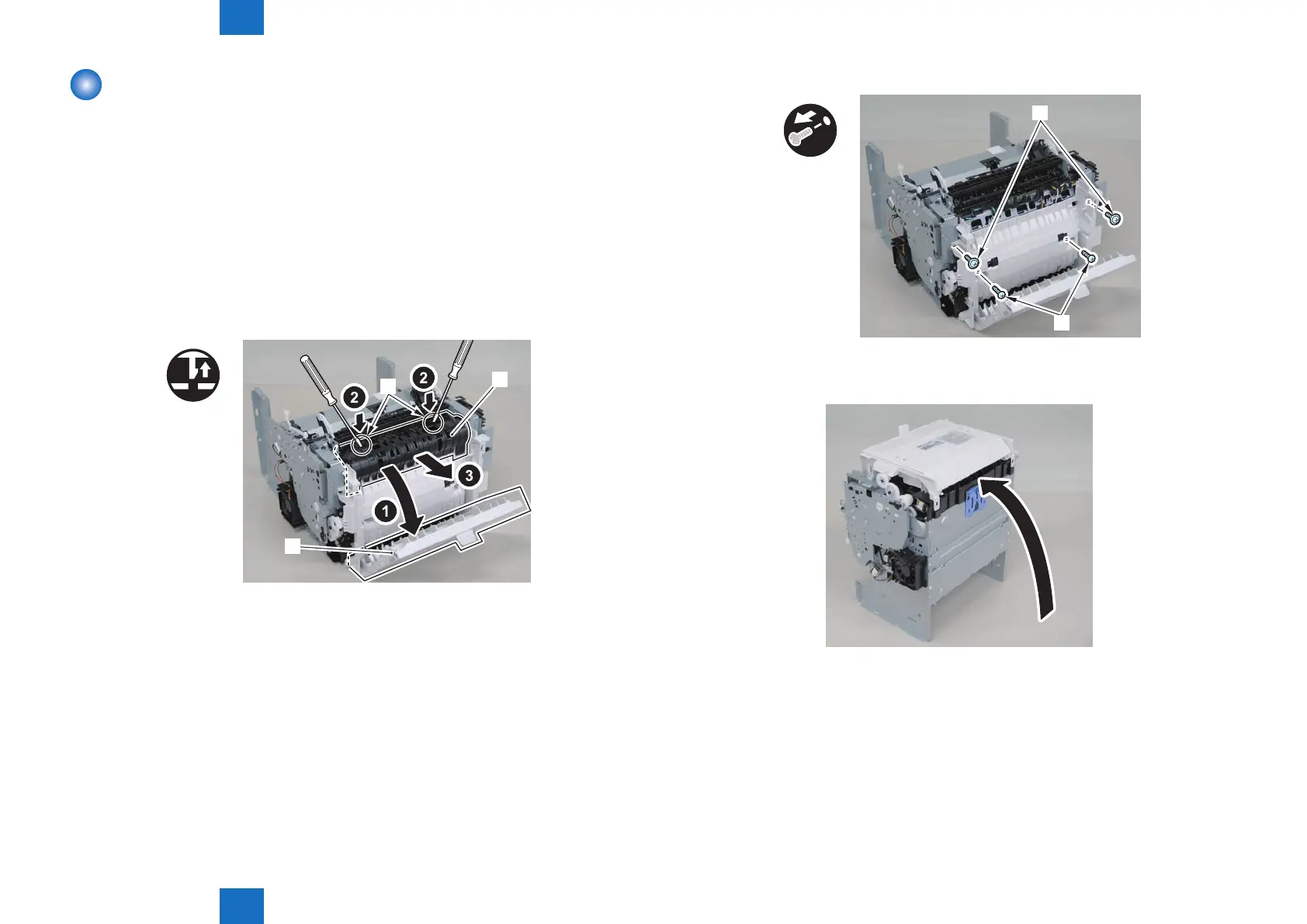
1)Open the rear cover[1], and remove the duplex guide[2]
• 2 claws[3]
x2
[1]
[2]
[3]
F-4-981
2) Remove the 2 screws (TP) [1] and 2 screws (tapping) [2] using a stubby screwdriver.
x4
[2][1]
[2]
3) Close the rear cover.
4) Face the front of the host machine downwards.
F-4-982
F-4-983










 To Next Page