8
8
8-6
8-6
Service Mode > COPIER > OPTION > SERIAL
Service Mode > COPIER > OPTION > SERIAL
■
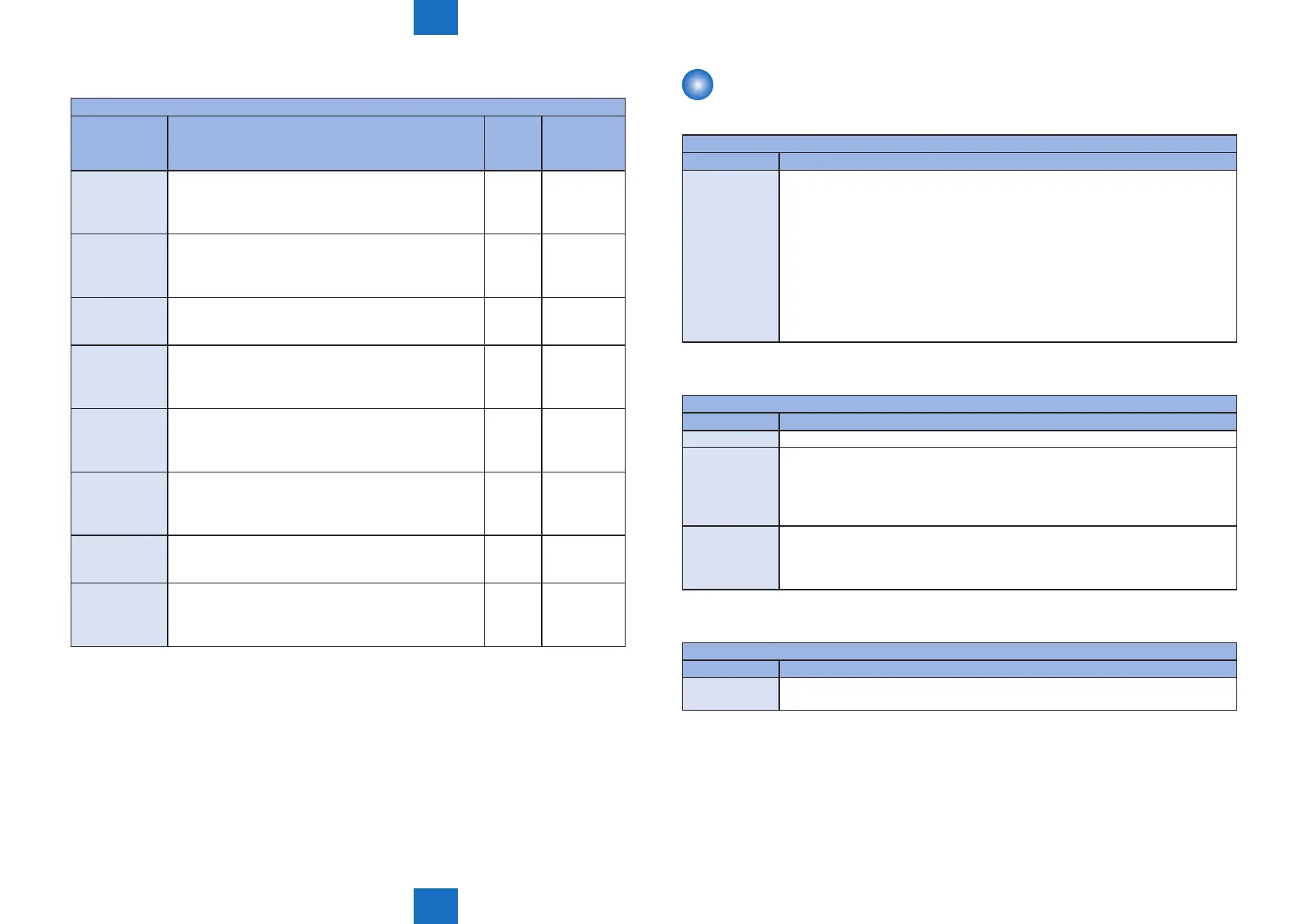
SPLMAN
COPIER>FUNCTION>SPLMAN
Sub item Description
Common
to all
models
Double sided
printing
model only
TOP-MPT Adjustment of leading edge margin when feeding from
MP tray.
Adjustment in: 0.1mm
Setting range: 50 ~ 150 (Default value: 104)
Yes
TOP-DUP-MPT Adjustment of leading edge margin on both sides/ back
side when feeding from MP tray.
Adjustment in: 0.1mm
Setting range: 50 ~ 150 (Default value: 104)
Yes
LEFT-MPT Adjustment of left margin when feeding from MP tray.
Adjustment in: 0.1mm
Setting range: 50 ~ 150 (Default value: 97)
Yes
LEFT-DUP-MPT Adjustment of left margin on both sides/ back side when
feeding from MP tray.
Adjustment in: 0.1mm
Setting range: 50 ~ 150 (Default value: 96)
Yes
TOP-CST Adjustment of leading edge margin when feeding from
cassette.
Adjustment in: 0.1mm
Setting range: 50 ~ 150 (Default value: 104)
Yes
TOP-DUP-CST Adjustment of leading edge margin on both sides/ back
side when feeding from cassette.
Adjustment in: 0.1mm
Setting range: 50 ~ 150 (Default value: 104)
Yes
LEFT-CST Adjustment of left margin when feeding from cassette.
Adjustment in: 0.1mm
Setting range: 50 ~ 150 (Default value: 97)
Yes
LEFT-DUP-CST Adjustment of left margin on both sides/ back side when
feeding from cassette.
Adjustment in: 0.1mm
Setting range: 50 ~ 150 (Default value: 96)
Yes
T-8-11
OPTION
■
BODY
COPIER>OPTION>BODY
Sub item Description
LOCALE To set country group.
1: Japan
2: North America
3: Korea
4: China
5: Taiwan
6: Europe
7: Asia
8: Oceania
Execute the following service mode to enable this setting.
■
ACC
COPIER>OPTION>ACC
Sub item Description
WLAN -
WLANMODE Shows whether the Wireless LAN IEEE 802.11/n standard is enabled/disabled.
0: Disabled (When COPIER > OPTION > BODY > LOCALE is set to "6", this is the
default setting.)
1: Enabled (When COPIER > OPTION > BODY > LOCALE is set to the value
other than "6", this is the default setting.)
WLANSERIAL Use this setting to use the serial interface exclusively for the WiFi function. Use
this setting to take various measurement of Wireless LAN.
0: Normal mode
1: Measurement mode
■
SERIAL
COPIER>OPTION>SERIAL
Sub item Description
SN-MAIN Enter the device serial number written on the rating name plate of the host
machine.
T-8-12
T-8-13
T-8-14










 To Next Page