2
2
2-9
2-9
Technical Overview > Document Exposure/Feeder System > Document Feeder System > Various Control
Technical Overview > Document Exposure/Feeder System > Document Feeder System > Various Control
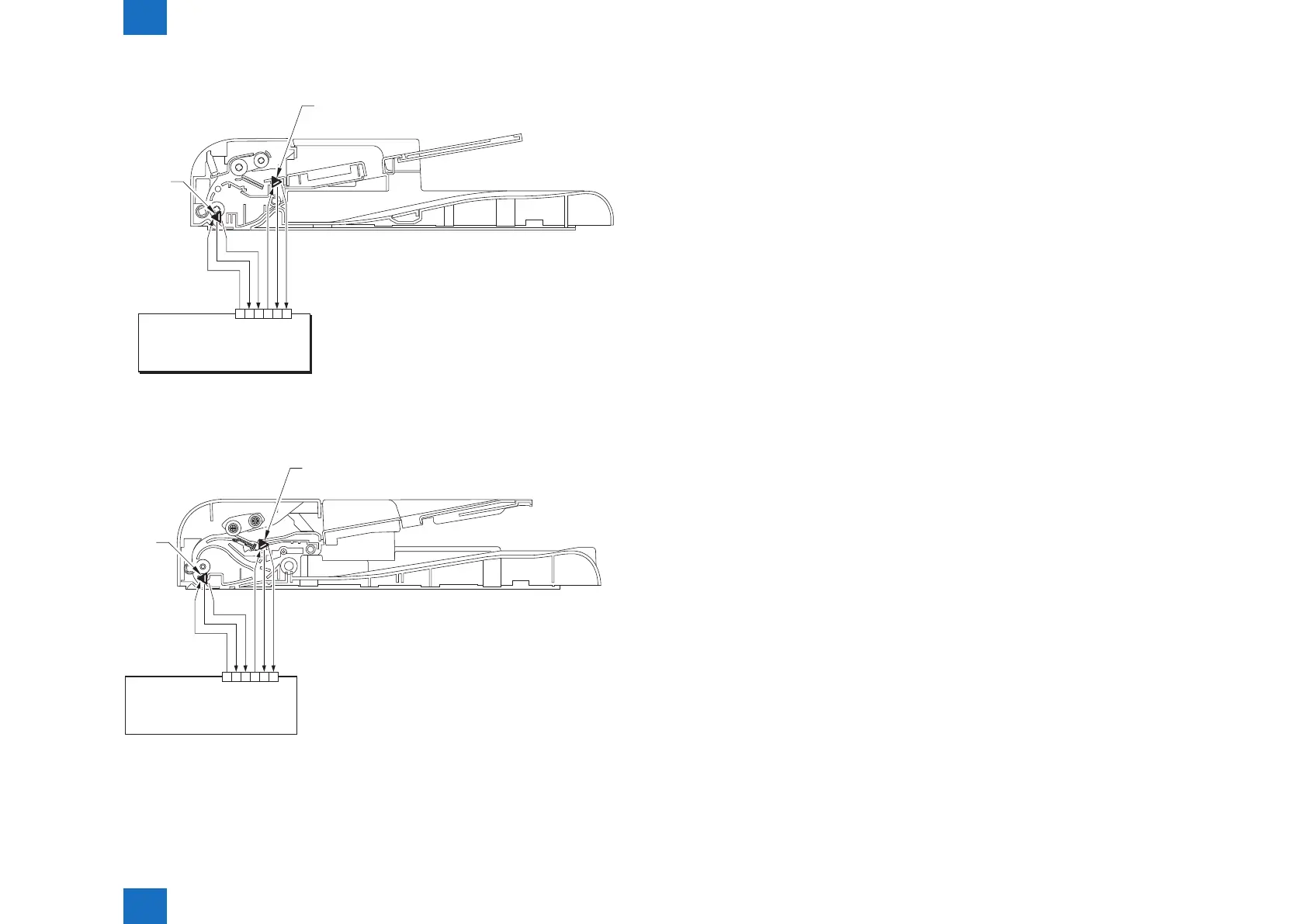
In the case of SADF
J15
Main Controller
1 2 3 4 5 6
VCC
GND
DES
VCC
GND
DS
In the case of DADF
Main Controller
J15
VCC
GND
DES
VCC
GND
DS
Document
Sensor
1 2 3 4 5 6
F-2-11
F-2-12
●
Jam Detection
The following cases are judged as jam.
1. In case of delay in reaching DS/DES or stationary during scanning of original
2. In case DS/DES is detected as ON at power-on (residual paper jam)
3. In case of detecting original of which length is 400 mm or longer
• Operation after Detection of Jam
The host machine stops scanning operation and displays "CHECK DOCUMENT" on the
control panel. No jam code is displayed. In case of the model equipped with fax function (with
built-in speaker), the warning beep occurs at the detection of jam.
• How to release Jam
Remove the jammed paper and open / close the SADF/DADF upper cover
Document
Sensor
Document
Sensor
Edge
Document
Sensor
Edge










 To Next Page