Chapter 6
6-40
6.4 Firmware Update Tool
6.4.1 imagePROGRAF Firmware Update Tool
0031-2634
a) Function of imagePROGRAF Firmware Update Tool
This tool has the following function.
- Updating the firmware of printer
Connection method with the computer:
USB, Network
b) Operation
1) Make sure that the printer is the online mode.
2) Exit all other running programs.
3) Start the imagePROGRAF Firmware Update Tool.
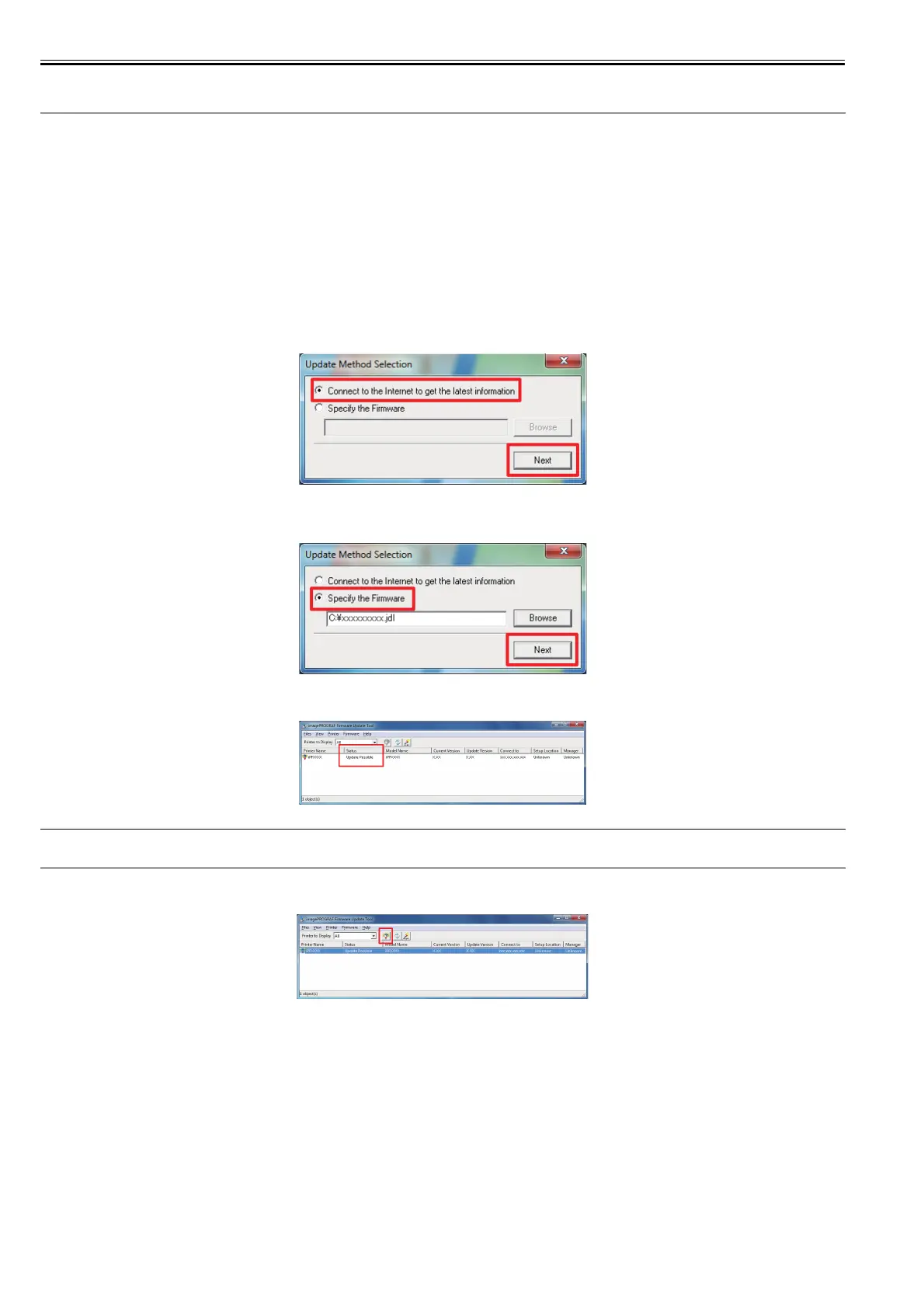
4) According to the internet connection state of the computer, specify in the [Update Method Selection] dialogue box as shown in the followings.
4)-1 In case the computer is connected to the internet, select the [Connect to the internet to get the latest information], and then click [Next].
F-6-10
4)-2 In case the computer is not connected to the internet, select the [Specify the Firmware] and specify the firmware data that downloaded manually, and then click
the [Next].
F-6-11
5) The [Update Possible] is displayed in the [Status] field of the printers that a newer firmware is available.
F-6-12
MEMO:
The overwriting the same firmware version or the firmware downgrade can not execute.
6) Click the printer to update the firmware of to select it, and then click the [Start Update] icon.
F-6-13














 To Next Page