Chapter 4
4-34
4.3.10 Ink Tube Unit
0023-3328
a) Ink Tube Unit
Removing the Ink Tube Unit
1) Perform ink drainage. Refer to "Disassembly/Reassembly > Points to Note on Disassembly and Reassembly > Draining the ink".
2) Unlock the carriage unit. Refer to "Disassembly/Reassembly > Points to Note on Disassembly and Reassembly > Opening the Cap/Moving the Wiper Unit".
3) Remove the front cover.
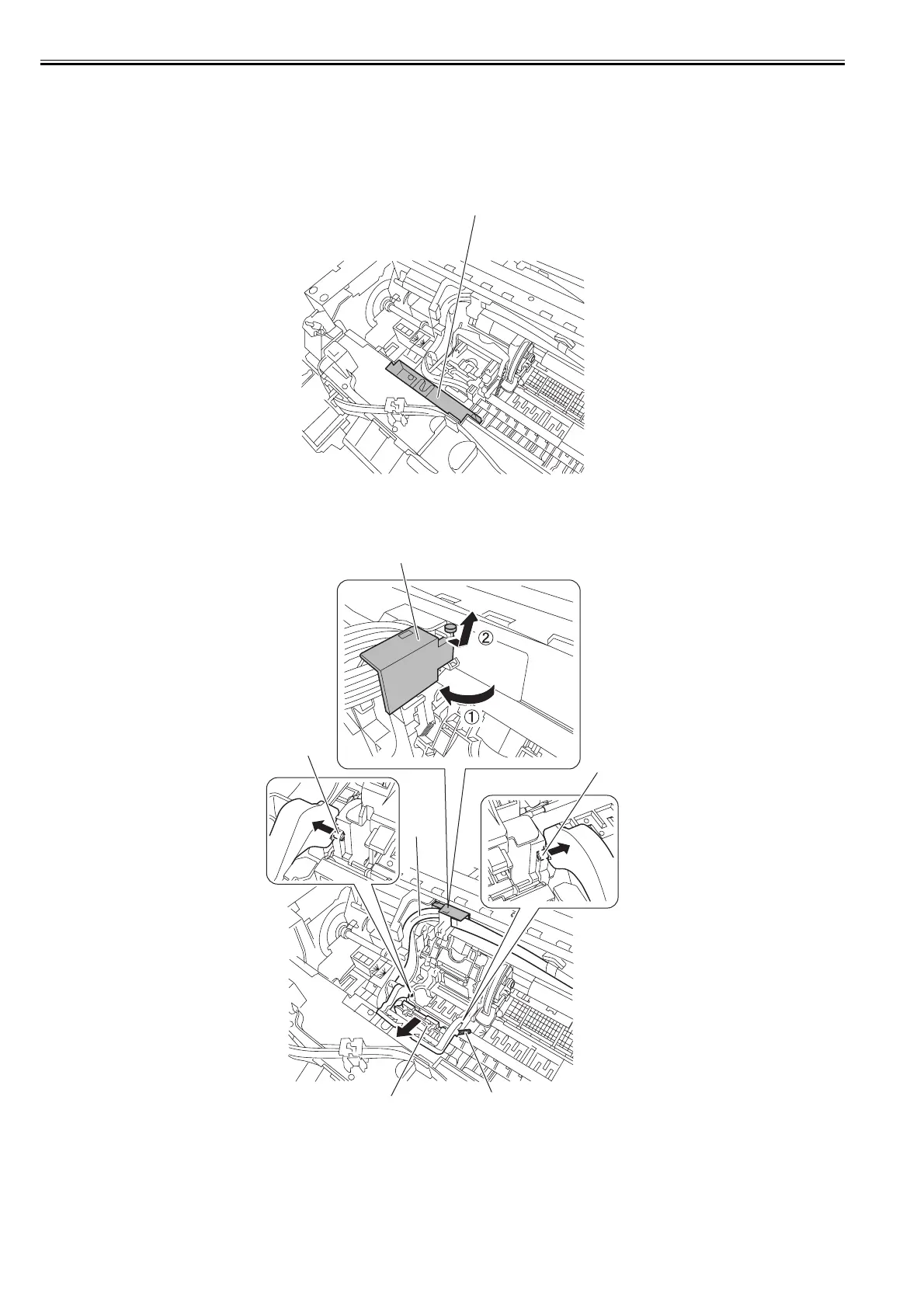
4) Move the carriage to the position where there is a notch [1] at the front of the platen as shown below.
F-4-76
5) Remove the printhead.
6) Open the tube guide [1] an angle of 90 degrees frontward, and then remove the tube guide [1] together with the ink tube.
Remove the ink tube [2] from the carriage guide and one spring [3], release two hooks [4], and then remove the joint base [5] together with the printhead fixer lever.
F-4-77
[1]
[1]
[3]
[5]
[2]
[4]
[4]














 To Next Page