0HWJ-02U
Setting System Manager Passwords
Administrator access rights are required to change machine settings from the Remote UI. After logging in as an administrator, use the
following procedure to set the PIN (system manager password). The system manager password is critical to the security of the machine.
Make sure that only system managers know the system manager password.
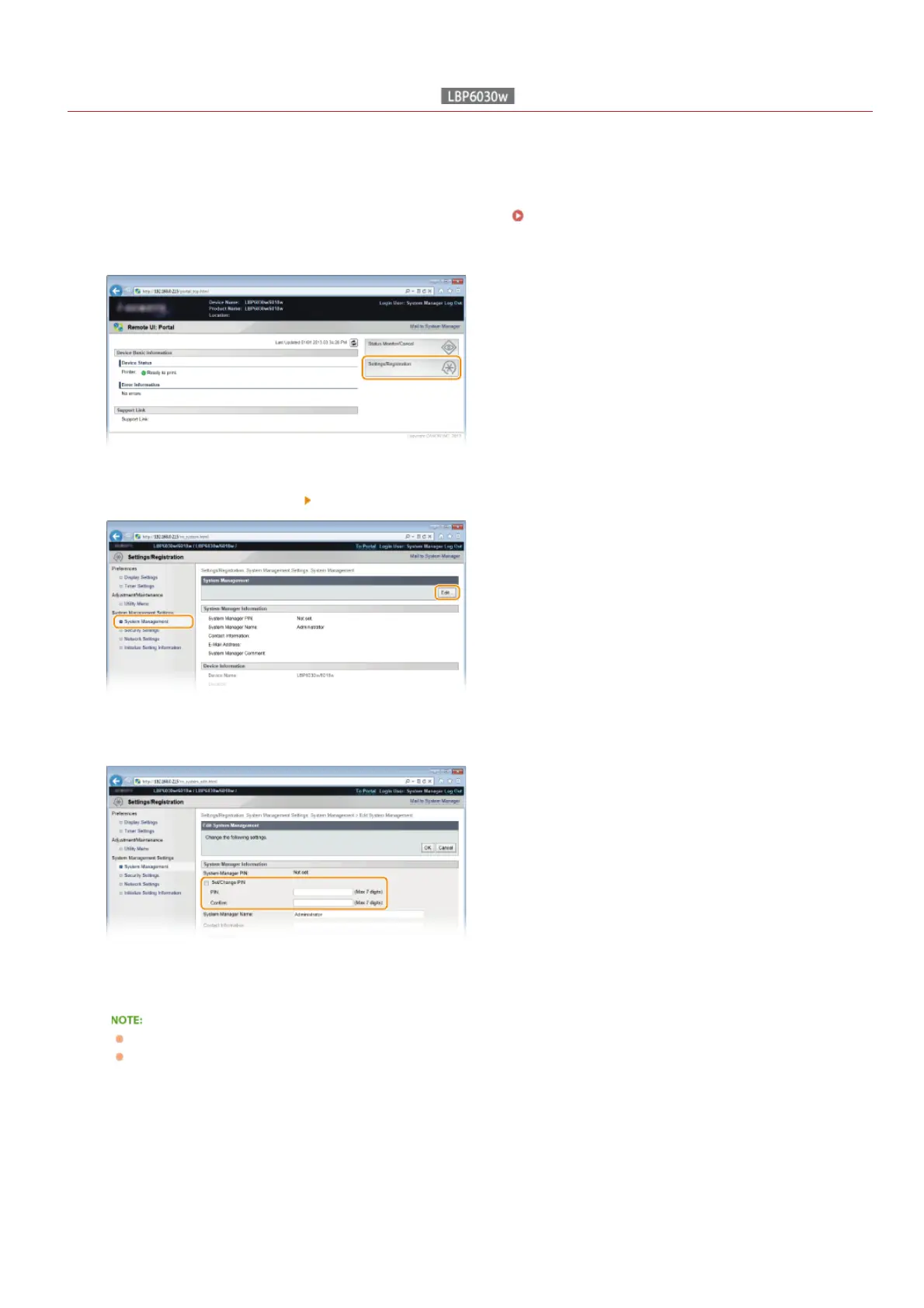
Start the Remote UI and log on in System Manager Mode. Starting the Remote UI
Click [Settings/Registration].
Click [System Management] [Edit].
Enter the PIN.
[Set/Change PIN]
To set or change a PIN, select the check box and enter a number of up to 7 digits. Enter the same number in both in the [PIN]
and [Confirm] text boxes.
You cannot register a PIN that consists only of zeros, such as "00" or "0000000."
To clear a PIN setting, select the [Set/Change PIN] check box and click [OK] with the [PIN] and [Confirm] text boxes empty.
Enter the name and contact information of the system manager as necessary, and click [OK].
1
2
3
4
5
㻝㻜㻟㻌㻛㻌㻞㻝㻥












 To Next Page