0JAY-00S
Troubleshooting
If you encounter problems during installation of the printer driver, see the following sections before contacting Canon.
Problems with the Wireless LAN Connection
Problems with the USB Connection
Problems via the Print Server
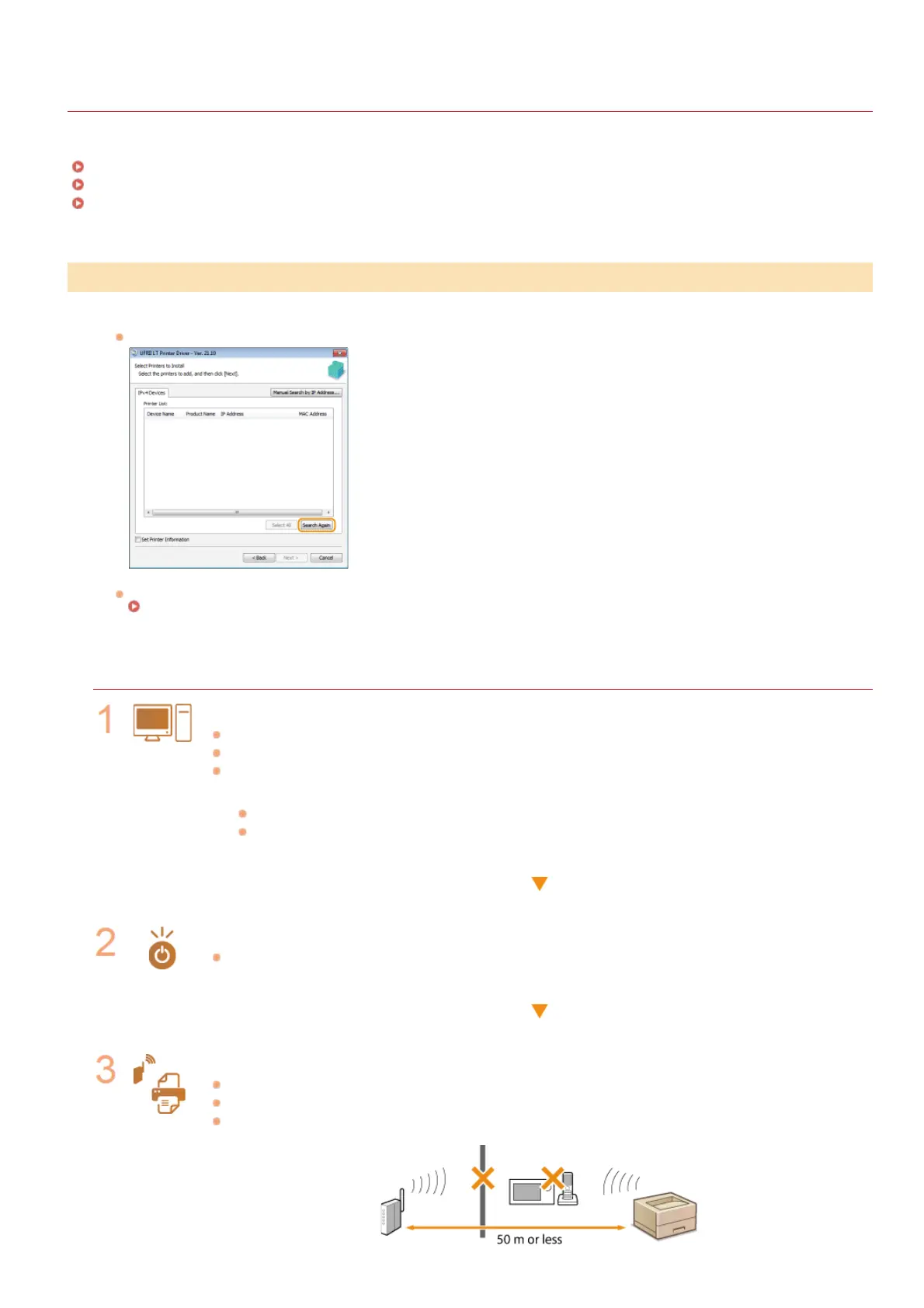
The printer that you want does not appear in [Printer List].
Click [Search Again] to search for the printer on the network.
Check whether the printer is ready to connect to the network.
Cannot Connect to the Wireless LAN
Cannot Connect to the Wireless LAN
Check the status of your computer.
Have the settings of the computer and the wireless router been completed?
Are the cables of the wireless router (including the power cord and LAN cable) correctly plugged in?
Is the wireless router turned ON?
If the problem persists even after checking the above:
Turn OFF all of the devices, and then turn them ON again.
Wait for a while, and try again to connect to the network.
Check whether the printer is turned ON.
If the printer is turned ON, turn it OFF, and then turn it back ON.
Check the installation site of the printer and the wireless router.
Is the printer too far from the wireless router?
Are there any obstacles such as walls between the printer and the wireless router?
Are there any appliances such as microwave ovens or digital cordless phones that emit radio waves near the
printer?
Problems with the Wireless LAN Connection
㻟㻟㻌㻛㻌㻡㻟










 To Next Page