0JAY-00J
Updating
Proceed as follows to download the latest printer driver from the Canon website and update the printer driver installed on your
computer.
Log on to the computer with an administrator account.
Download the printer driver from the Canon website (http://www.canon.com/).
For more information about how to download the printer driver, see the driver download page for your printer.
Unzip the downloaded file.
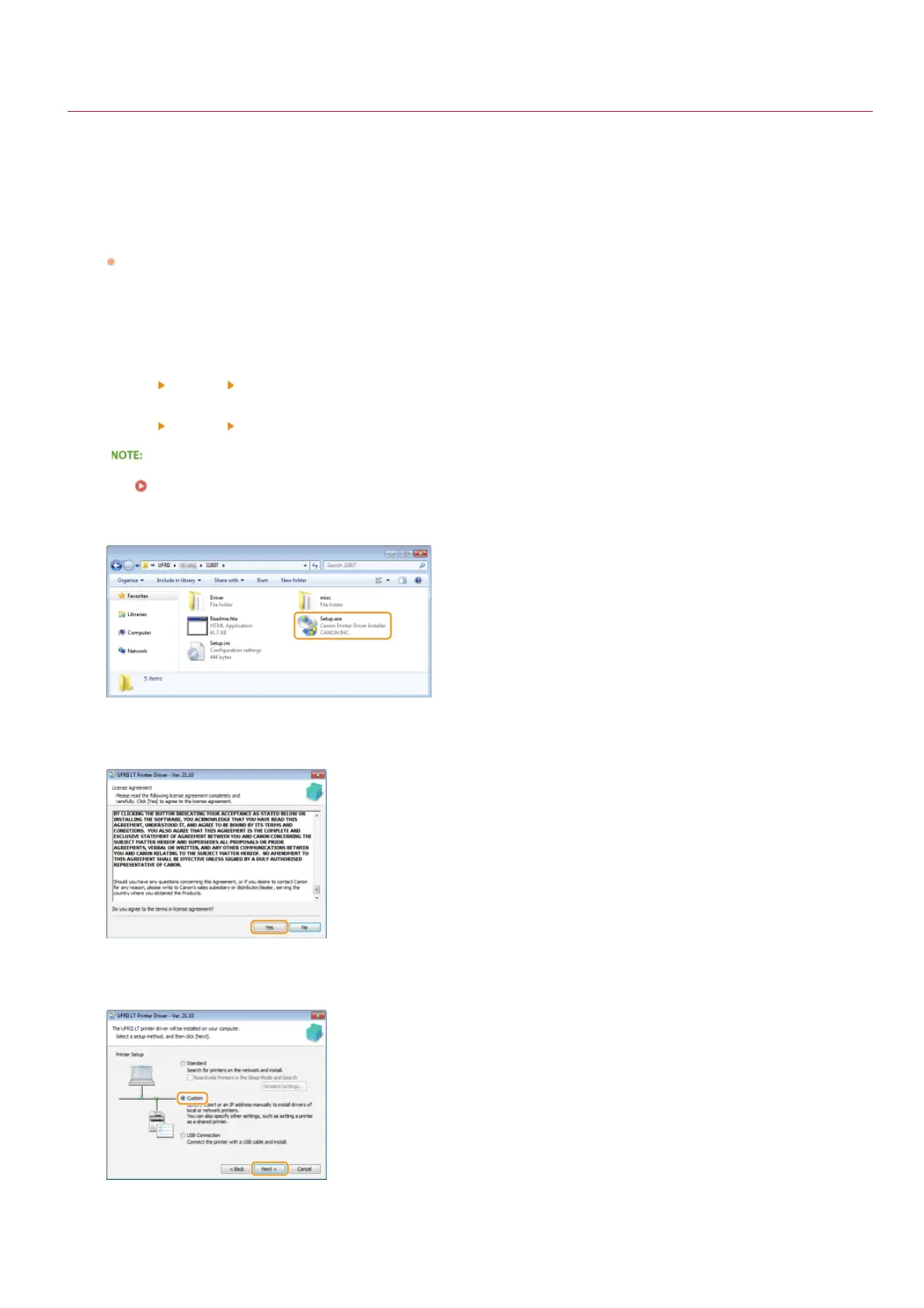
Open the folder where the printer driver is stored.
32-bit operating system
[UFRII]
[uk_eng] [32BIT] folders
64-bit operating system
[UFRII]
[uk_eng] [x64] folders
If you do not know whether to specify the 32-bit version or the 64-bit version for Windows Vista/7/8/Server 2008/Server 2012,
see
Checking the Bit Architecture.
Double-click "Setup.exe."
Read the License Agreement and click [Yes] to agree.
Select [Custom], and click [Next].
Select [Update Existing Printer Drivers], and click [Next].
1
2
3
4
5
6
7
8
㻞㻤㻌㻛㻌㻡㻟










 To Next Page