0JAY-00U
Deleting the USB Class Driver
Delete the USB class driver when it is not possible to install the printer driver correctly when using a USB connection. Note that even if
you delete the USB class driver, it will be installed again automatically when you connect the printer and your computer with a USB
cable.
Connect the printer and your computer with a USB cable ( Connecting via USB ), and turn ON the printer.
Log on to the computer with an administrator account.
Display [Device Manager].
Displaying [Device Manager]
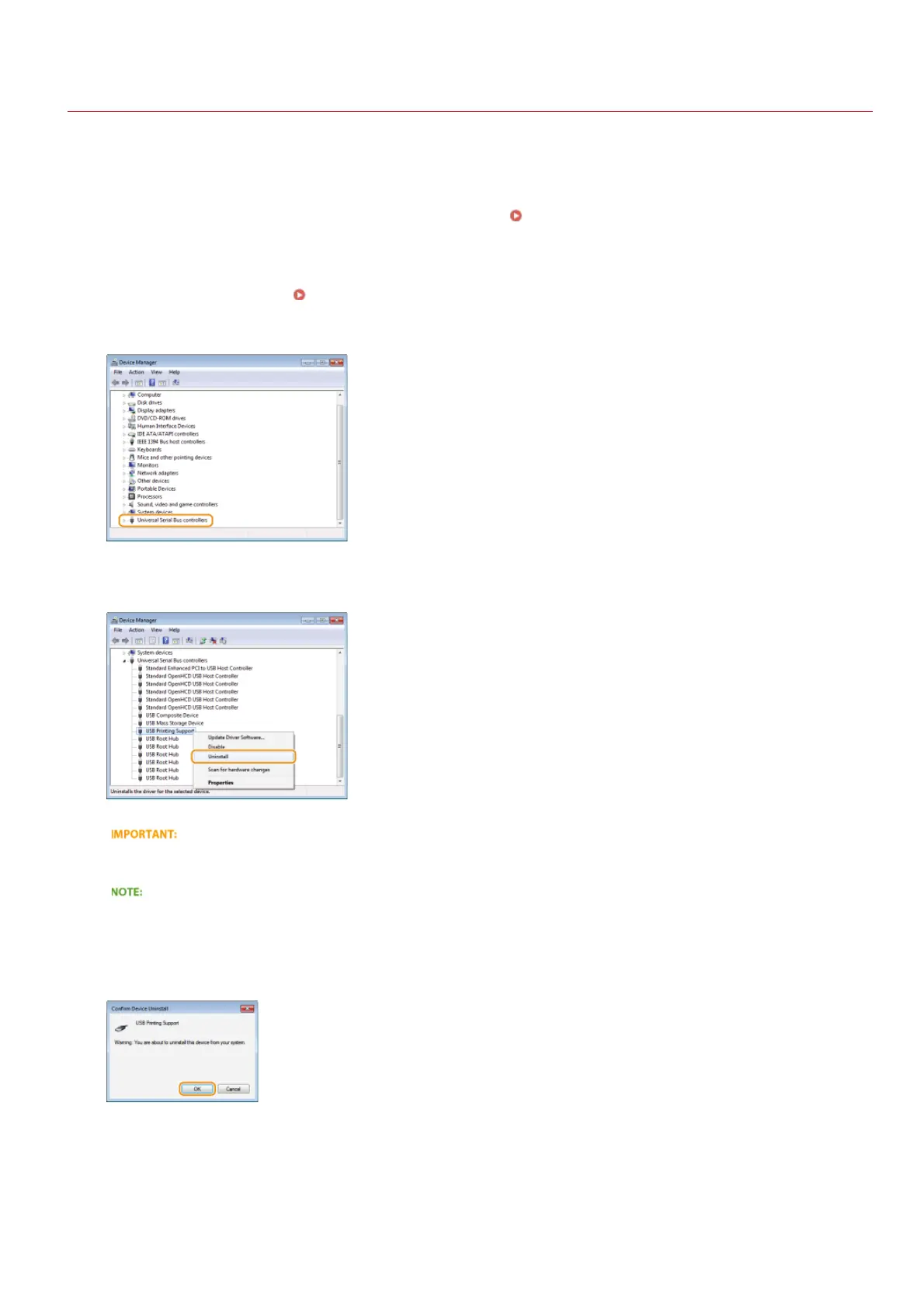
Double-click [Universal Serial Bus controllers].
Right-click [USB Printing Support], and click [Uninstall].
Be careful to delete [USB Printing Support] only, and never delete any other devices or device drivers
Windows may not operate properly if you delete other devices or device drivers.
If [USB Printing Support] is not displayed
[USB Printing Support] is not displayed if the USB class driver is not installed properly. In this case, close [Device Manager]
without doing anything further.
Click [OK].
Close [Device Manager].
Unplug the USB cable, and restart your computer.
1
2
3
4
5
6
7
8
㻟㻢㻌㻛㻌㻡㻟












 To Next Page