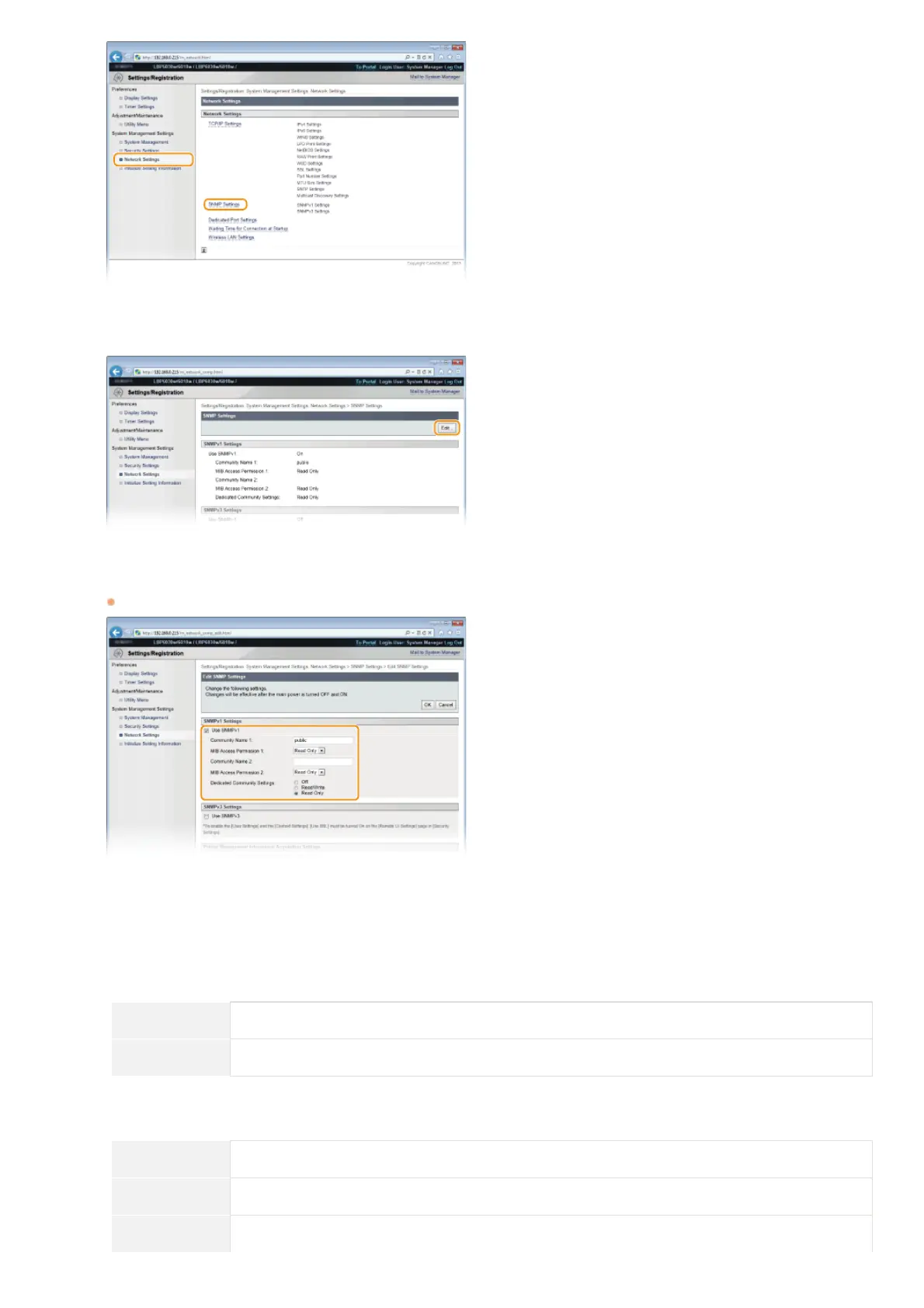
Click [Edit].
Specify SNMPv1 settings.
If you do not need to change SNMPv1 settings, proceed to the next step.
[Use SNMPv1]
Select the check box to enable SNMPv1. You can specify the rest of the SNMPv1 settings only when this check box is selected.
[Community Name 1]/[Community Name 2]
Enter up to 32 alphanumeric characters for the name of the community.
[MIB Access Permission 1]/[MIB Access Permission 2]
For each community, select [Read/Write] or [Read Only] for the access privileges to MIB objects.
[Read/Write] Allows both viewing and changing the values of MIB objects.
[Read Only] Allows only viewing the values of MIB objects.
[Dedicated Community Settings]
Dedicated Community is a preset community, intended exclusively for administrators using Canon software, such as imageWARE
Enterprise Management Console. Select [Off], [Read/Write] or [Read Only] for access privileges to MIB objects.
[Off] Do not use the Dedicated Community.
[Read/Write] Allows the Dedicated Community to both view and change the values of MIB objects.
[Read Only] Allows the Dedicated Community to only view MIB objects.
4
5
㻥㻢㻌㻛㻌㻞㻝㻥












 To Next Page