153
Contents
Preparation/
Setup
Print Using a
Computer
Appendix
IndexPrint/SaveInput/Edit
Names of
Components
Maintenance/
Printer Settings
Trouble-
shooting
5
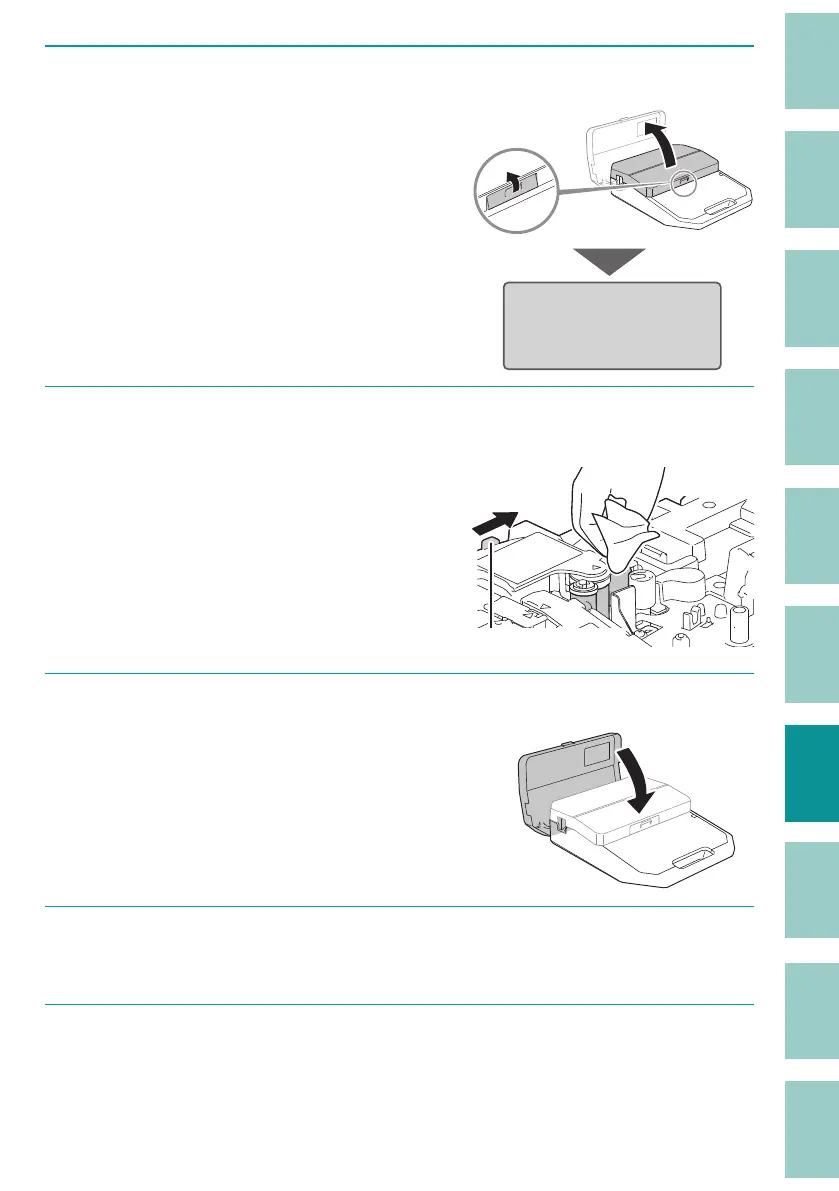
Open the cover.
When the cover is opened, instructions will
be displayed on the screen.
Cleaning mode
After cleaning,
close safety cover.
6
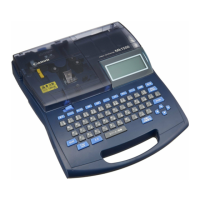
Wipe o any dirt on the transport roller 1, 2 and 3 with a cloth moistened with
water and wrung out tightly.
Transport roller 3 is cleaned by pushing the
jam recovery lever in the direction of the
arrow.
Use a lint-free cloth.
Jam recovery lever
7
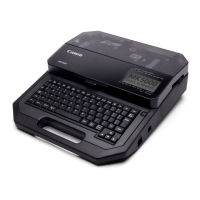
Close the cover.
The transport roller will spin.
8
Repeat steps 5 to 7.
Open and close the cover 8 times to make one rotation of the roller.
9
When cleaning is nished, press the [Shift] + [Cancel] keys.
The display returns to the character input display.


 To Next Page