79
Contents
Preparation/
Setup
Print Using a
Computer
Appendix
IndexPrint/SaveInput/Edit
Names of
Components
Maintenance/
Printer Settings
Trouble-
shooting
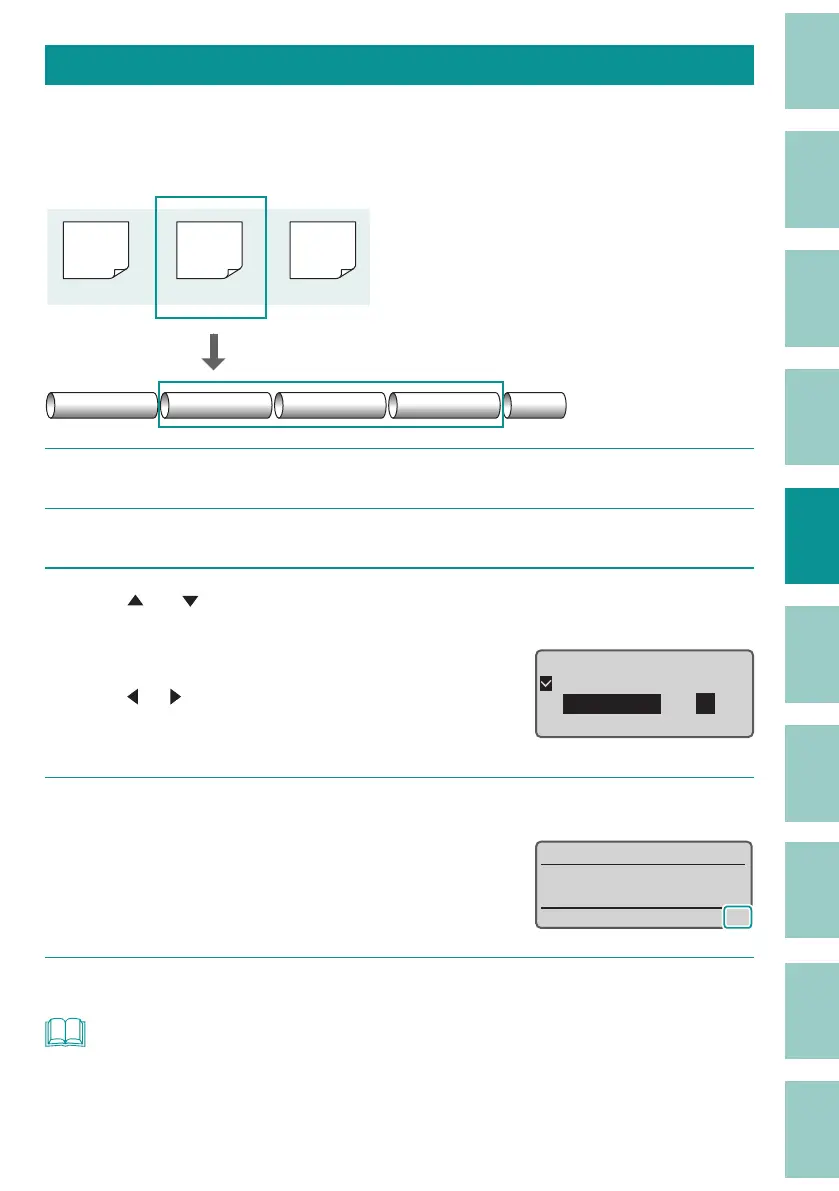
Setting Up Repeat Printing of a Page
If you want to set up repeat printing for a page, enter the number of times in "Continuous Print."
For Continuous Print, you can set the number of prints from 2 to 200 per page.
[Example] Print the second page three times.
200V
C1
(Page 2)
200V
(Page 1) (Page 3)
Pump
Room
C1
Pump Room Pump Room Pump Room
1
Display the page to be printed in Continuous Print.
2
Press the [Conti.] key.
3
Use [ ] or [ ] to select "Set count" and enter "3" (the number of times for
Continuous Print).
Use the numeric keys or the arrow keys
([
]/[ ]) to enter the data.
The value can be set in the range of 2 to 200
(times).
ɻɻ
ʁ
Continuous Print
O
Set count
[ to 200 ]
4
Press the [Enter] key.
The display returns to the character input
displa
y.
The number of times for Continuous Print can
be check
ed on the display.
˛
5
Print.
(P.72)
NOT
• Continuous Print is set for each page.
• When you want to cancel the Continuous Print setting (print once), set "O " in step 3 above.



 To Next Page