34
Contents
Preparation/
Setup
Print Using a
Computer
Appendix
IndexPrint/SaveInput/Edit
Names of
Components
Maintenance/
Printer Settings
Trouble-
shooting
Changing the Control Setting of the Tube Warmer
Switches between tube warmer settings.
Setting Details
Auto
(Auto)
Only warms the tube during printing. When printing is executed, the tube
will be warmed up to the set temperature, and then printing will start.
ON
(RDY)
Warms the tube except while printing. When printing is executed, it starts
printing immediately. "WAI" will be displayed when the set temperature is
adjusted.
OFF
(OFF)
Disables the tube warmer settings.
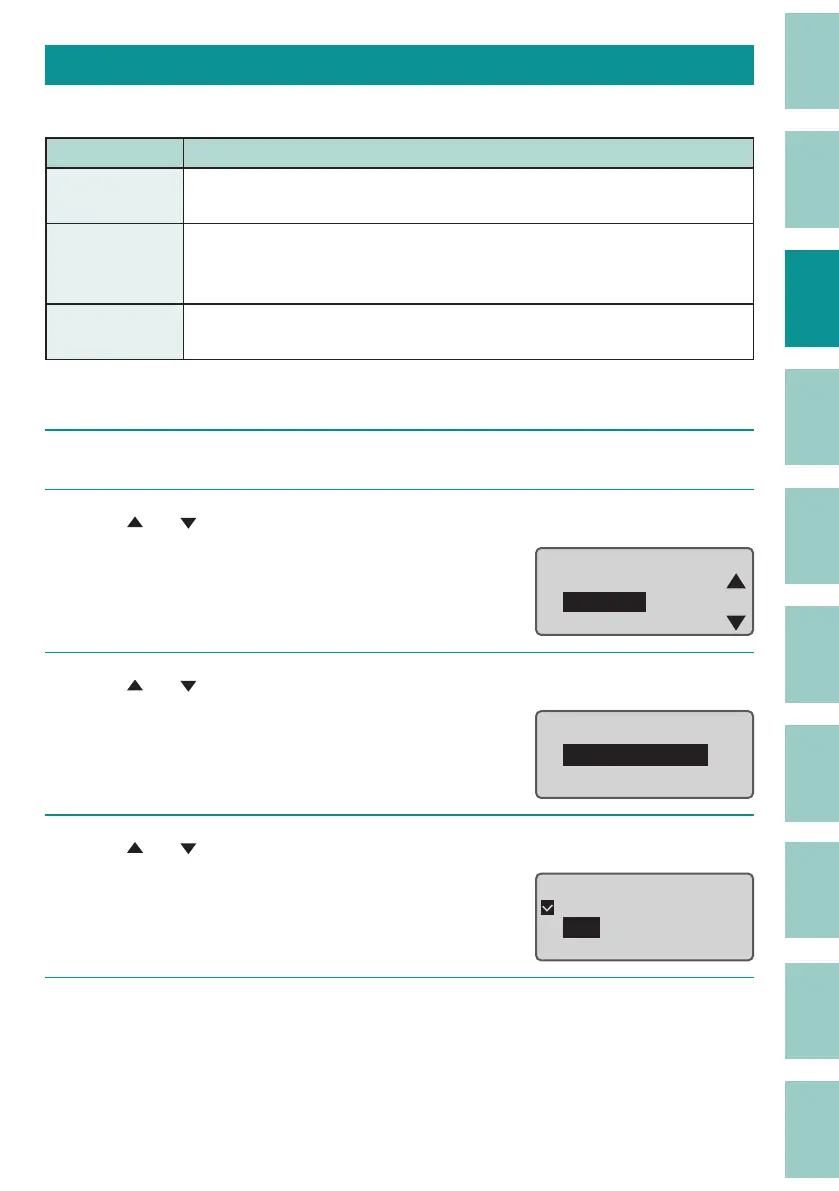
[Example] To start printing immediately, set the warmer control setting to "ON".
1
Press the [Option] key.
2
Use
[ ] or [ ]
to select "Warmer," and then press the [Enter] key.
ɻɻ
Option
Connect
Warmer
Character Edit
3
Use
[ ] or [ ]
to select " Warmer Control," and then press the [Enter] key.
Warmer
Warmer Control
Warmer Temp.
4
Use
[ ] or [ ]
to select "ON," and then press the [Enter] key.
Warmer control
Auto
ON
OFF
5
Press the [Shift]+[Cancel] keys.
The display returns to the character input display.



 To Next Page