54
Contents
Preparation/
Setup
Print Using a
Computer
Appendix
IndexPrint/SaveInput/Edit
Names of
Components
Maintenance/
Printer Settings
Trouble-
shooting
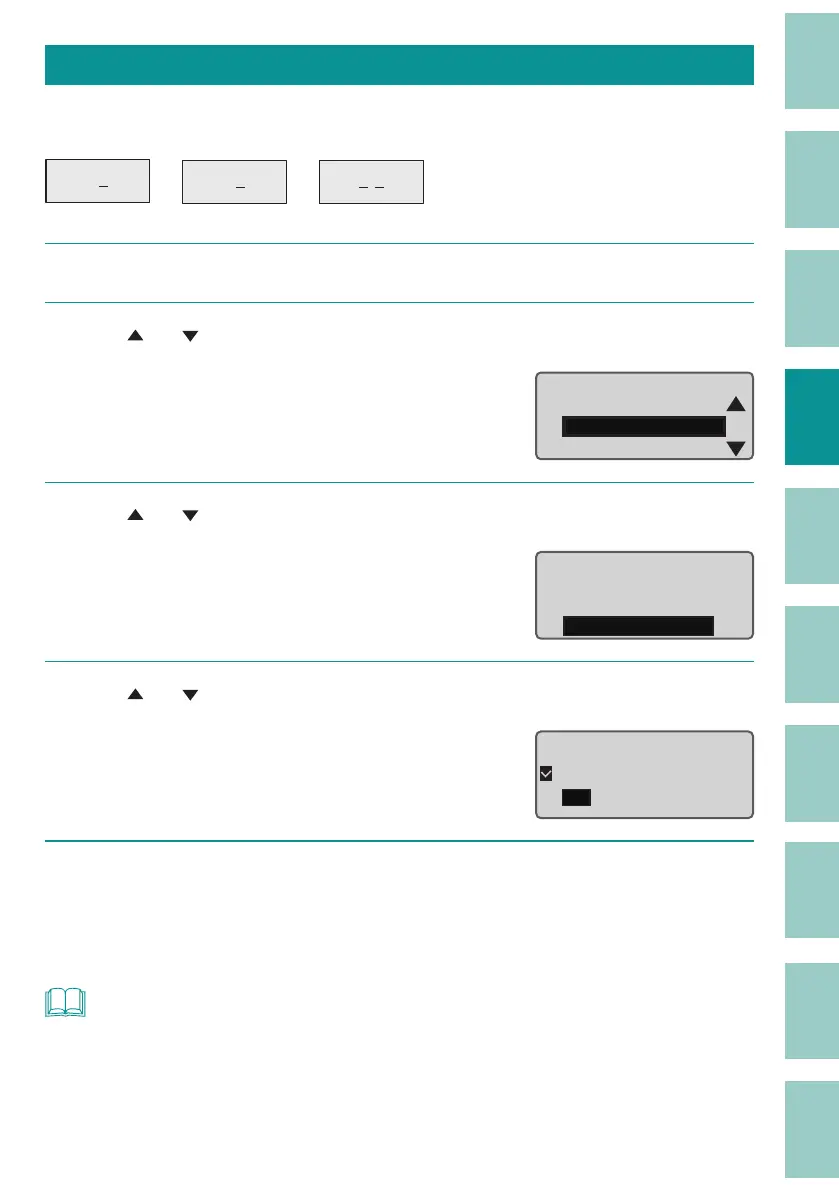
Underline 6, 9
The numbers 6 and 9 can be underlined to distinguish them from each other. The default setting
is "O ."
16
96
29
1
Press the [Option] key.
2
Use [ ] or [ ] to select "Print Settings" and press the [Enter] key.
Page Settings
Print Settings
Delete All
Option
3
Use [ ] or [ ] to select " Underline 6, 9" and press the [Enter] key.
Print Settings
Half cut
Full cut
Underline 6 , 9
4
Use [ ] or [ ] to select "On," and then press the [Enter] key.
When printing, the numbers 6 and 9 will be
underlined.
O
On
Underline 6 and 9
5
Press the [Shift]+[Cancel] keys.
The display returns to the character input
display.
NOT
• The settings for this function are applied to all pages. You cannot change the settings for each page.



 To Next Page