69
Contents
Preparation/
Setup
Print Using a
Computer
Appendix
IndexPrint/SaveInput/Edit
Names of
Components
Maintenance/
Printer Settings
Trouble-
shooting
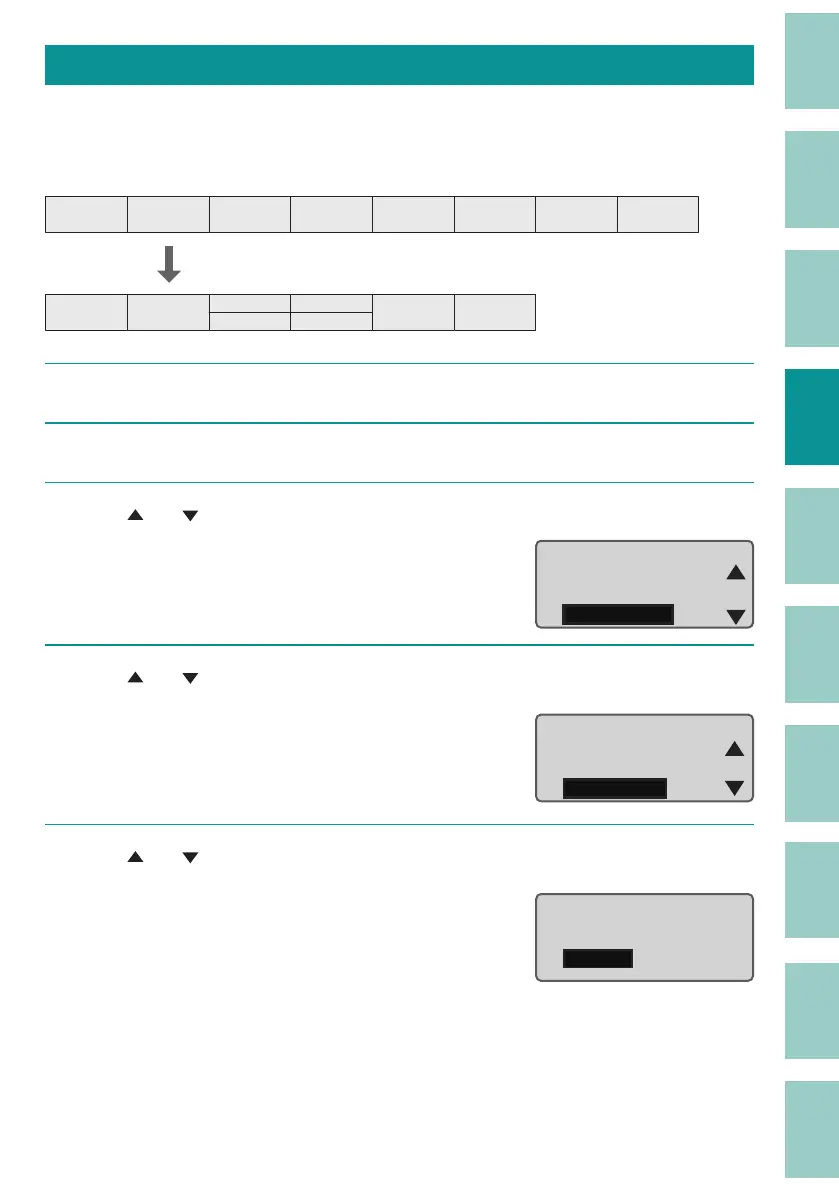
Page Combining
You can combine two pages of data into two lines on one page.
[Example] Combine pages 3 to 6.
$í $í %í %í &í &í 'í 'í
$í $í
%í
%í
&í
&í
'í 'í
1
Display the page you wish to make into a combined one (page 3).
2
Press the [Option] key.
3
Use [ ] or [ ] to select "Page Edit" and press the [Enter] key.
Warmer
Character Edit
Page Edit
Option
4
Use [ ] or [ ] to select " Combining" and press the [Enter] key.
The page combining selection screen will
appear.
Page Edit
Paste
Division
Combining
5
Use [ ] or [ ] to select "Specify," and press the [Enter] key.
If you select "All," all pages will be combined
into one page with two lines.
Page combining
All
Specify



 To Next Page