8
Contents
Preparation/
Setup
Print Using a
Computer
Appendix
IndexPrint/SaveInput/Edit
Names of
Components
Maintenance/
Printer Settings
Trouble-
shooting
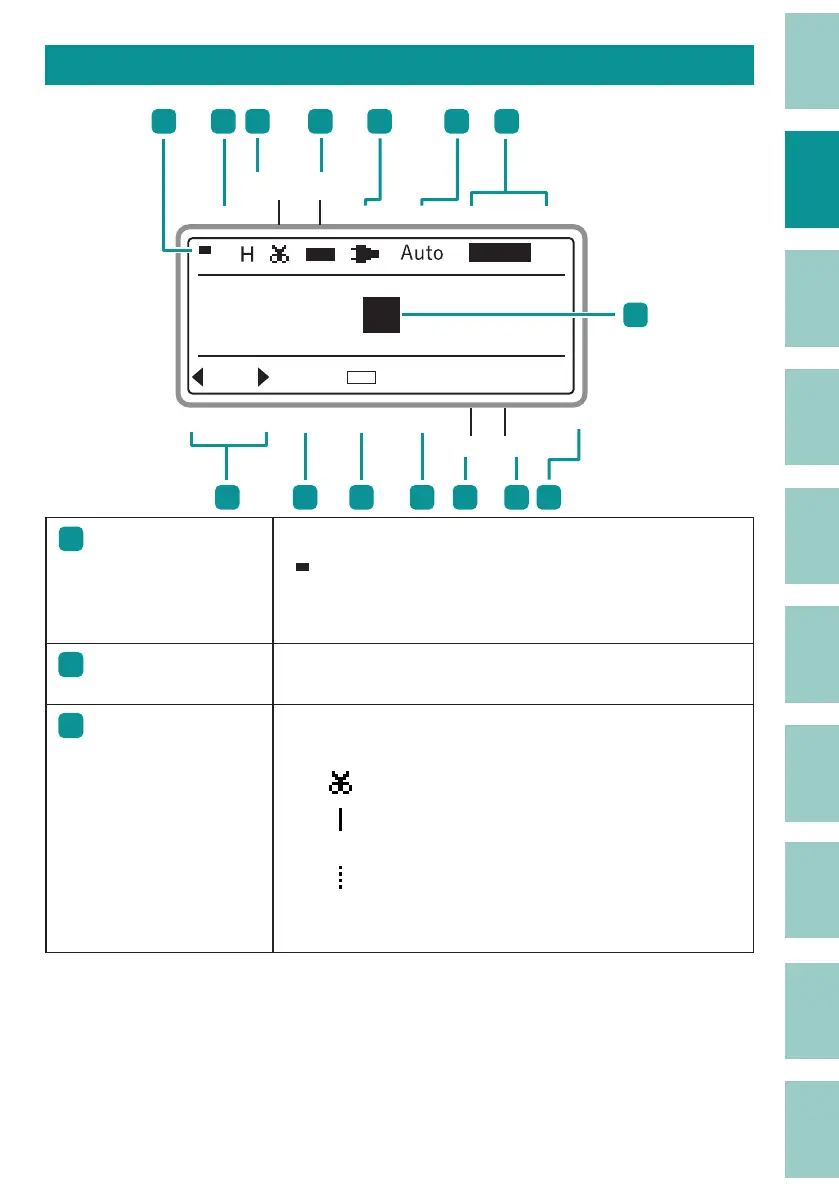
How to Read the Display
PP
1
H / H
&
Prev
PWR Warmer
Frame Char Size
Char Space#Line
NextPage Cont PrintA/
A
Seg Length Align
Remaining Ink Ribbon
Half Cut
Print Speed
2
3 4
5
6 7
8
10
11
131415
12
1
9
1
Caps Lock
Indicates whether the Caps Lock mode is active.
:
Active, so all alphabetic characters are entered in
uppercase.
(No indication): Normal (inactive).
2
Print speed
Displays the printing speed settings.
(P.87)
H: High L: Low
3
Half cut setting
The settings for adding a half cut to tubes or label tapes are
indicated by the following symbols.
(P.88)
: Half cut.
: Not half cut, but a solid line is printed showing
where to cut with scissors, etc.
: Not half cut, but a dotted line is printed showing
where to cut with scissors, etc.
(No indication) : Not half cut, and no cutting line is printed.


 To Next Page