12
Menus and Settings
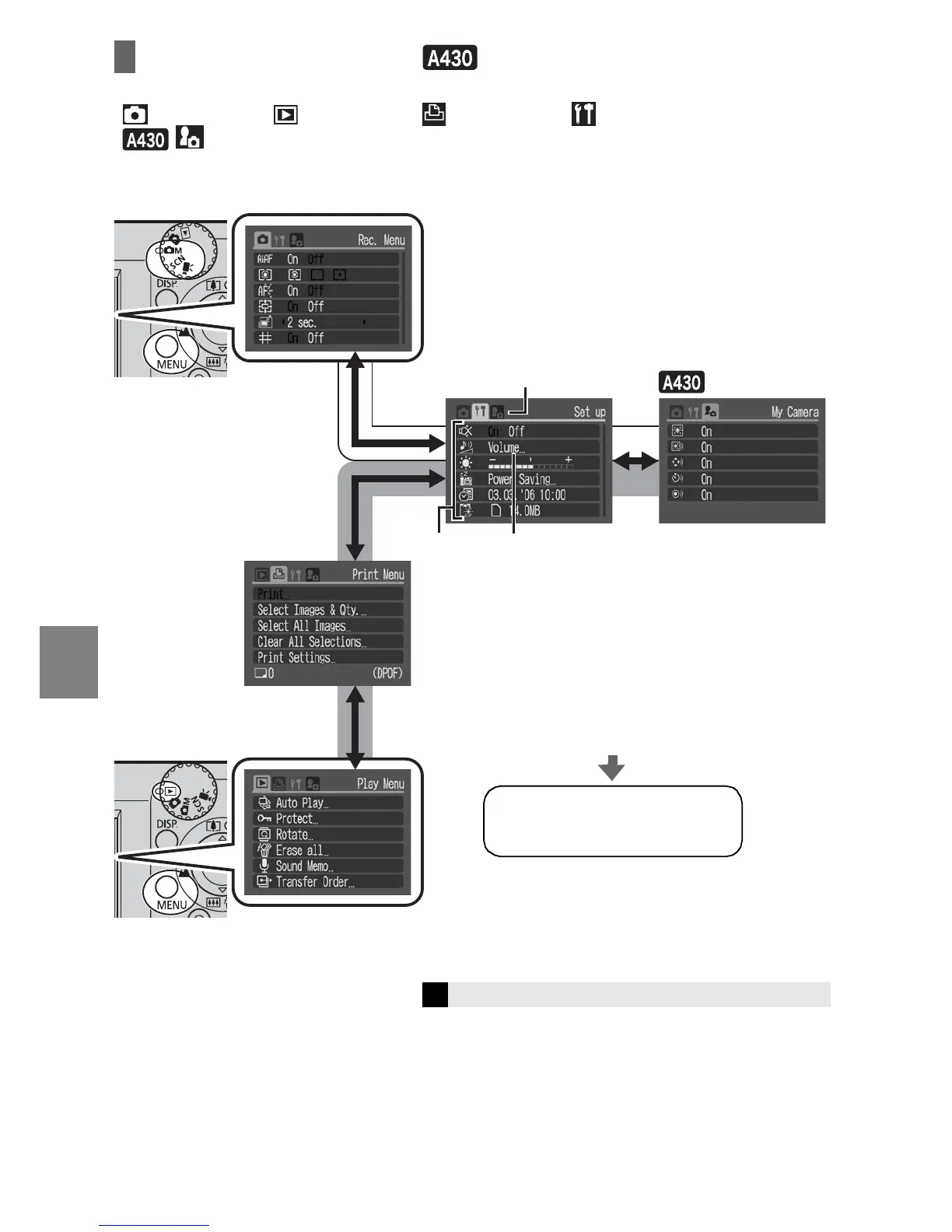
Rec./Play/Print/Set up/ My Camera Menus
You can specify settings related to camera functions from these menus:
[ Rec. Menu], [ Play Menu], [ Print Menu], [ Set up Menu], and
[ My Camera Menu].
Î
See the Advanced Guide: Menus and Settings (p. 21)
b c
a
To switch between menus (a)
When the menu icon is selected, press
the W or X button.
To select an item (b)
Press the S or T button.
To change the setting (c)
Press the W or X button.
When "..." appears by an item, press the
FUNC./SET button to display the set up
screen, and then use the S, T, W or X button
to change the settings.
Press the MENU button.
Press the MENU button.
From shooting mode
From playback
mode
When you finish making
settings
Press the MENU button.
My Camera
Print
Setup















 To Next Page