0
Function
~
LI
~
~~~
~
~
-"
Page
mEr)
~
milam
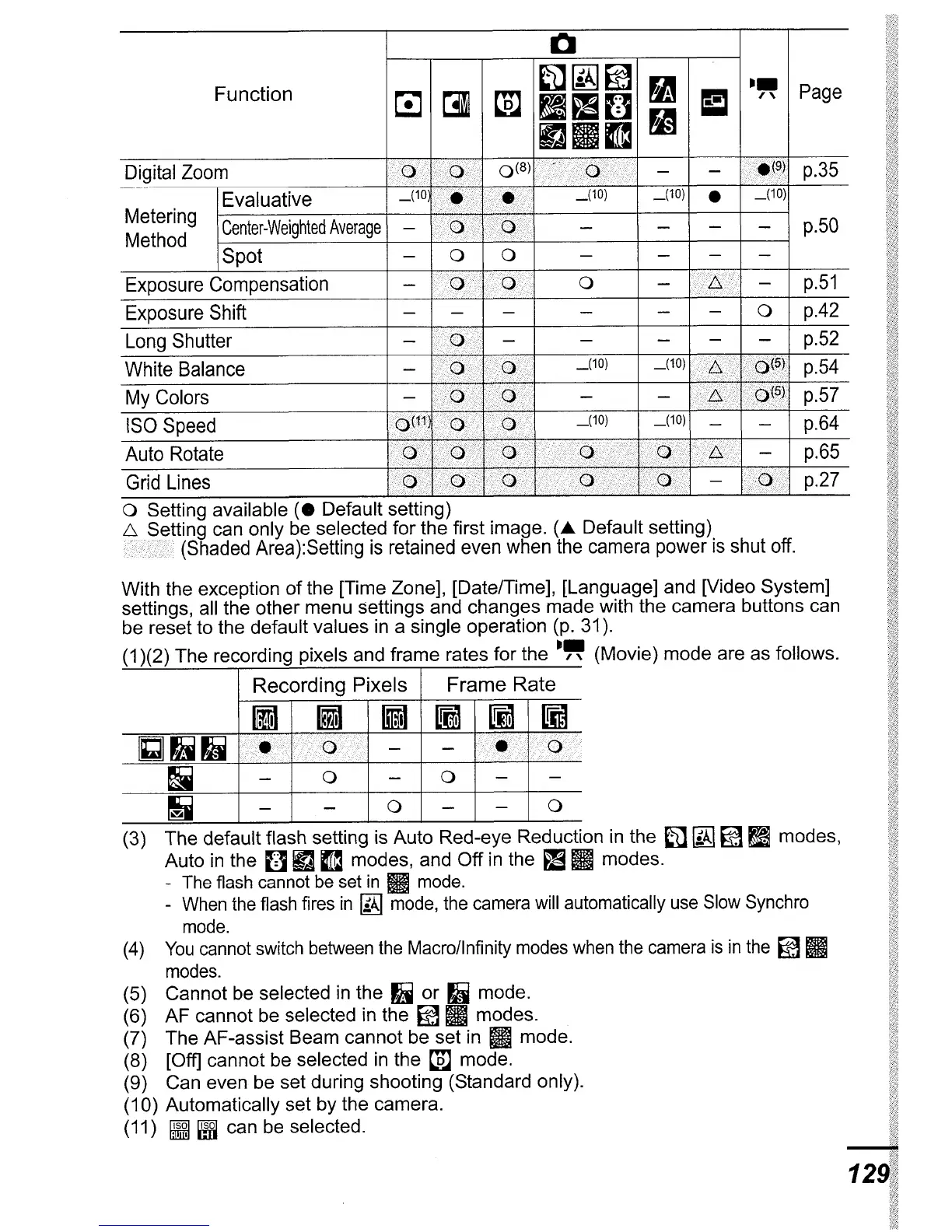
Digital Zoom
ax
·
••
·r-K<i
OfH
-
-
C;CI;(~t
p.35
7""<
...
IEvaluative
_(10)
(10)
•
(10)
Metering
I
Center-Weighted
Average
p.50
Method
ISpot
- 0 0
-
-
-
-
Exposure Compensation
-
0
-
i;>/Jj./X
-
p.51
:'7
7X.
Exposure Shift
-
- -
- - - 0
p.42
Long Shutter
-
><
-
-
- - -
p.52
White Balance
_(10)
XX>X
···.XX(h\
p.54
-
<
..
<7
My Colors
- - -
<~<X>
X
••
""f<SI
p.57
ISO Speed
""f<X
(10)
(10)
p.64
Auto Rotate
<>
»
>.
»
p.65
Grid Lines
..•..
<.
Ix>·~··;
p.27
o Setting available
(.
Default setting)
~>I~tting
can only be selected for the first image.
(A
Default setting)
(Shaded Area):Setting is retained even when the camera power is shut off.
With the exception
of
the [Time Zone], [Date/Time], [Language] and [Video System]
settings, all the other menu settings and changes made with the camera buttons can
be reset to the default values
in
a single operation (p. 31).
(1
)(2) The recording pixels and frame rates for the
-"
(Movie) mode are as follows.
Recording
Pixels
Frame
Rate
fiI
IiJ
GiffiI
~
lIm
nm
Gill)
>1<
(0)
-
-
«i~;
<<?Jx
!i
-
0 - 0
-
-
~
-
-
0
-
-
0
(3)
The
default flash setting is Auto Red-eye Reduction in the
fi1
~ ~
~
modes,
Auto
in
the
[]
m
~
modes, and
Off
in
the
~
mmodes.
- The flash cannot
be
set
in
m
mode.
-
When
the
flash fires
in
~
mode,
the camera will automatically
use
Slow Synchro
mode.
(4)
You
cannot switch between
the
Macro/lnfinity modes
when
the camera
is
in
the
~
m
modes.
(5) Cannot be selected
in
the
II
or
Ij
mode.
(6)
AF
cannot be selected in the
~
mmodes.
(7) The AF-assist Beam cannot be set in II mode.
(8)
[Off] cannot be selected
in
the
t.m
mode.
(9)
Can even be set during shooting (Standard only).
(10) Automatically set by the camera.
(11)
~ ~
can be selected.
-
129





 To Next Page