EasyManua.ls Logo

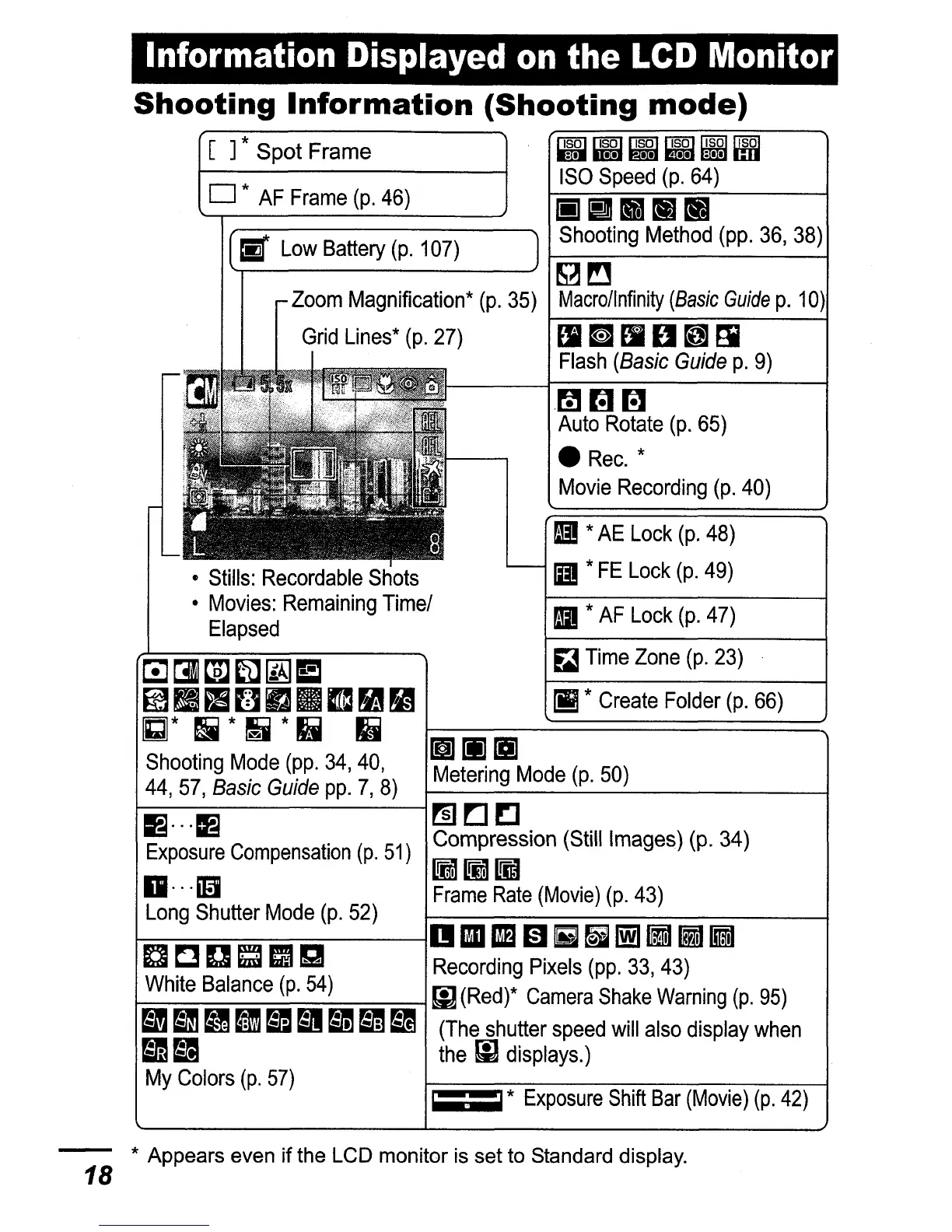
Canon PowerShot SD600 - Information Displayed on the LCD Monitor

Canon PowerShot SD600
347 pages
Print Icon
To Next Page IconTo Next Page
To Previous Page IconTo Previous Page
Loading...
Information Displayed
on
the
LCD
Monitor
==*
Exposure
Shift
Bar
(Movie)
(p.
42)
rilrn~
Auto
Rotate
(p.
65)
Rec.
*
Movie
Recording
(p.
40)
~
*
Create
Folder
(p.
66)
&!
Time
Zone
(p.
23)
II
*
AE
Lock
(p.
48)
II
*
FE
Lock
(p.
49)
II
*
AF
Lock
(p.
47)
Stills:
Recordable
Shots
Movies:
Remaining
Time/
Elapsed
~CllPJ~~E
~fI~BrJmD~~
GJ*
!4
*
II
*
Ii
Ij
~[i][i]
Shooting
M?de
(~p.
34,
40,
Metering
Mode
(p.
50)
44,
57,
BasIc
GUide
pp.
7,
8)
B"'~
~~!:]
Exposure
Compensation
(p.
51)
Compression
(Still
Images)
(p.
34)
I!m[iJLim
1I···m)
Frame
Rate
(Movie)
(p.
43)
Long
Shutter
Mode
(p.
52)
~-~~~--~DDEm~~~~M~
a C D
~
IJg
Recording
Pixels
(pp.
33,
43)
White
Balance
(p.
54)
!I]
(Red)*
Camera
Shake
Warning
(p.
95)
=
11
ag
Bm
m
Bm
Bm
BI
(The
shutter
speed
will
also
display
when
Bm
B1I
the
[i]
displays.)
My
Colors
(p.
57)
Shooting
Information
(Shooting
mode)
[ ] * Spot Frame
!iii
~ ~
~
~ ~
ISO
Speed
(p.
64)
o *
AF
Frame
(p.
46)
iii
il1IlIm
LI1
~
Shooting
Method
(pp.
36,
38)
~~
Macrollnfinity
(Basic
Guide
p.
10)
lImllU~[i
Flash
(Basic
Guide
p.
9)
* Appears even
if
the LCD monitor is set to Standard display.
18

Table of Contents

Related product manuals