List
of
Messages
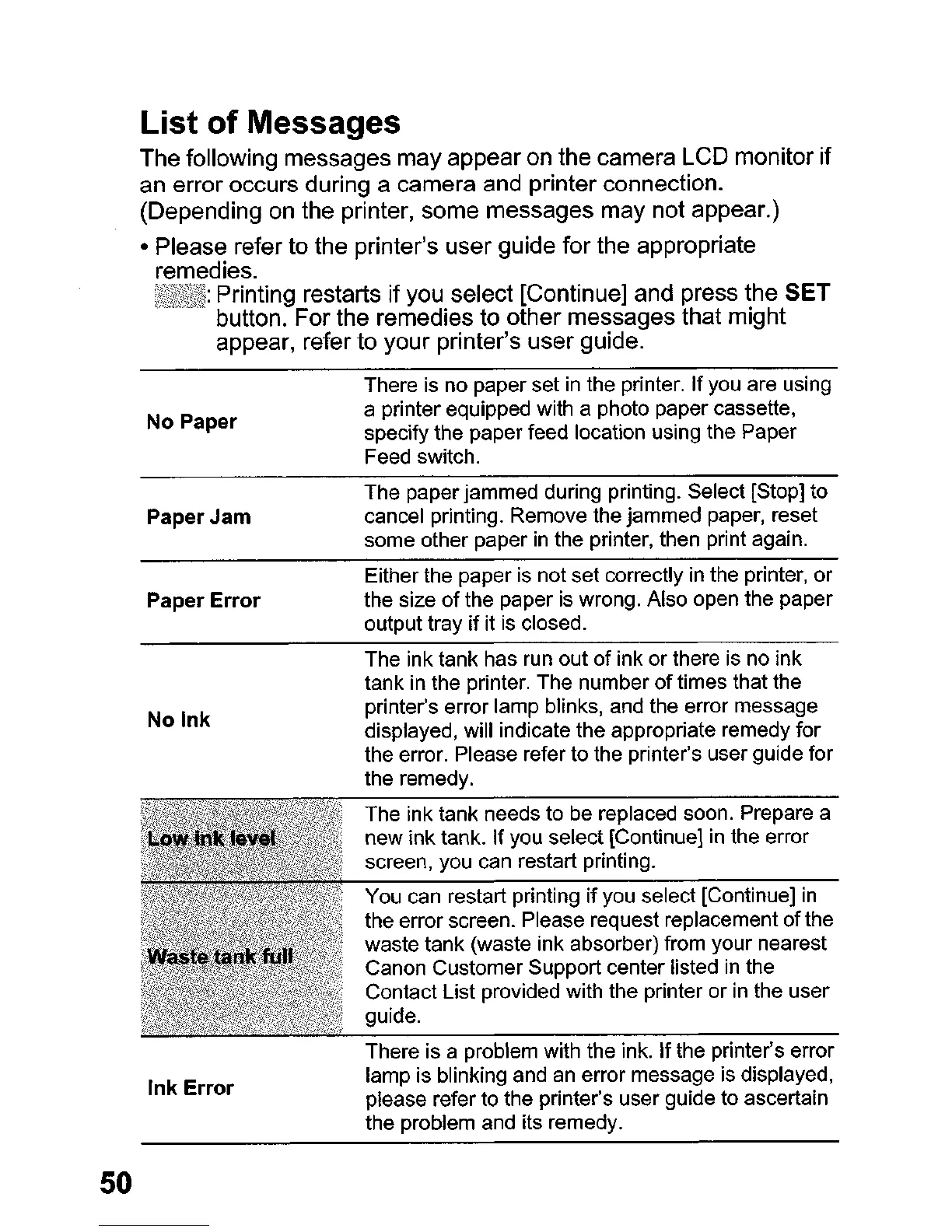
The following messages may appear
on
the camera LCD monitor
if
an
error occurs during a camera and printer connection.
(Depending
on
the printer, some messages may not appear.)
• Please refer to the printer's user guide for the appropriate
remedies.
~~'W!l{t~4:
Printing restarts
if
you select [Continue] and press the SET
button. For the remedies to other messages that might
appear, refer to your printer's user guide.
50
No Paper
Paper Jam
Paper
Error
No
Ink
Ink Error
There
is
no paper set
in
the printer. If you are using
a printer equipped with a photo paper cassette,
specify the paper feed location using the Paper
Feed switch.
The paper jammed during printing. Select [Stop] to
cancel printing. Remove the jammed paper, reset
some other paper
in
the printer, then print again.
Either the paper is not set correctly in the printer, or
the size
of
the paper
is
wrong. Also open the paper
output tray
if
it is closed.
The ink tank has run out of ink
or
there is no ink
tank in the printer. The number
of
times that the
printer's error lamp blinks, and the error message
displayed, will indicate the appropriate remedy for
the error. Please refer to the printer's user guide for
the remedy.
The ink tank needs to be replaced soon. Prepare a
new ink tank. If you select [Continue]
in
the error
screen, you can restart printing.
You can restart printing
if
you select [Continue]
in
the error screen. Please request replacement ofthe
waste tank (waste ink absorber) from your nearest
Canon Customer Support center listed
in
the
Contact List provided with the printer or in the user
guide.
There is a problem with the ink. If the printer's error
lamp is blinking and an error message is displayed,
please refer to the printer's user guide
to
ascertain
the problem and its remedy.















 To Next Page