EasyManua.ls Logo

Canon PowerShot SD600 - Automated Playback (Slide Shows)

Canon PowerShot SD600
347 pages
Print Icon
To Next Page IconTo Next Page
To Previous Page IconTo Previous Page
Loading...
80
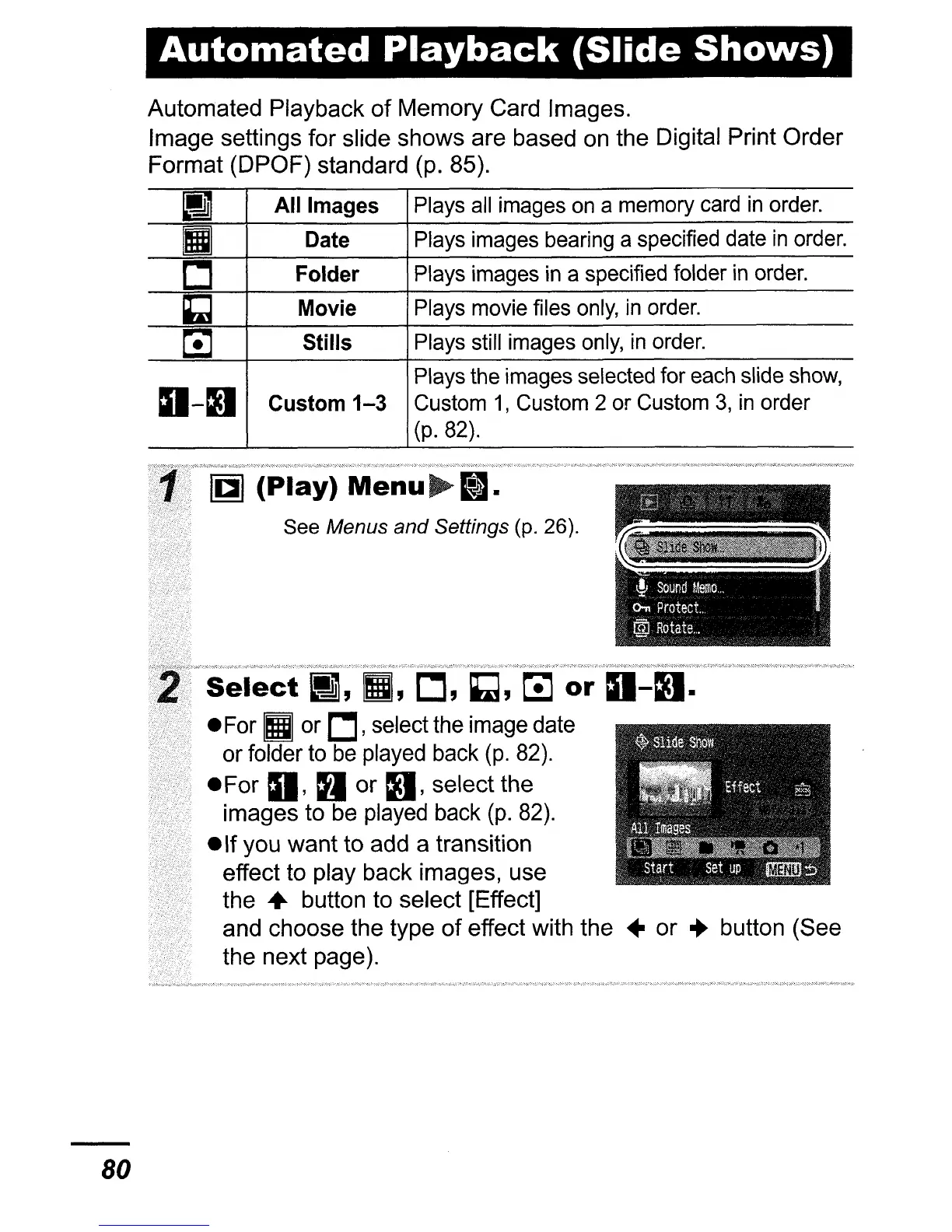
Automated
Playback
(Slide
Shows)
Automated
Playback
of
Memory
Card Images.
Image
settings
for
slide
shows
are
based on
the
Digital Print
Order
Format
(DPOF)
standard (p. 85).
I]
All Images
Plays
all
images
on
a memory
card
in
order.
II
Date
Plays images bearing a specified date
in
order.
L:]
Folder
Plays images
in
a specified folder
in
order.
~
Movie
Plays movie files
only,
in
order.
~
Stills Plays still images
only,
in
order.
a-D
Plays the images selected for each slide
show,
Custom
1-3
Custom
1,
Custom 2 or Custom
3,
in
order
(p.82).
Select
or
For
II
or
L:],
select the image date
or folder to
be
played back
(p.
82).
For
a,
a
or
D,
select
the
images
to be played back
(p.
82).
If
you
want
to
add a transition
effect to play
back
images, use
the
..
button to
select
[Effect]
and
choose
the
type
of
effect with
the"
or
..
button
(See
the
next
page).

Table of Contents

Related product manuals