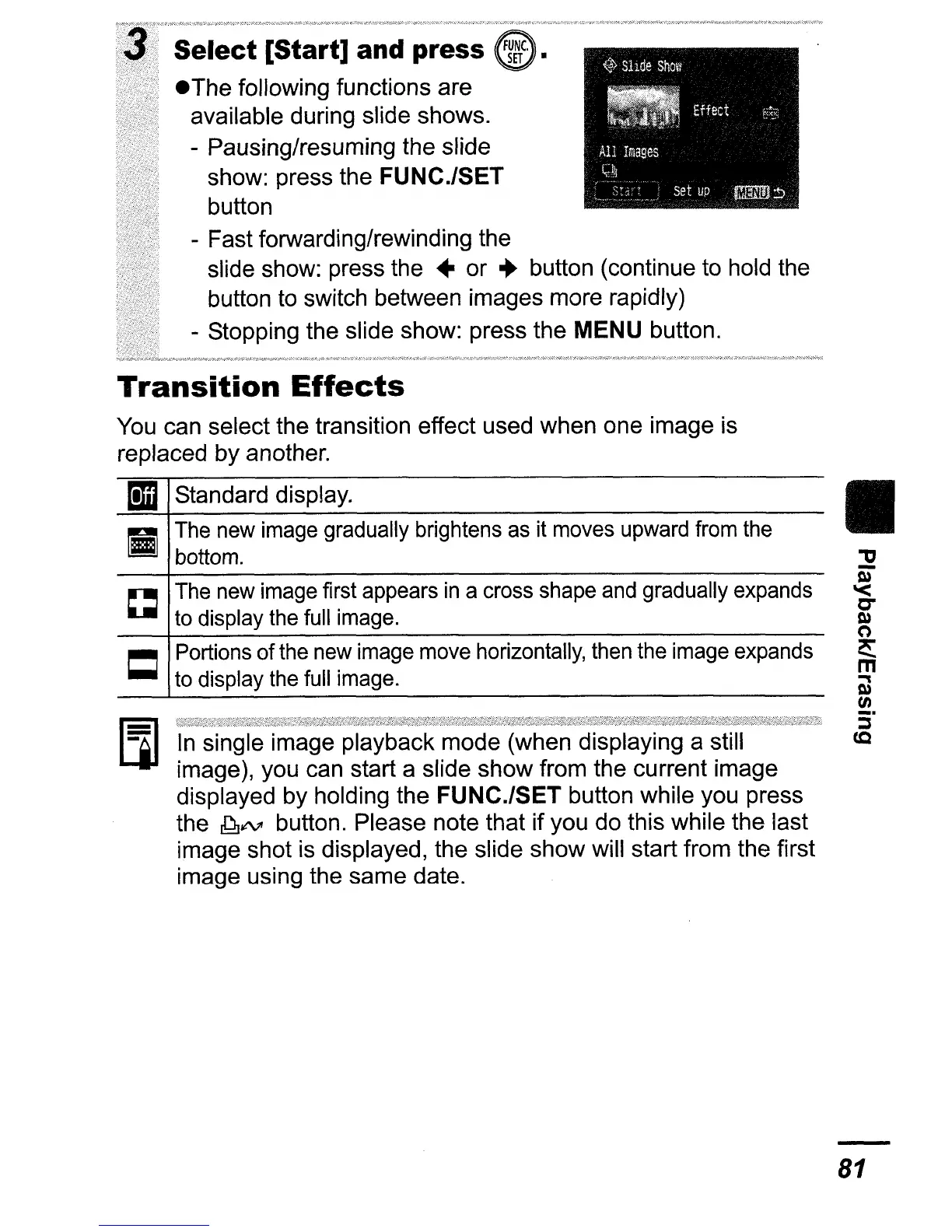
Select [Start] and press
eThe following functions are
available during slide shows.
- Pausing/resuming the slide
show: press the
FUNC./SET
button
- Fast forwarding/rewinding the
slide show: press the • or
..
button (continue to hold the
button
to
switch between images more rapidly)
- Stopping the slide show: press the
MENU button.
Transition
Effects
You can select the transition effect used when one image is
replaced by another.
mIl
Standard display.
II
The
new
image
gradually brightens
as
it
moves
upward
from
the
~
bottom.
~
The
new
image
first appears
in
a
cross
shape
and
gradually
expands
to
display
the
full
image.
C Portions of
the
new
image
move
horizontally,
then
the
image
expands
to
display
the
full
image.
In
single image playback mode (when displaying a still
image), you can start a slide show from the current image
displayed by holding the
FUNC.JSET button while you press
the
ddllN"
button. Please note that if you do this while the last
image shot is displayed, the slide show will start from the first
image using the same date.
II
81













 To Next Page