EasyManua.ls Logo

Canon PowerShot SD600 - Page 112

Canon PowerShot SD600
347 pages
Print Icon
To Next Page IconTo Next Page
To Previous Page IconTo Previous Page
Loading...
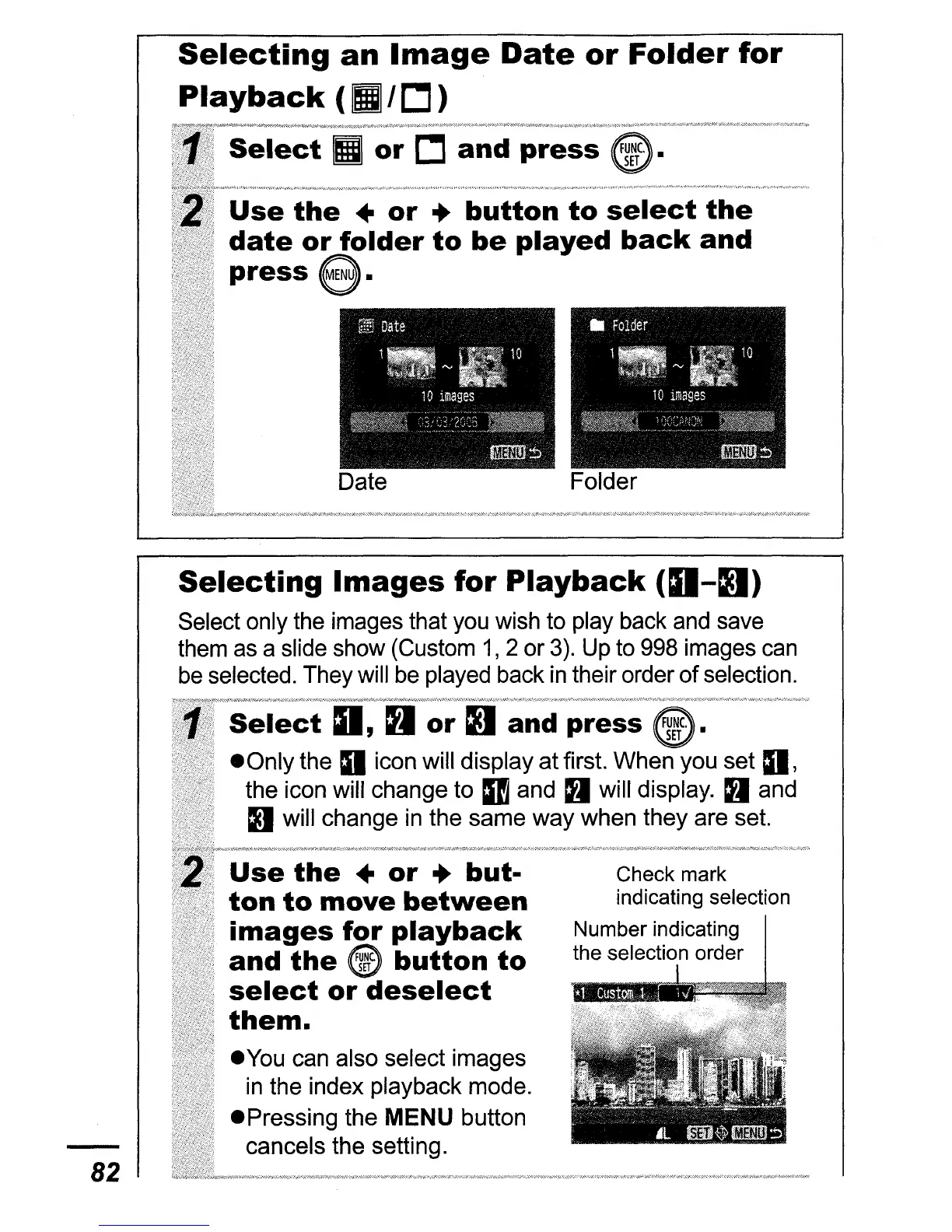
FolderDate
the
..
or
..
button
to
select
the
or
folder
to
be
played
back
and
press
e.
Selecting
an
Image
Date
or
Folder
for
Playback
( I
c:J
)
Select
II
or
c:J
and
press
Selecting
Images
for
Playback
(O-D)
Select only the images that you wish to play back and save
them as a slide show (Custom
1,
2
or
3).
Up to 998 images can
be selected. They will be played back
in
their order
of
selection.
82
Use
the
..
or
..
but-
ton
to
move
between
images
for
playback
and
the
@
button
to
select
or
deselect
them
.
• You can also select images
in
the index playback mode.
• Pressing the
MENU button
cancels the setting.
Check mark
indicating selection
Number indicating
the selection order

Table of Contents