Enioy
Customizing
Your
Camera
with
the
My
Camera
Settings
The start-up image, start-up sound, shutter sound, operation sound, and self-timer sound are
called the
My
Camera settings. You
can
add your favorite images and sounds
from
your
computer
to
the
My
Camera settings. This topic explains
how
to
upload the
My
Camera
settings saved
onto
your computer
to
the camera and vice versa.
,
Attach
the
supplied
interface
cable
to
the
computer's
USB
port
and
the
camera's
DIGITAL
terminal
and place
the
camera in
the
correct
mode
for
connecting
.
•
Methods
for
connecting
the
camera
to
the
computer
and placing
it
in
the
correct
mode
for
connecting
vary
between
camera models. Please
refer
to
the
Camera User Guide.
• Perform
the
settings described in First Time Camera
is
Connected
to
a
Computer
(p. 17)
the
first
time
you
connect
the
camera
to
the
computer.
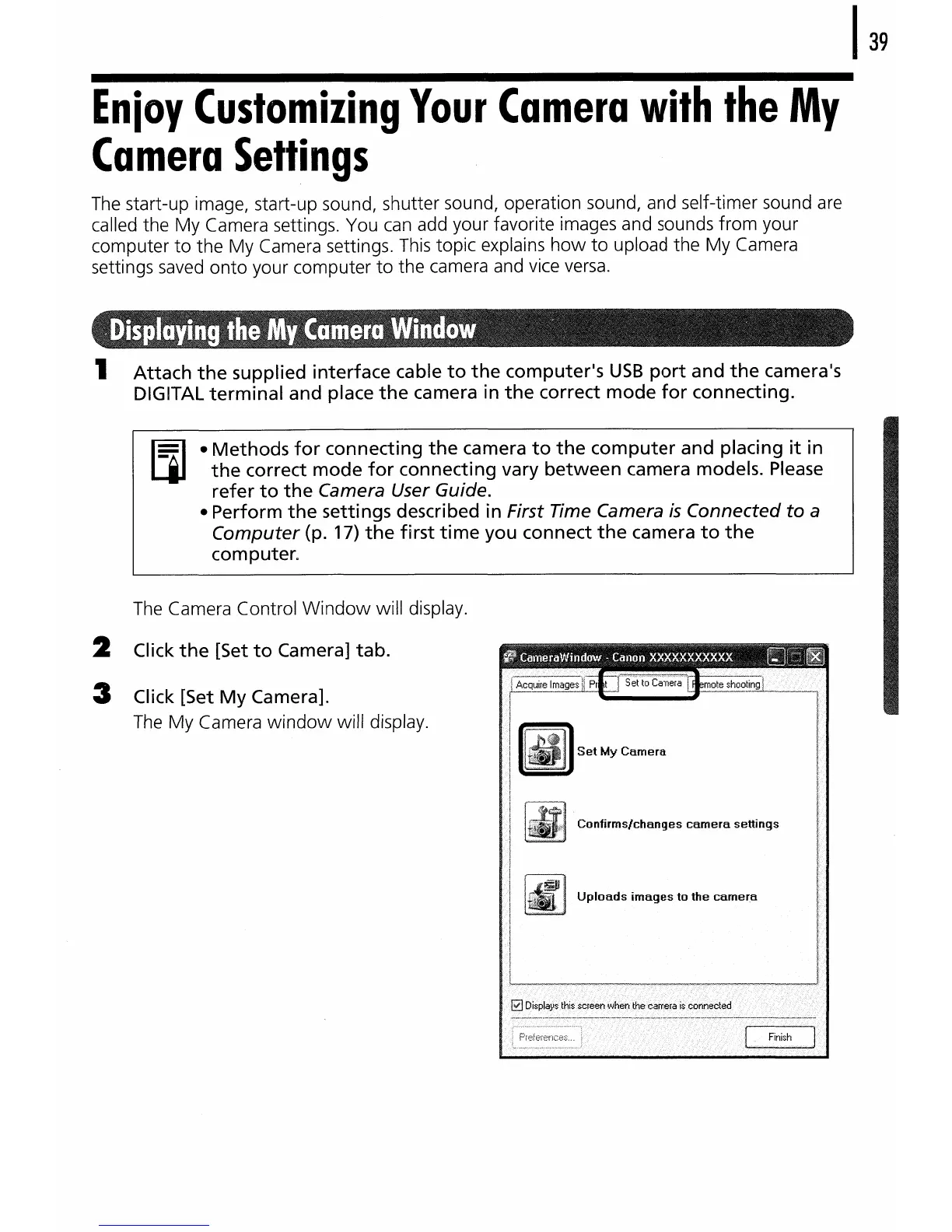
The Camera Control
Window
will display.
2 Click
the
[Set
to
Camera]
tab.
3 Click [Set
My
Camera].
The
My
Camera
window
will display.
Confirms/changes
camera
settings
Uploads
images
to
the
camer.a















 To Next Page