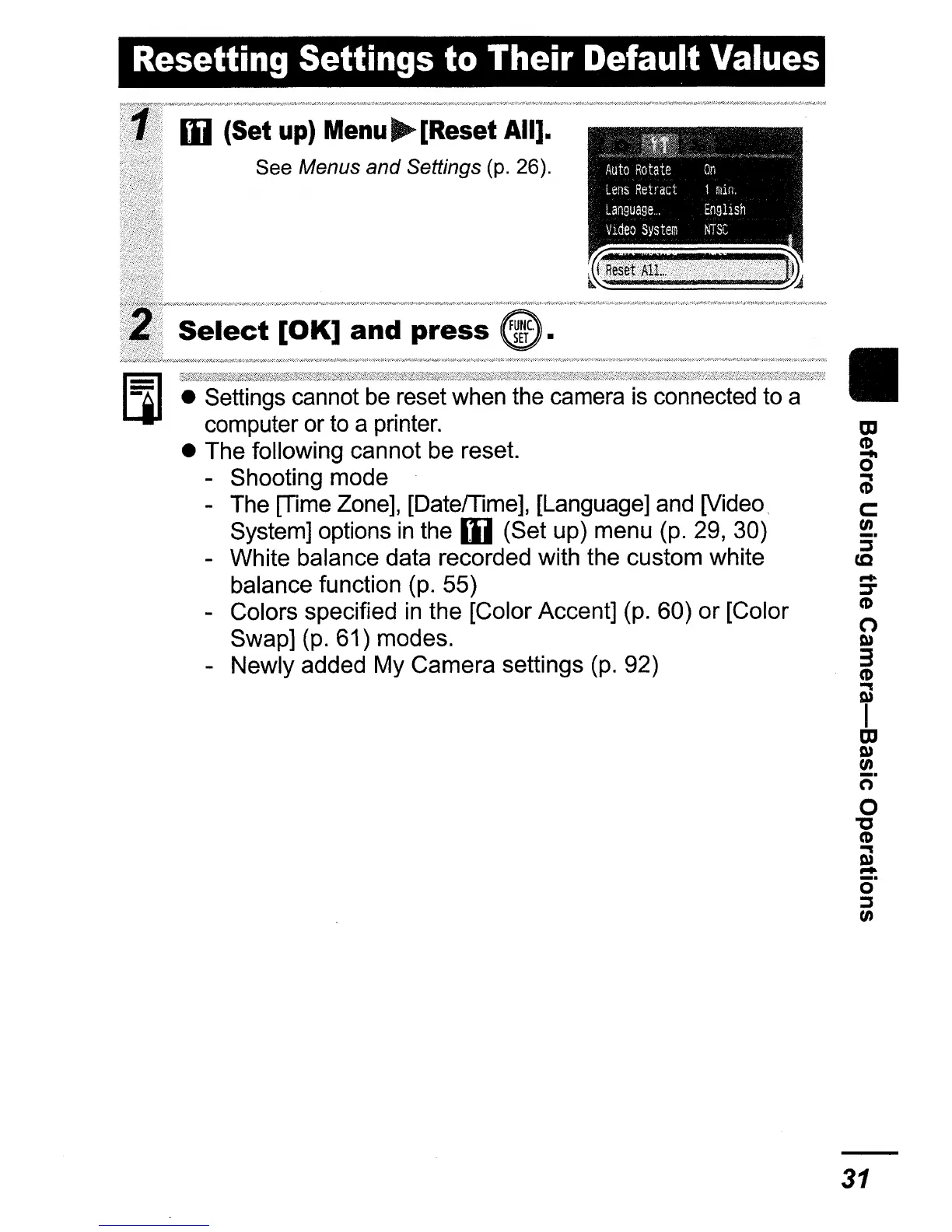
Resetting Settings to Their Default Values
• Settings cannot
be
reset when the camera
is
connected to a
computer or to a printer.
• The following cannot be reset.
- Shooting mode
- The [Time Zone], [Datemme], [Language] and [Video
System] options
in
the
Ii)
(Set
Up)
menu (p. 29, 30)
- White balance data recorded with the custom white
balance function (p. 55)
- Colors specified
in
the [Color Accent] (p. 60)
or
[Color
Swap] (p. 61) modes.
- Newly added My Camera settings (p. 92)
Ii)
(Set
up)
Menu~[Reset
All].
See Menus
and
Settings (p. 26).
Select
[OK]
and
press
"'h"_'
~"',,,
Auto
Rotate
On
Lens
Retract
1
nun.
Language
El1gl1sh
VldeoSystem
NTSC
II
tD
CD
0'
(;l
c:
en
:i"
cc
....
::T
CD
o
Co»
3
CD
..
Co»
I
tD
Co»
en
c:;-
o
"C
CD
OJ
...
c5"
:::s
en
31




 To Next Page