Menus
and
Settings
Menus are used to set the shooting, playback and print settings as
well as such camera settings as the date/time and electronic beep.
The following menus are available.
eFUNC. Menu
eRec., Play, Print, Set
up
and My Camera Menus
FUNe.
Menu
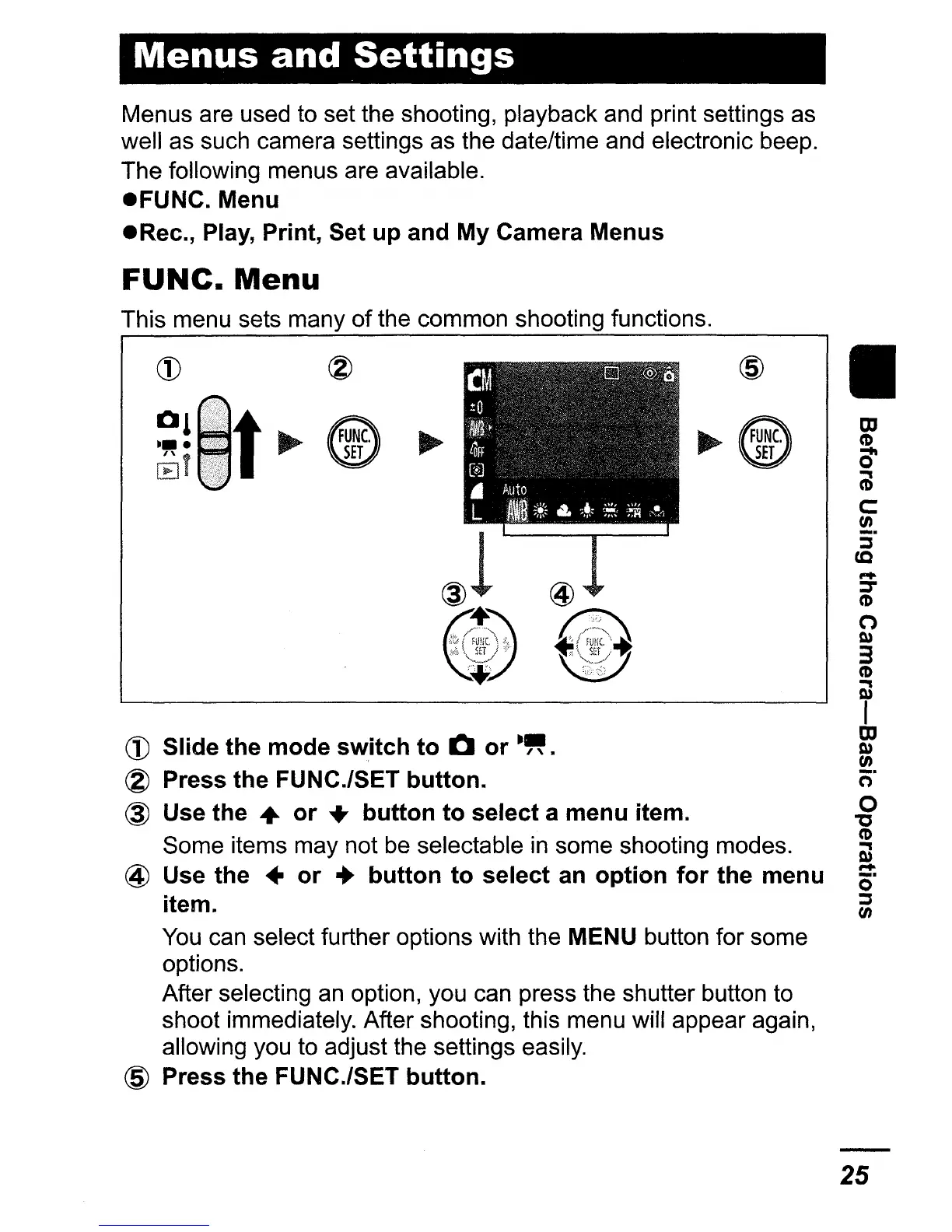
This menu sets many
of
the common shooting functions.
CD
Slide the mode
switch
to
CI
or
-"
.
~
Press the FUNC.lSET button.
@ Use the
..
or
...
button
to
select a menu item.
Some items may not be selectable
in
some shooting modes.
@ Use the •
or
•
button
to
select an
option
for
the menu
item.
You
can select further options with the MENU button for some
options.
After selecting an option, you can press the shutter button to
shoot immediately. After shooting, this menu will appear again,
allowing you to adjust the settings easily.
@ Press the FUNC./SET
button.
II
OJ
CD
cr
(iJ
c:
tJ)
:;.
cc
.....
::::r
CD
(")
Q)
3
CD
OJ
I
OJ
Q)
tJ)
(=r
o
"C
CD
OJ
.....
c)"
~
tJ)
25















 To Next Page