EasyManua.ls Logo

Canon PowerShot SD600 - Menu List

Canon PowerShot SD600
347 pages
Print Icon
To Next Page IconTo Next Page
To Previous Page IconTo Previous Page
Loading...
Menu
List
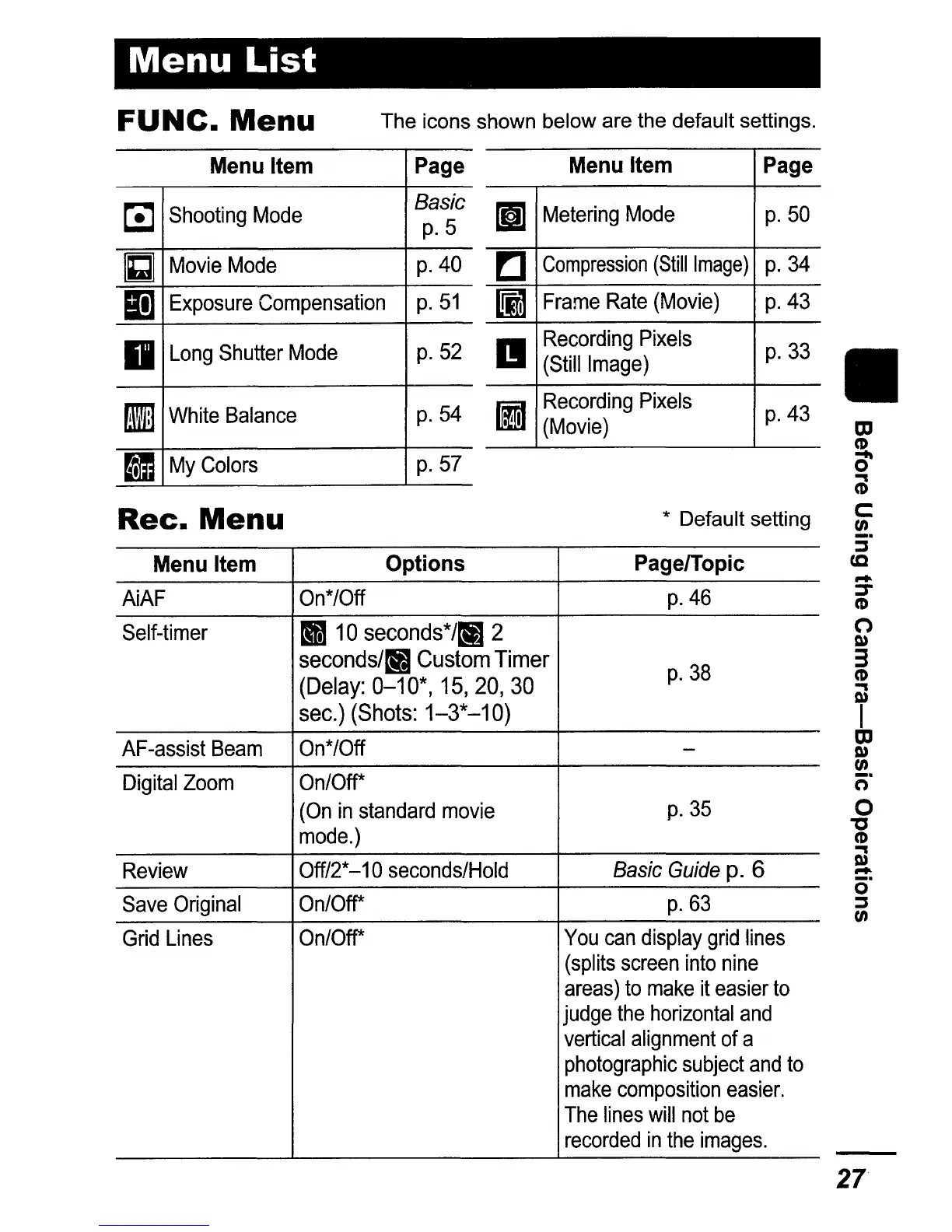
FUNe.
Menu
The icons shown below are the default settings.
Menu Item Options
PagelTopic
AiAF
On*/Off
p.46
Self-timer
1110
seconds*/rIB 2
seconds/~
Custom Timer
p.38
(Delay:
0-10*,15,20,30
sec.) (Shots:
1-3*-10)
AF-assist
Beam
On*/Off
-
Digital
Zoom
On/Off*
(On
in
standard
movie
p.35
mode.)
Review
Off/2*
-10
seconds/Hold
Basic
Guide
p.
6
Save
Original
On/Off*
p.63
Grid
Lines
On/Off*
You
can
display
grid
lines
(splits
screen
into
nine
areas)
to
make
it
easier
to
judge
the
horizontal
and
vertical
alignment
of
a
photographic
subject
and
to
make
composition
easier.
The
lines
will
not
be
recorded
in
the
images.
Menu Item
Page
Lij
Shooting
Mode
Basic
p.5
11
Movie
Mode
p.40
ID]
Exposure
Compensation
p.51
D
Long
Shutter
Mode
p.52
fiI
White
Balance
p.54
II
My
Colors
p.57
Rec.
Menu
Menu Item
Page
mil
Metering
Mode
p.50
!:I
Compression
(Still
Image)
p.34
I!i1
Frame
Rate
(Movie)
p.43
II
Recording
Pixels
p.33
(Still
Image)
ID
Recording
Pixels
p.43
(Movie)
* Default setting
II
27

Table of Contents

Related product manuals