EasyManua.ls Logo

Canon PowerShot SD600 - Page 58

Canon PowerShot SD600
347 pages
Print Icon
To Next Page IconTo Next Page
To Previous Page IconTo Previous Page
Loading...
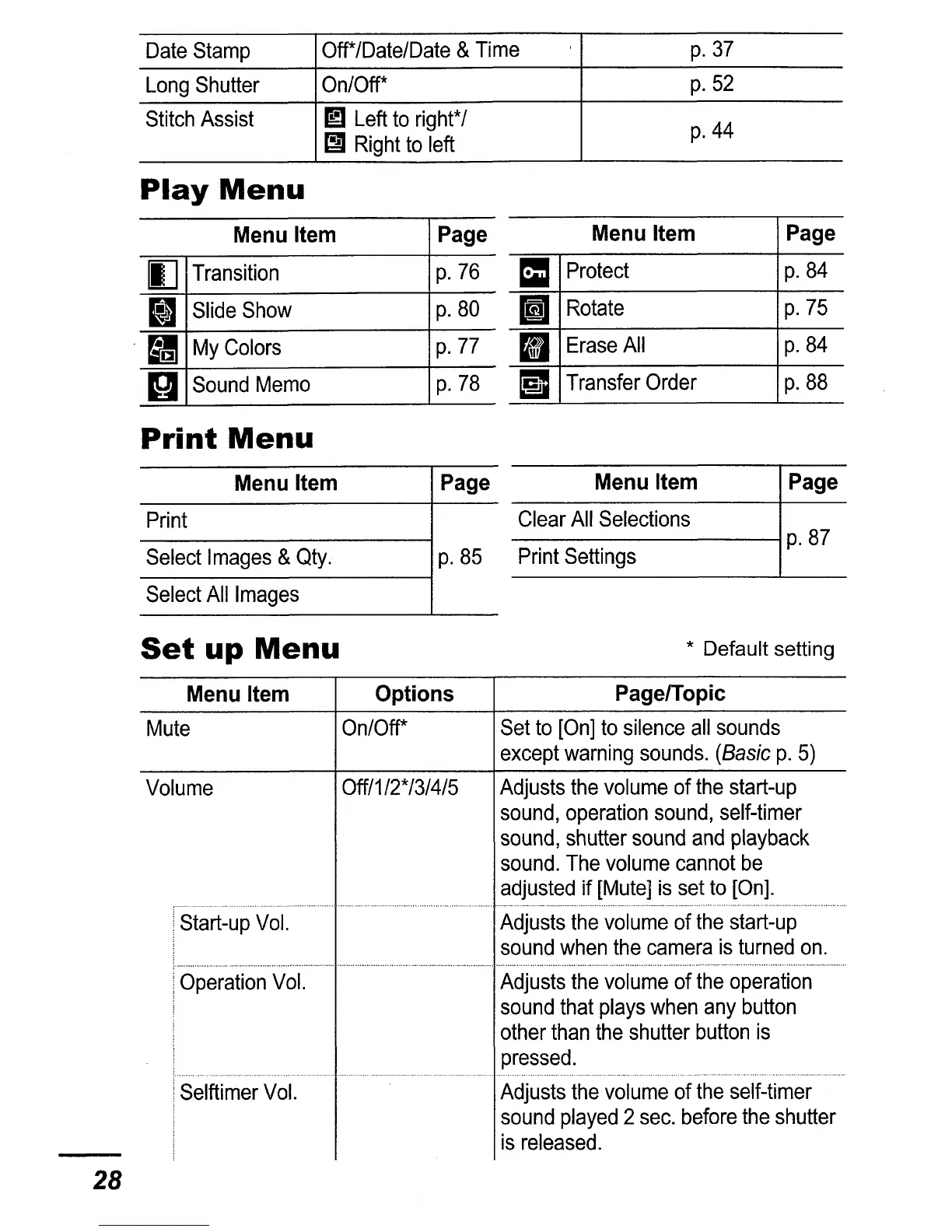
Date
Stamp
Off*/Date/Date
&
Time
p.37
Long
Shutter
On/Off*
p.52
Stitch
Assist
ml
Left
to
right*
/
p.44
~
Right
to
left
Play
Menu
Menu Item
Page
IJ
Transition
p.
76
II
Slide
Show
p.80
My
Colors
p.
77
II
Sound
Memo
p.
78
Menu Item
Page
=
Protect
p.84
I]
Rotate
p.
75
II
Erase
All
p.84
i1
Transfer
Order
p.88
Print
Menu
PageMenu Item
Print
Select
Images
&
Qty.
Page Menu Item
-----------t----
Clear
All
Selections
----------;
p.
87
p.
85
Print
Settings
Select
All
Images
Set
up
Menu
* Default setting
28
Menu Item Options PagelTopic
Mute
On/Off*
Set
to
[On]
to
silence
all
sounds
except
warning
sounds.
(Basic
p.
5)
Volume
Off/1/2*/3/4/5
Adjusts
the
volume
of
the
start-up
sound,
operation
sound,
self-timer
sound,
shutter
sound
and
playback
sound.
The
volume
cannot
be
adjusted
if
[Mute]
is
set
to
[On].
Start-up
Vol.
Adjusts
the
volume
of
the
start-up
sound
when
the
camera
is
turned
on.
Operation
Vol.
Adjusts
the
volume
of
the
operation
sound
that
plays
when
any
button
other
than
the
shutter
button
is
pressed
Selftimer
Vol.
Adjusts
the
volume
of
the
self-timer
sound
played
2
sec.
before
the
shutter
is
released.

Table of Contents

Related product manuals