EasyManua.ls Logo

Canon PowerShot SD600 - Page 59

Canon PowerShot SD600
347 pages
Print Icon
To Next Page IconTo Next Page
To Previous Page IconTo Previous Page
Loading...
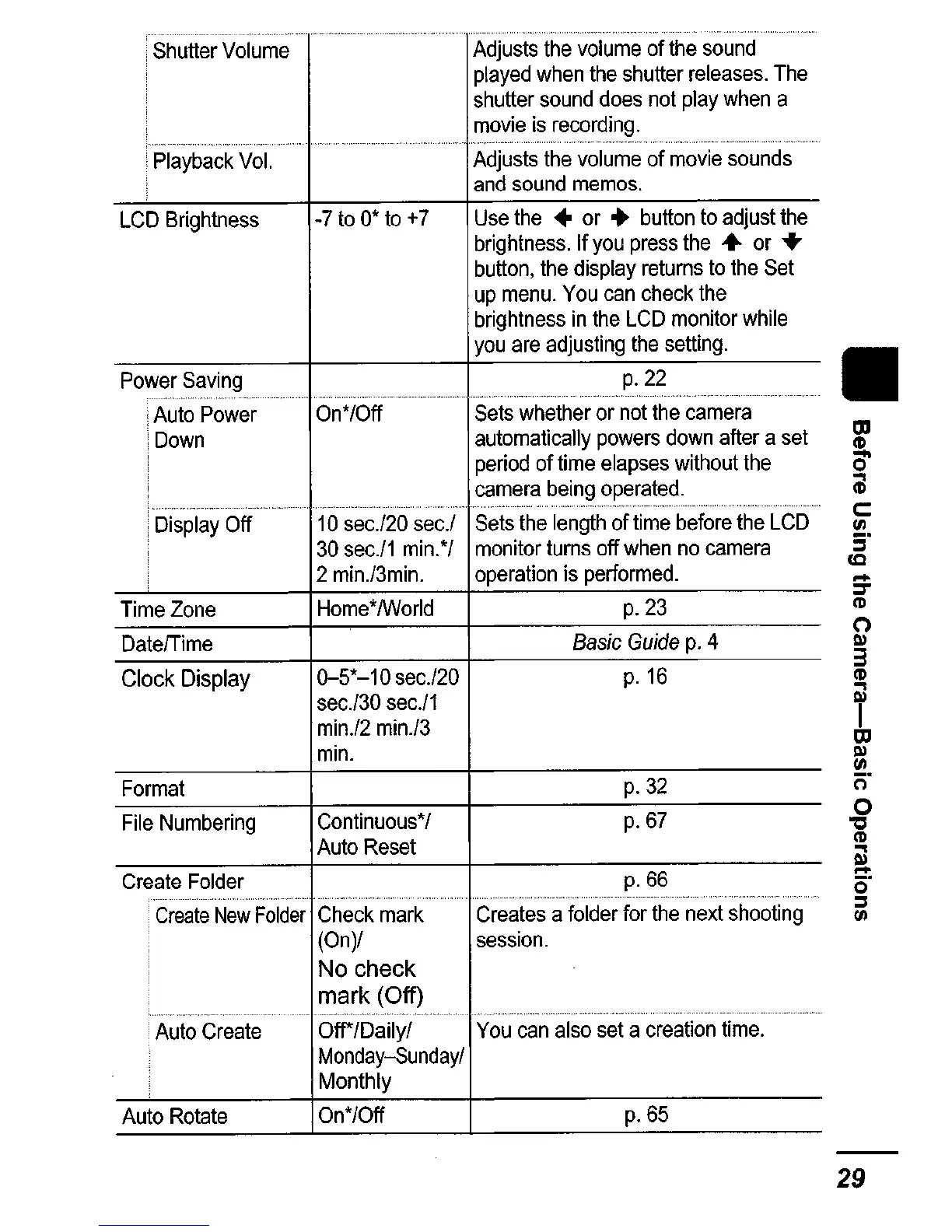
Shutter
Volume
Adjusts
the
volume
of
the
sound
played
when
the
shutter
releases.
The
shutter
sound
does
not
play
when
a
movie
is
recording,
Playback
Vol.
Adjusts
the
volume
of
movie
sounds
and
sound
memos.
LCD
Brightness
-7
to
0*
to
+7
Use
the
or
...
button
to
adjust
the
brightness.
If
you
press
the
or
..
button,
the
display
returns
to
the
Set
up
menu.
You
can
check
the
brightness
in
the
LCD
monitor
while
you
are
adjusting
the
setting
.
Power
Saving
p.22
iAuto
Power
On*/Off
Sets
whether
or
not
the
camera
'Down
automatically
powers
down
after
a
set
!
period
of
time
elapses
without
the
camera
being
operated
.
''''-''--''-'.c'
,._"
___
._~
___
.
___
.
__
.
___
,
__
~
,
_..
-,".
,_
..
_
..
_,
.•...
- -
....
i
Display
Off
10
sec.!20
sec.!
Sets
the
length
of
time
before
the
LCD
30
sec.l1
min.*/
monitor
turns
off
when
no
camera
2
min.l3min.
operation
is
performed.
Time
Zone
Home*/World
p.23
DatelTime
Basic
Guide
p.
4
Clock
Display
0-5*-10
sec.l20
p.
16
sec.l30
sec.l1
min.l2
min.l3
min.
Format
p.32
File
Numbering
Continuous*
/ p.6?
Auto
Reset
Create
Folder
p.66
Create
New
Folder
Check
mark
Creates
a
folder
for
the
next
shooting
(On)/
session.
No check
mark (Off)
Auto
Create
OW/Daily/
You
can
also
set
a
creation
time.
Monday-Sunday/
Monthly
Auto
Rotate
On*/Off
p.65
29

Table of Contents

Related product manuals