First Time Camera
is
Connected
to
a Computer
Set
the following settings the first time you connect the camera
to
the computer. These
procedures are
not
required
from
the second connection onward.
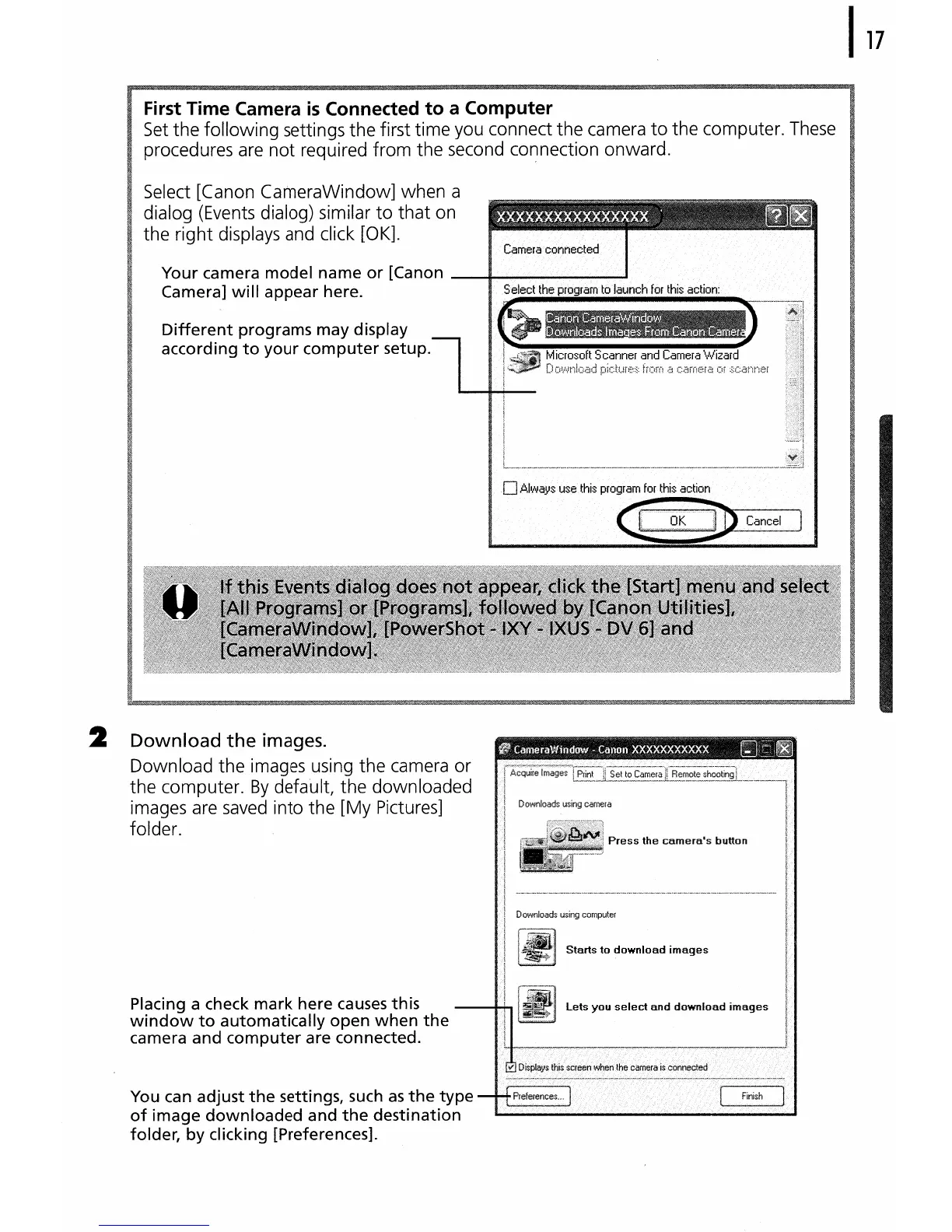
Select [Canon CameraWindow] when a
dialog (Events dialog) similar
to
that
on
the right displays and click [OK].
Your camera
model
name
or
[Canon ----1---------
......
Camera]
will
appear here.
::~~=~~~~~=~~_.~~._~~"'~
Different
programs may display
according
to
your
computer
setup.
Press
the
camera's
button
Starts
to
download
images
lets
you
select
and
download
images
You can adjust
the
settings, such
as
the
type
---+-+-I-'relererlces .
of
image
downloaded
and
the
destination
.........
folder,
by
clicking [Preferences].
Placing a check
mark
here causes this
window
to
automatically
open
when
the
camera
and
computer
are connected.
2
Download
the
images.
Download the images using the camera or
the computer.
By
default, the downloaded
images are
saved
into the
[My
Pictures]
folder.















 To Next Page