EasyManua.ls Logo

Canon PowerShot SD600 - Page 199

Canon PowerShot SD600
347 pages
Print Icon
To Next Page IconTo Next Page
To Previous Page IconTo Previous Page
Loading...
361
Using
the
Software
on
the
Windows
Platform
-Advanced
Techniques
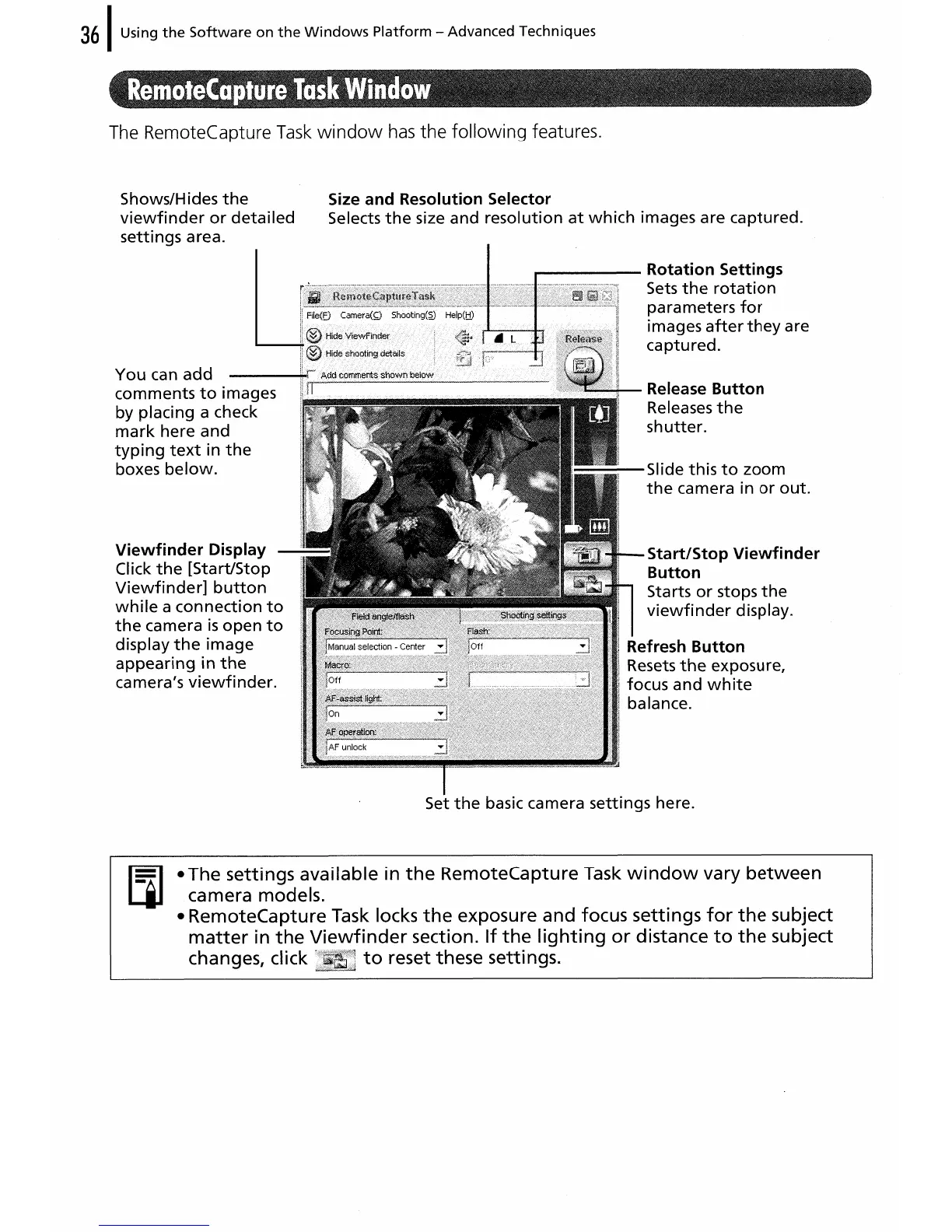
The RemoteCapture
Task
window
has
the following features.
Shows/Hides
the
viewfinder
or
detailed
settings area.
You
can
add
comments
to
images
by placing a check
mark
here
and
typing
text
in
the
boxes
below.
Viewfinder
Display
Click
the
[Start/Stop
Viewfinder]
button
while
a
connection
to
the
camera
is
open
to
display
the
image
appearing
in
the
camera's
viewfinder.
Size
and
Resolution Selector
Selects
the
size and
resolution
at
which
images are captured.
...-----
Rotation
Settings
njl~!.,~~81'1~lllrJrfIIIIBJlftflllj~\I~~JII'~j~i~flll,~11!~f111~~IGlj~il~1
Sets
the
rotat
ion
i.i~
parameters
for
images
after
they
are
captured.
Release
Button
Releases
the
shutter.
Slide
this
to
zoom
the
camera in
or
out.
Start/Stop
Viewfinder
Button
Sta
rts
or
stops
the
viewfinder
display.
Refresh
Button
Resets
the
exposure,
focus and
white
balance.
Set
the
basic camera settings here.
• The settings available in
the
RemoteCapture Task
window
vary
between
camera models.
• RemoteCapture Task locks
the
exposure and focus settings
for
the
subject
matter
in
the
Viewfinder
section.
If
the
lighting
or
distance
to
the
subject
changes, click
to
reset these settings.

Table of Contents