EasyManua.ls Logo

Canon PowerShot SD600 - Page 238

Canon PowerShot SD600
347 pages
Print Icon
To Next Page IconTo Next Page
To Previous Page IconTo Previous Page
Loading...
Uaiastolliag
lie
UBI
I,i,el
laiudoW5)
Uninstall the
USB
Driver using the following procedures if you are using Windows 2000,
Windows Me
or
Windows 98
SE.
[j] You
do
not
need
to
uninstall
the
USB
driver
with
Windows
XP.
1 Attach
the
supplied interface cable
to
the
computer's
USB
port and
the
camera's
DIGITAL Terminal. Prepare
the
camera
for
communication
with
the
computer.
For
interface cable connection instructions,
see
the
Camera
User
Guide.
2 Click
the
[Finish] button
if
the
Camera Control
Window
displays.
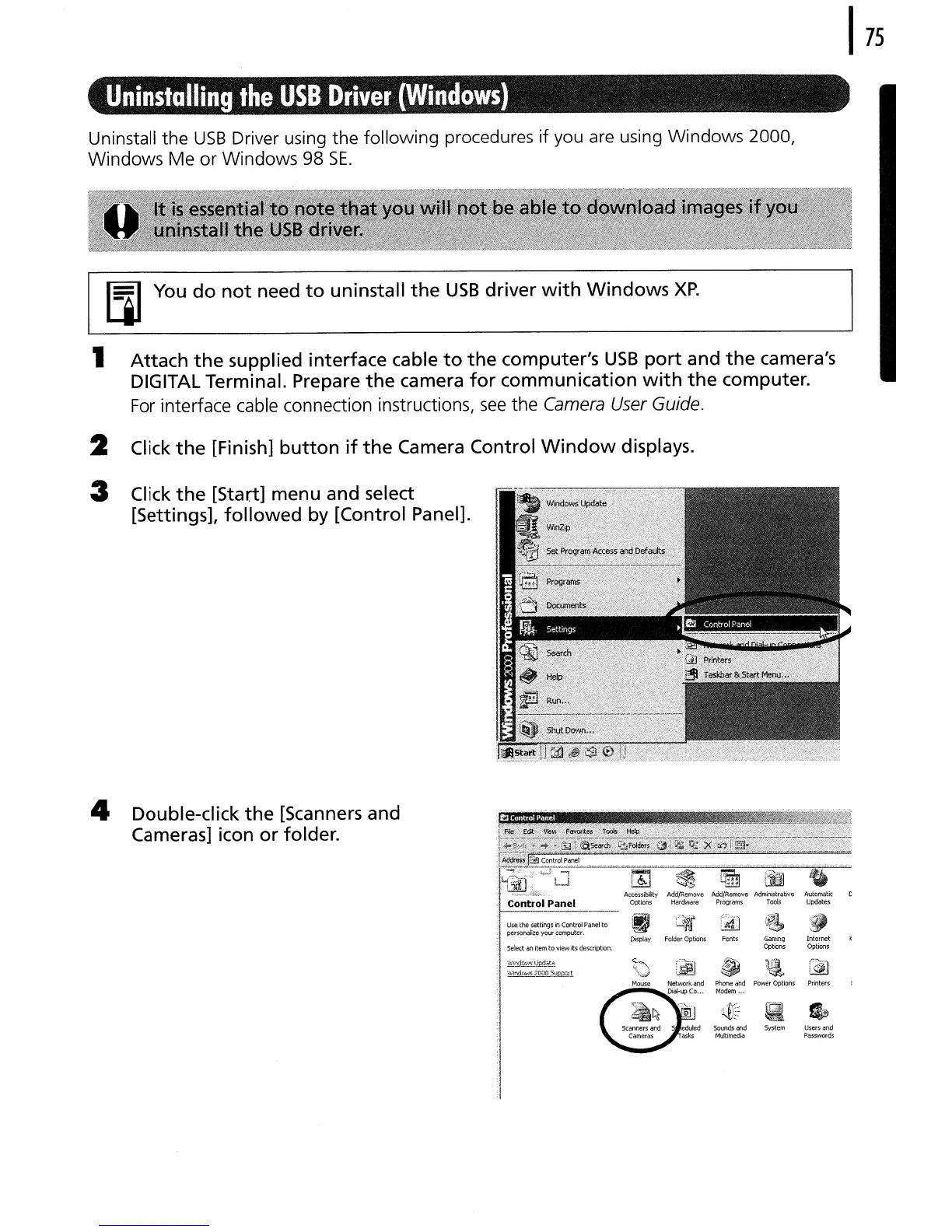
3 Click
the
[Start] menu and select
[Settings], followed
by
[Control Panel].
4 Double-click
the
[Scanners and
Cameras] icon or folder.

Table of Contents