1.
Charging
the Battery.
Charge the battery before use under the following circumstances.
• When using the battery for the first time.
• When the "Change the battery pack" message displays.
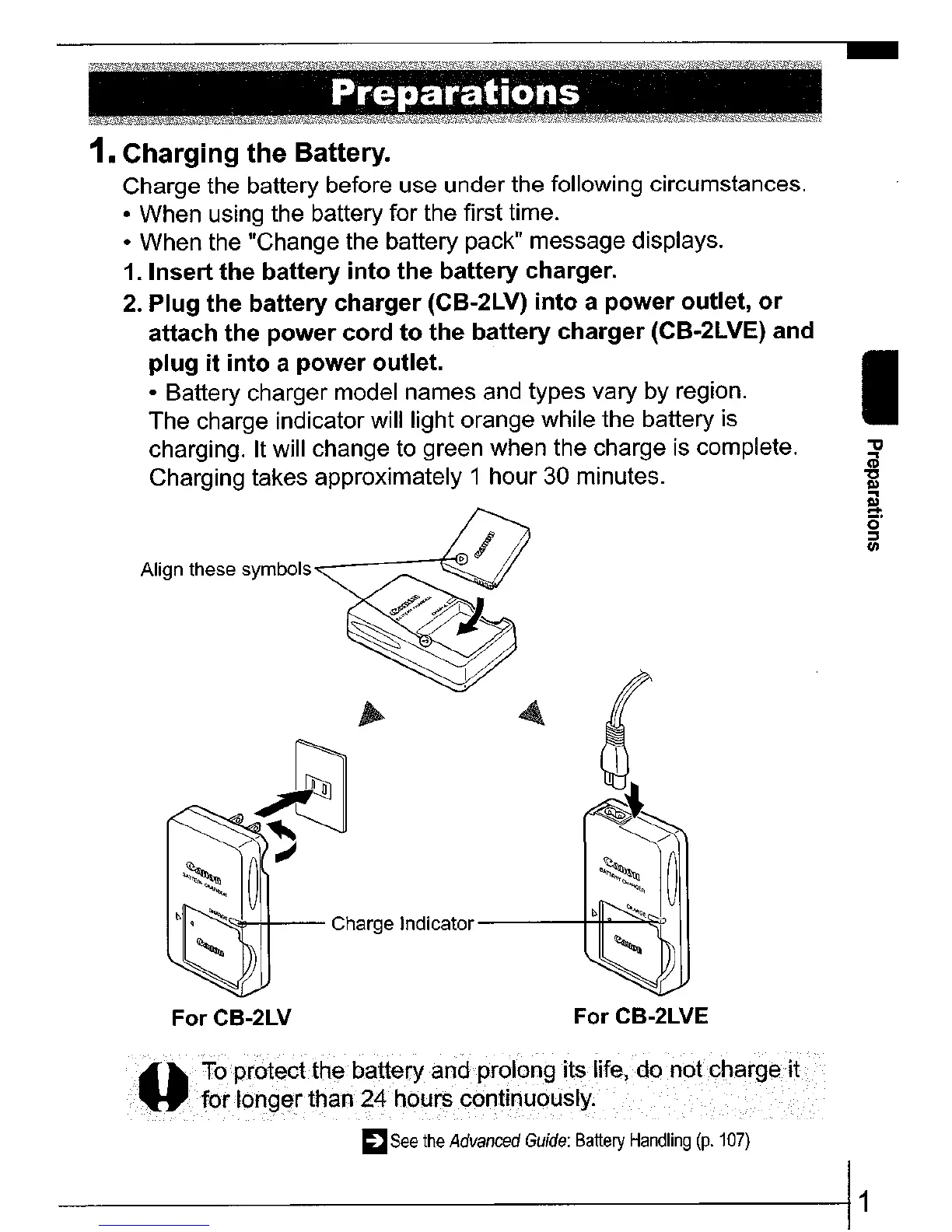
1. Insert the battery
into
the battery charger.
2.
Plug the battery
charger
(CB-2LV)
into
a
power
outlet,
or
attach the
power
cord
to
the battery charger (CB-2LVE) and
plug
it
into
a
power
outlet.
• Battery charger model names and types vary
by
region.
The charge indicator will light orange while the battery is
charging.
It
will change to green when the charge is complete.
Charging takes approximately 1 hour 30 minutes.
Align these symbols
","<::>Jo.-\+---
Charge
Indicator---~~~
I
"tI
(il
"C
III
~
o
:::::J
1/1
ForCB-2LV
For CB-2LVE
•....•...•...••.•
l'i.op.r.o.t~c
..
t.
t.
h
..
e.ba.
tte.ry
....•...
8.n.d
P
.f.O
..
I.O.
n
...
9.
itS.
life,
do
notcha.r
g
.e
..•......
(.i
..
t
..
...
for
longer
than
24
hours continuously. .
~
See
the
Advanced
Guide:
Battery
Handling
(p.
107}
------11















 To Next Page