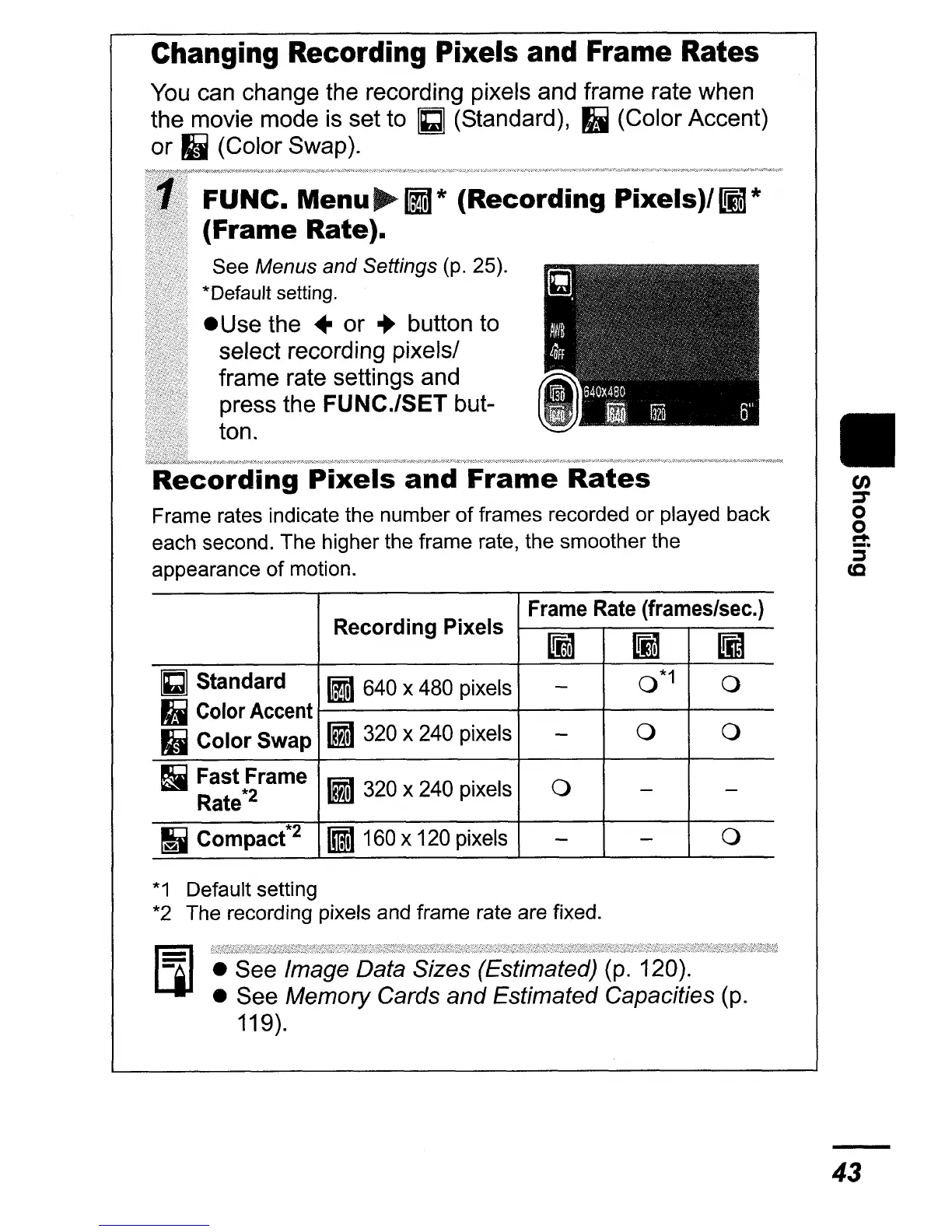
Changing Recording Pixels and Frame Rates
You can change the recording pixels and frame rate when
the movie mode is set to
Gl
(Standard),
II
(Color Accent)
or
II
(Color Swap).
FUNC.
Menu~liI*
(Recording
Pixels)/lIl*
(Frame Rate).
See Menus and Settings
(p.
25).
*Default setting.
• Use the • or
..
button to
select recording pixels/
frame rate settings and
press the FUNC.lSET but-
ton.
and
Frame
Rates
Frame rates indicate the number
of
frames recorded or played back
each second. The higher the frame rate, the smoother the
appearance
of
motion.
Recording Pixels
Frame
Rate
(frames/sec.)
~
li1
1Il
Gl
Standard
III 640 x 480 pixels
-
0*1
0
II
Color Accent
III 320 x 240 pixels
0 0
II
Color
Swap
-
Ii
Fast Frame
III 320 x 240 pixels
0
-
-
Rate*2
~
Compact*2
81160
x 120 pixels
-
-
0
*1
Default setting
*2
The recording pixels and frame rate are fixed.
• See Image Data Sizes (Estimated) (p. 120).
• See
Memory Cards and Estimated Capacities (p.
119).
II
en
:r
o
o
....
:i"
(Q
43















 To Next Page