File
and
Folder
Numbers
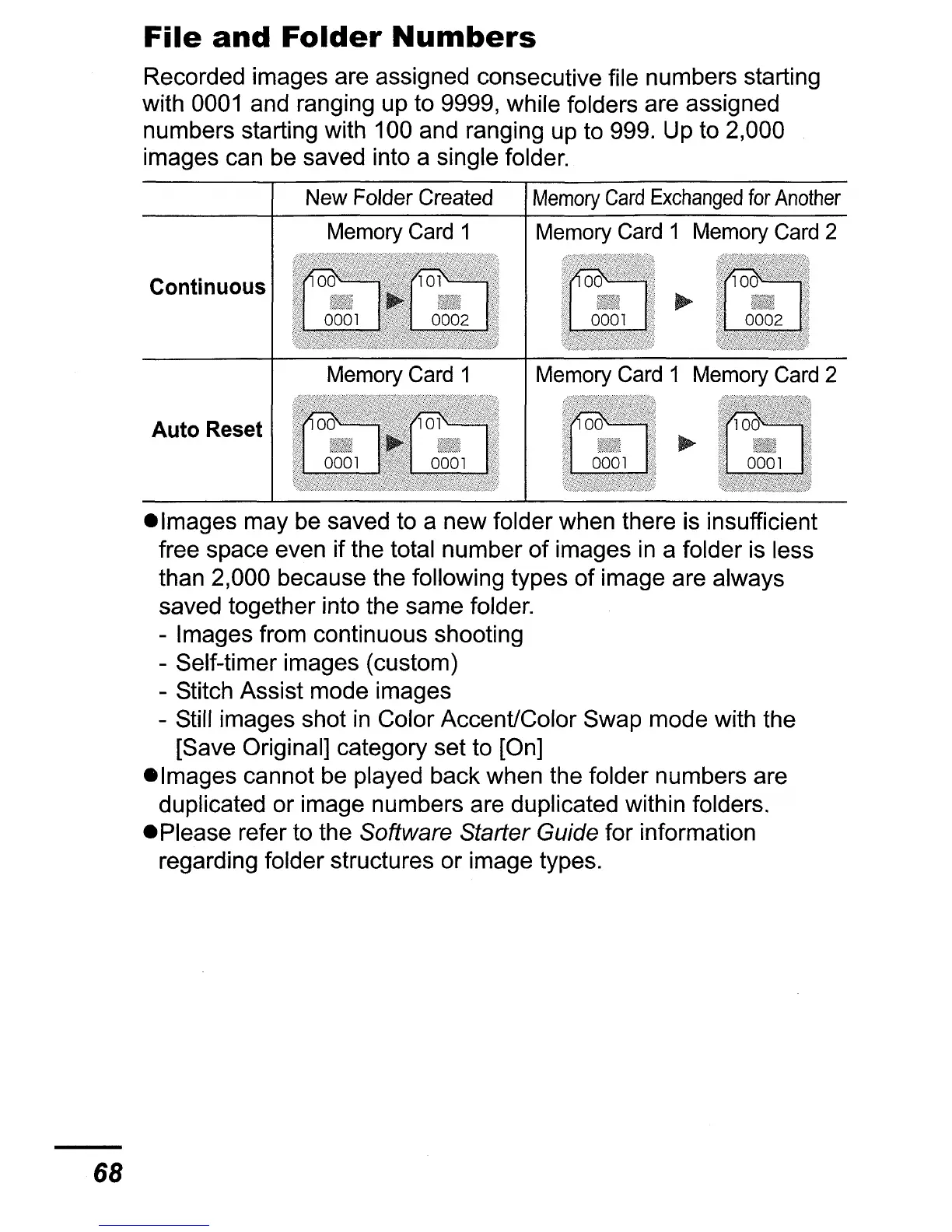
Recorded images are assigned consecutive file numbers starting
with
0001
and ranging up to 9999, while folders are assigned
numbers starting with 100 and ranging up to 999. Up to 2,000
images can
be
saved into a single folder.
New Folder Created
Memory
Card
Exchanged
for
Another
Memory Card 1 Memory Card 1 Memory Card 2
Continuous
Auto Reset
68
elmages may
be
saved to a new folder when there is insufficient
free space even if the total number of images
in
a folder
is
less
than 2,000 because the following types
of
image are always
saved together into the same folder.
- Images from continuous shooting
- Self-timer images (custom)
- Stitch Assist mode images
- Still images shot
in
Color Accent/Color Swap mode with the
[Save Original] category set to [On]
elmages cannot
be
played back when the folder numbers are
duplicated or image numbers are duplicated within folders.
ePlease refer to the
Software Starter Guide for information
regarding folder structures or image types.















 To Next Page