EasyManua.ls Logo

Canon SELPHY DS810 - Printing Multiple Photos on One Sheet of Media-Layout Print

Canon SELPHY DS810
108 pages
Print Icon
To Next Page IconTo Next Page
To Previous Page IconTo Previous Page
Loading...
Printing
from
the
Memory
Card
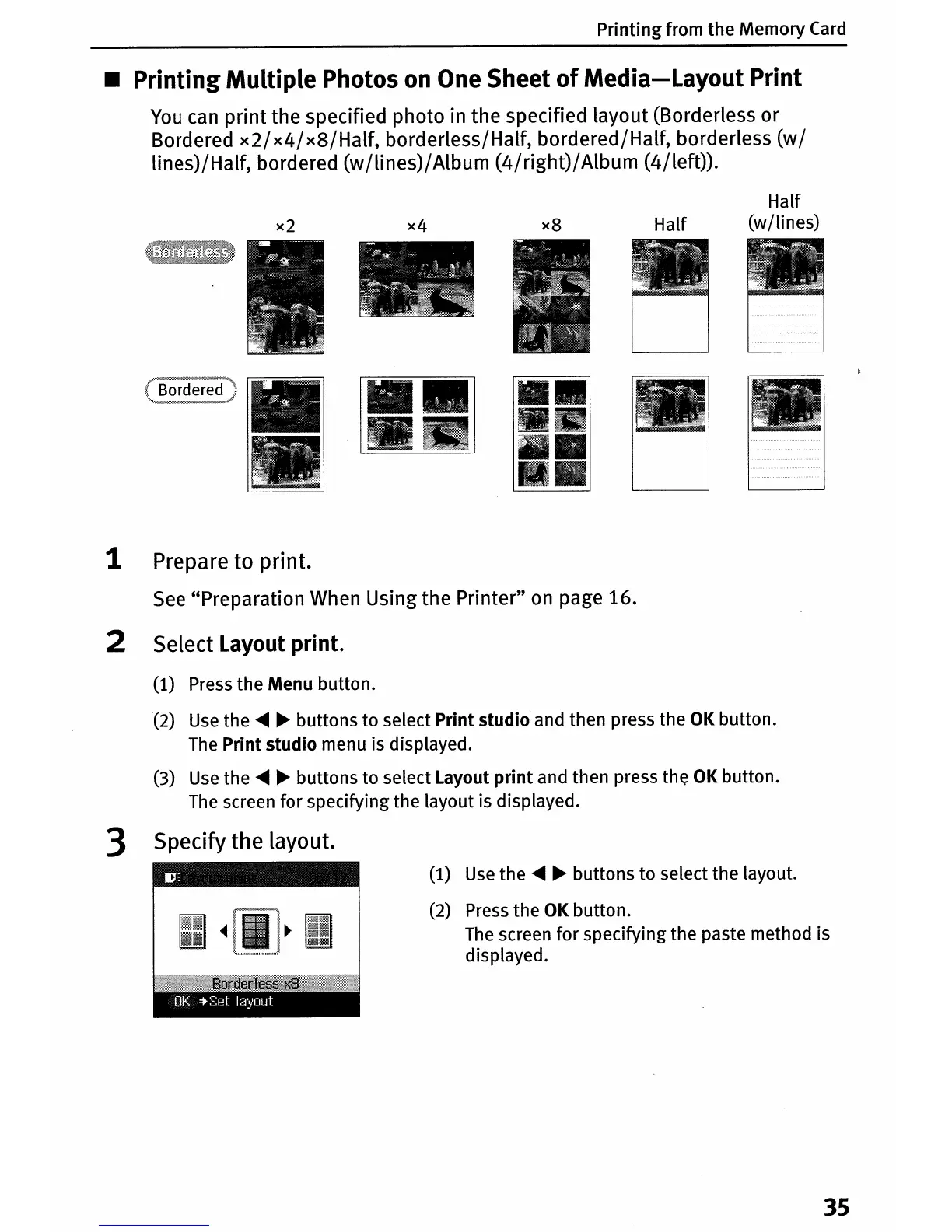
• Printing Multiple Photos
on
One
Sheet
of
Media-Layout
Print
You
can
print the specified photo in the specified layout (Borderless or
Bordered
x2/x4/x8/Half,
borderless/Half, bordered/Half, borderless
(w/
lines)/Half, bordered
(w
/lines)/
Album
(4/right)/
Album (4/left)).
x2
x4
x8
Half
Half
(wjlines)
1 Prepare to print.
See
"Preparation
When
Using the Printer"
on
page 16.
2 Select Layout print.
(1) Press
the
Menu button.
(2) Use
the
....
~
buttons
to
select
Print
studio' and then press
the
OK button.
The
Print
studio
menu is displayed.
(3) Use
the
....
~
buttons
to
select Layout
print
and then press
the
OK button.
The screen
for
specifying
the
layout is displayed.
3 Specify the layout.
(1) Use
the
....
~
buttons
to
select
the
layout.
(2)
Press
the
OK button.
The screen
for
specifying the paste method is
displayed.
35

Table of Contents