The Fusion 400 has all of the same functions and components as the Fusion 100, except that it
has four channels for syringes and uses screw clamps to secure the syringes. Additionally,
instead of a safety collar, the Fusion 400 have a safety bar to protect the syringes.
Controls
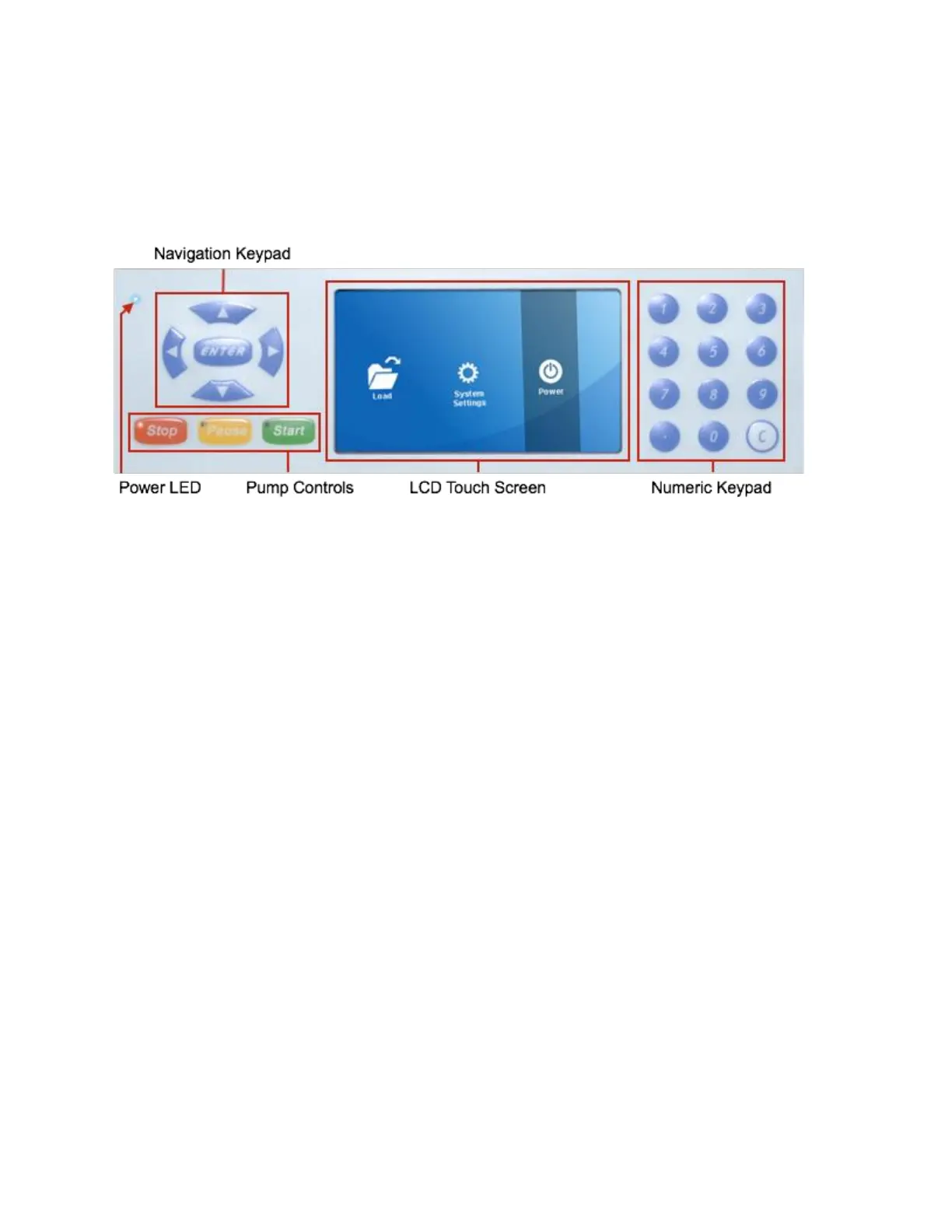
Front panel of pump
The Fusion Series uses a bright, 4.25”, resistive, LCD touchscreen with an intuitive graphical
user interface (GUI) for setting up detailed pump run methods. Buttons and entry fields within
the GUI are all selectable using the touchscreen. As a resistive, LCD touchscreen, the interface
can be operated with any object, not just the touch of a fingertip. Selecting elements by touch
only requires a small amount of pressure; however, please do not use sharp objects as they
may damage the screen.
The Fusion series also includes physical navigation controls, allowing users to manually
maneuver between selectable GUI elements without touching the screen. Inputting numbers
and letters within the GUI is done using the physical numeric keypad. The physical pump control
keys are used to start, pause, and stop pump activity.
The power LED and pump-control LEDs allow users to easily discern whether the pump is on
and whether it is currently running, paused, or stopped.



 To Next Page