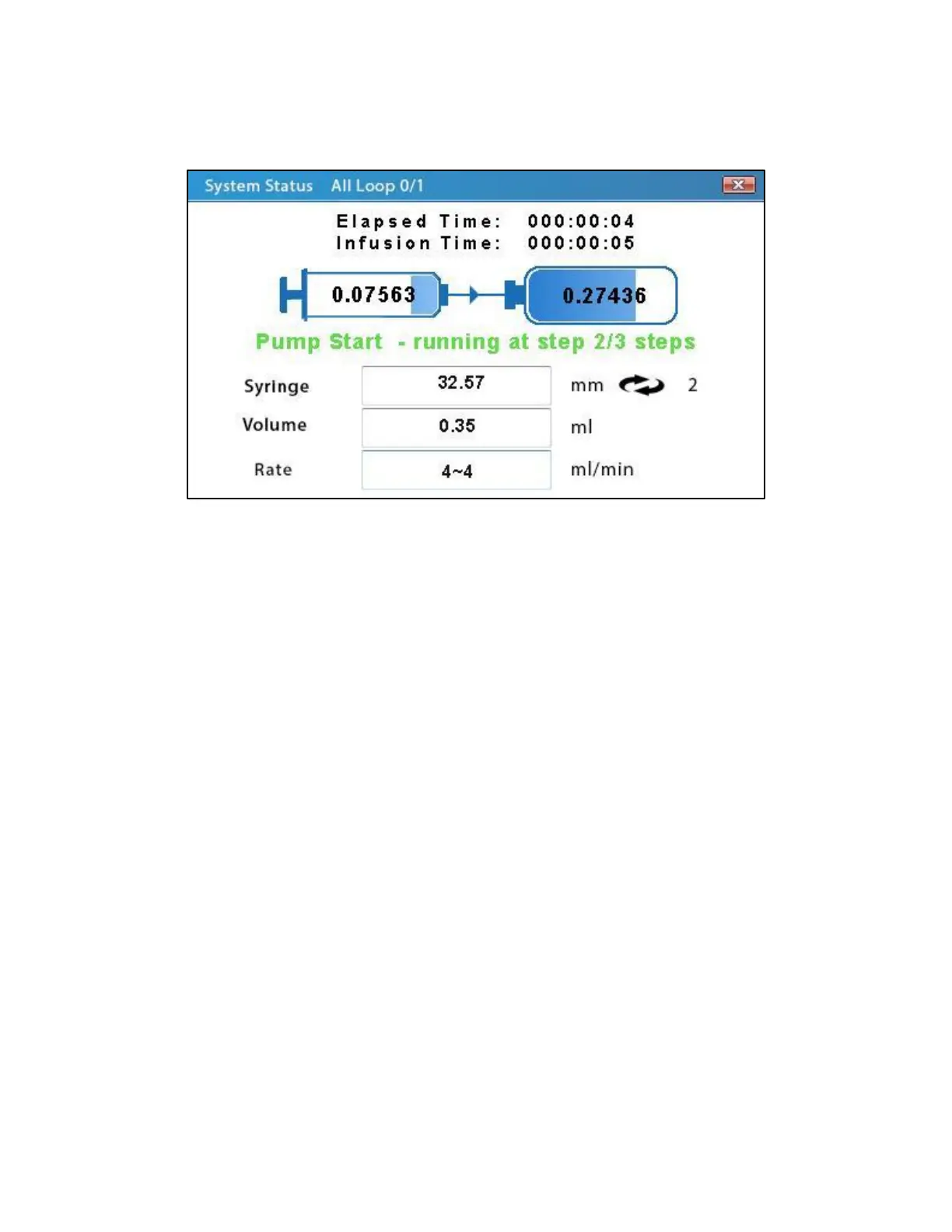
Multi-Step Mode System Status
The System Status screen for Multi-Step Mode highlights the current activity of the pump
during a step of the multi-step method.
The All Loop field at the top of the screen shows the current loop and the number of total loops
for the multi-step method.
The Elapsed Time field indicates how much time has passed since the pump has started
physically running the current step, not including the delay time, if any. The Infusion Time field
shows the calculated total time for the current step to finish, barring any pause or stall in the
instrument.
The two rectangular blocks on the screen illustrate the transfer of volume during the current
step. The left rectangle represents the volume in the syringe while the right rectangle represents
the volume transferred in or out of the syringe. While the pump is running, a small arrow will
appear between the two rectangles indicating the direction of flow. Depending upon the
direction of the arrow, the numbers within each rectangle will change as volume is transferred.
The colored text directly under the volume transfer graphic indicates the current status of the
pump and which step is currently being run: green - running; yellow - paused or delayed; and
red - stopped or stalled.
The Syringe, Volume, and Rate fields indicate the parameters that were set for the currently
running step in the Basic Mode main screen.



 To Next Page