3-22 Christie ACT User Manual
020-100129-05 Rev. 1 (02-2010)
Section 3: Operation
All of the selections displayed in the Select an Action drop-down list require you to make selections or to type
entries. Each option is outlined in Table 3.10.
Table 3.10 Options and Commands for Adding Actions
Adding Actions
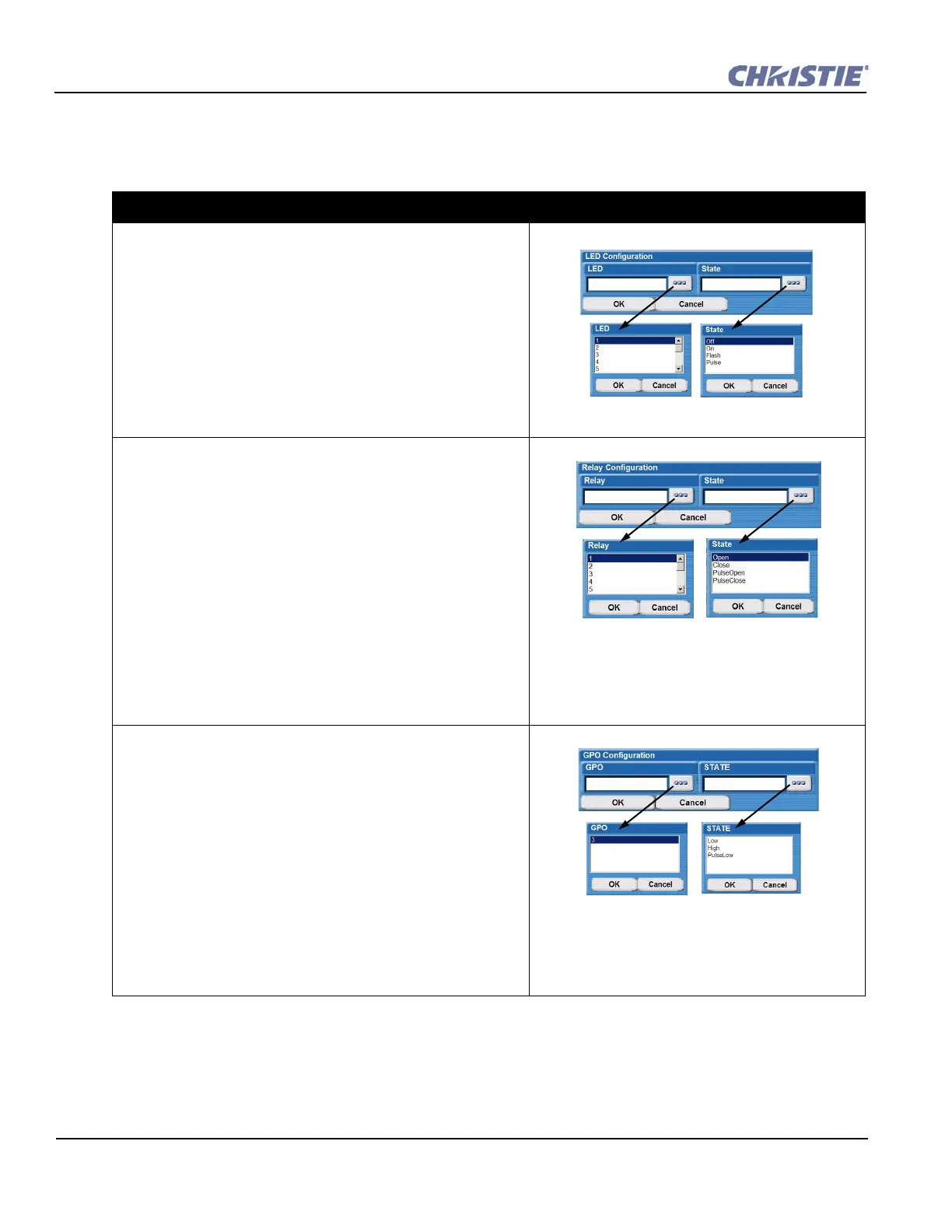
LED
1. Select LED to open the LED Configuration window.
2. Click the LED button to open the LED window.
3. Highlight the LED number from the drop-down list (1-14) and
click OK.
4. Click the State button to open the State window.
5. Highlight the State from the drop-down list (Off, On Flash,
Pulse) and click OK.
6. In the LED Configuration window, click OK to add the
action.
Relay
1. Select Christie ACT Relay option to open the Relay
Configuration window.
2. Click the Relay button to open the Relay window.
3. Highlight the Relay number from the drop-down list (1-14) and
click OK.
4. Click the State button to open the State window.
5. Highlight the State from the drop-down list (Open, Close,
PulseOpen, PulseClose) and click OK.
If you select PulseOpen or PulseClose, the Relay Configuration
window appears with an area for you to type the duration (in ms) of the
pulse. The pulse duration can be 100 - 1000 ms.
6. In the Relay Configuration window, click OK to add the
action.
GPO
1. Select GPO to open the GPO Configuration window.
2. Click the GPO button to open the GPO window.
3. Highlight the GPO number from the drop-down list and click
OK.
4. Click the State button to open the State window.
5. Highlight the State from the drop-down list (Low, High,
PulseLow) and click OK.
If you select PulseLow, the GPO Configuration window appears with
an area for you to type the duration (in ms) of the pulse. The pulse
duration can be 100 - 1000 ms.
6. In the GPO Configuration window, click OK to add action to
Christie ACT.


 To Next Page