WELDSKILL 200AC/DC INVERTER OPERATION
Operation 4-4 Manual 0-5206
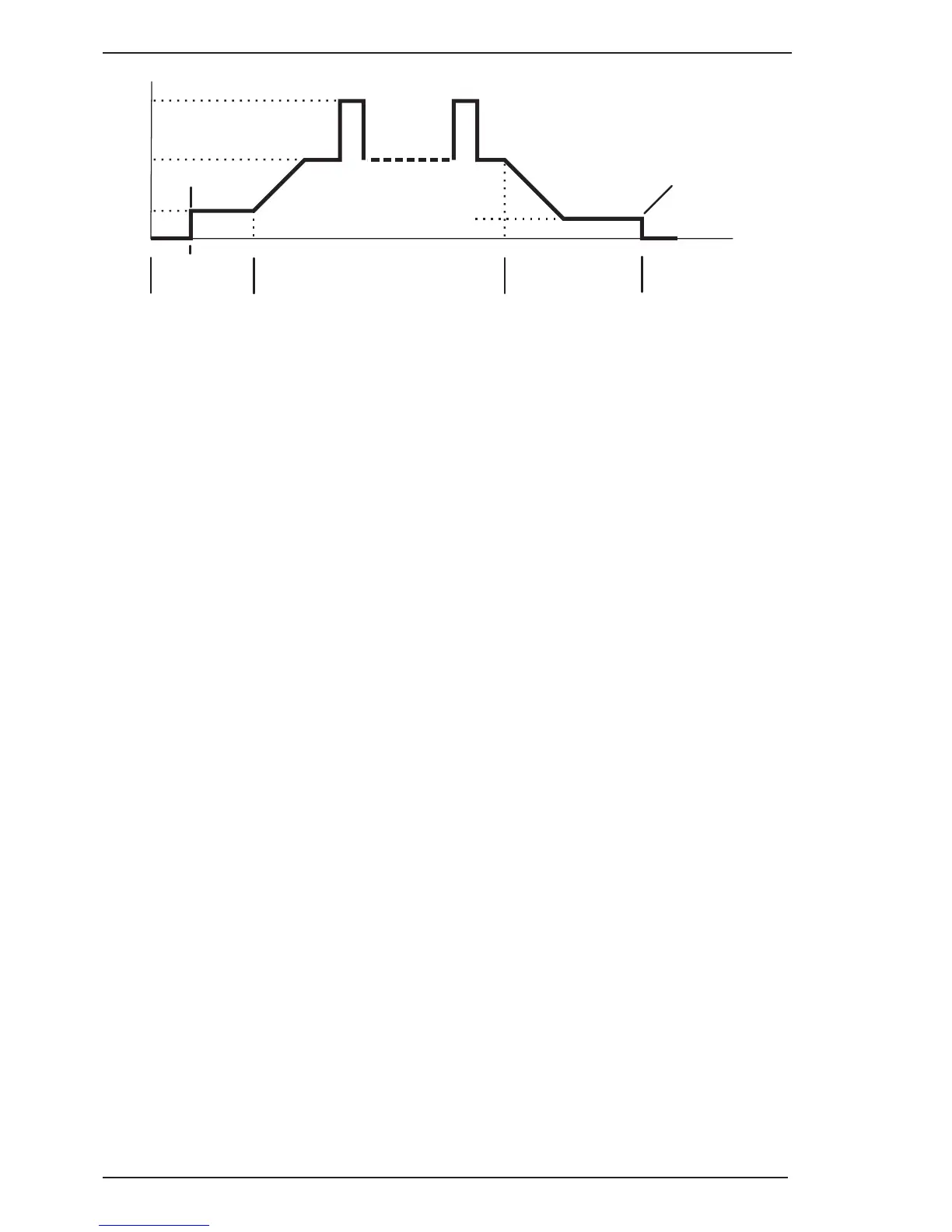
Press & hold
Trigger
Base
Current
Peak
Current
Down
Slope
Post
Flow
AMPS
TIME
Pre
Flow
Up
Slope
Release
Trigger
Initial
Current
Arc Ignited
Arc Terminated
Press & hold
Trigger
Release
Trigger
Crater
Current
A-11221
Figure 4-4
9. Wave Balance / Arc Force Indicator
This indicator light will illuminate when programming Wave Balance (AC HF TIG mode only) or Arc Force
(STICK mode only).
10. Forward Programming Button
Pressing this button will advance to the next step in the programming sequence.
11. Multifunction Control
The multifunction control knob is used to adjust welding current.
It is also used to adjust parameters when in programming mode.
12. Forward Programming Button
Pressing this button will go back to the previous step in the programming sequence.
13 .AC frequency Indicator
This indicator light will illuminate when programming AC Frequency (AC HF TIG mode only).
14. Purge Button
Press and hold the PURGE button to purge the gas line in LIFT TIG and HF TIG modes. To PURGE the
shielding gas line in LIFT TIG and HF TIG modes press the PURGE button and release. The indicator will
illuminated and shielding gas will purge for a preset period of 15 seconds. (This cannot be adjusted).
To stop shielding gas from purging within this time press the PURGE button and release and the purge
indicator will extinguish and shielding gas will cease.
15 Pulse Button
Press the PULSE button to toggle Pulse On and OFF in LIFT TIG and HF TIG modes
16. Programming Parameter Indicators
These indicator lights will illuminate when programming.
17. Mode Button
Press the MODE button to toggle AC and DC output in all Process modes



 To Next Page