WELDSKILL 200AC/DC INVERTER OPERATION
Operation 4-6 Manual 0-5206
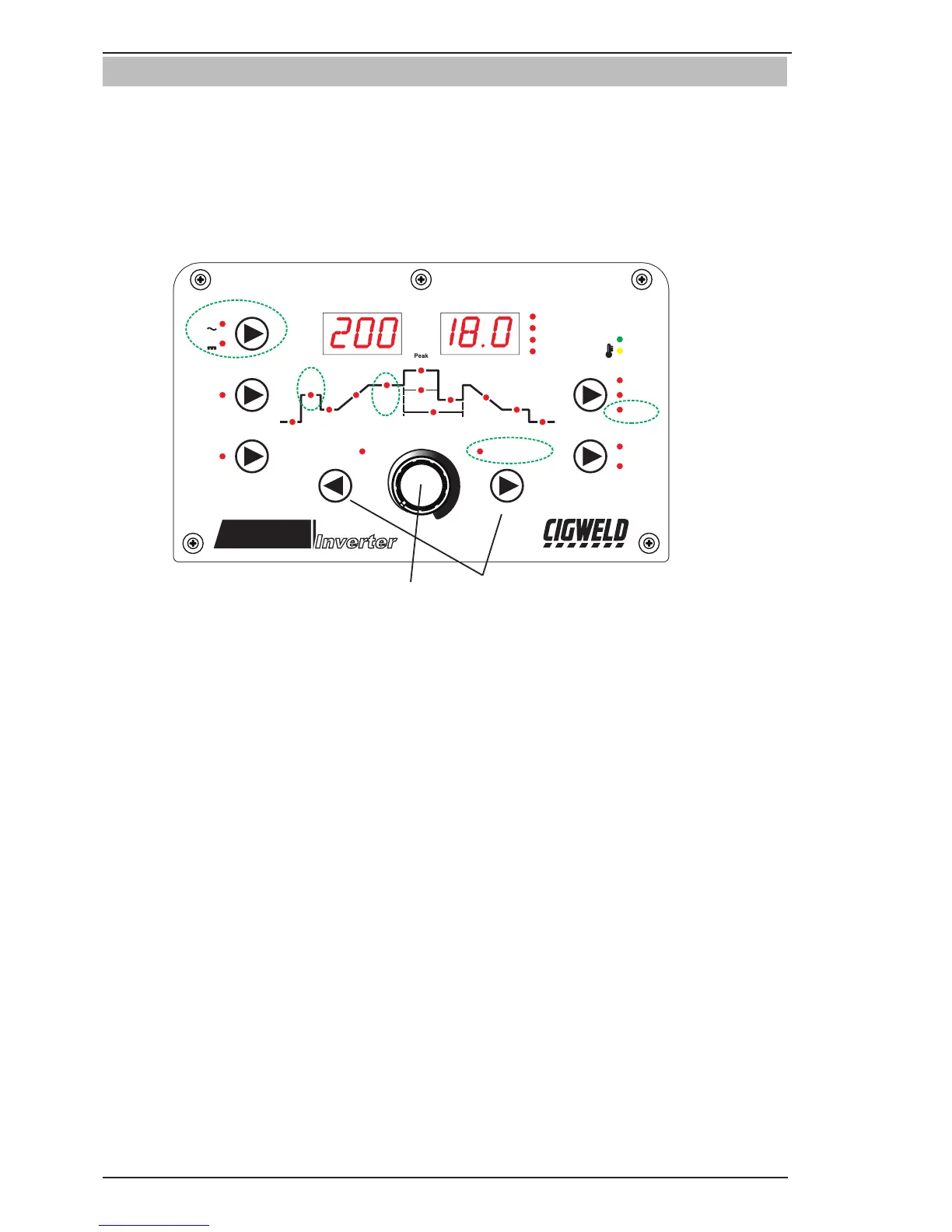
4.02 WELDSKILL 200AC/DC - STICK Programming Mode
Press the PROCESS button to select STICK mode.
Press the MODE switch to toggle between AC and DC welding output.
The Programming LED’s are always active. Press FORWARD or BACK to cycle through available programming
functions.
Use the Multi Function Control to adjust the Parameter.
While welding the Multi Function Control directly controls the BASE CURRENT
FAULT
POWER
Amps
Volts
FORWARDBACK
VOLTS
SECONDS
PERCENT (%)
FREQ (Hz)
AC FREQUENCY
WAVE BALANCE
(ARC FORCE)
MODE
AC
DC
PULSE
PURGE
PROCESS
TRIGGER
2T NORMAL
4T LATCH
HF TIG
LIFT TIG
STICK
Pre
Flow
Hot
Start
Initial
Current
Up
Slope
Base
Current
Current
Width
Trough
Current
Frequency
Down
Slope
Crater
Current
Post
Flow
WeldSkill
PORTABLE WELDING MACHINE
200
AC/DC
Inverter



 To Next Page