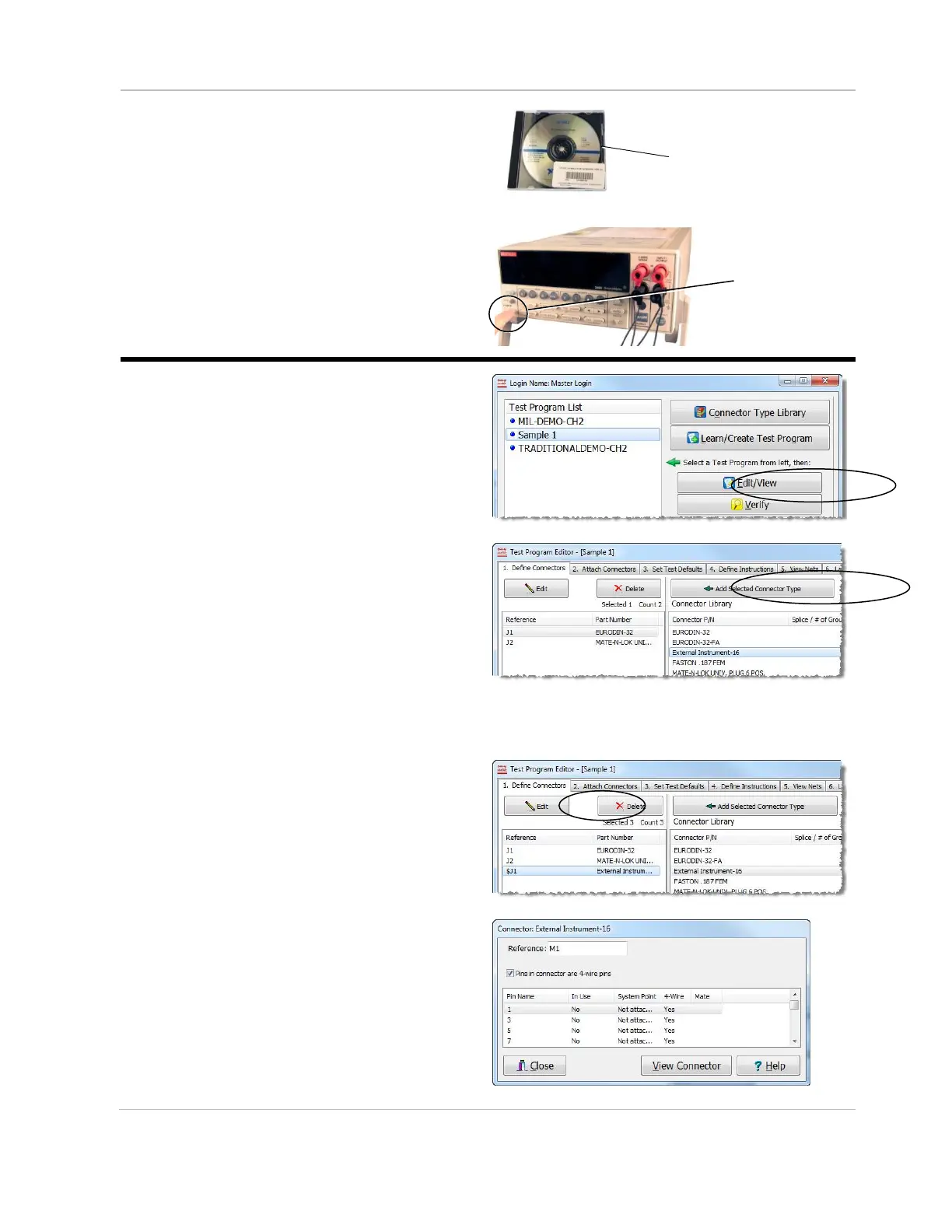
5. If you purchased a GPIB Converter,
insert the GPIB Installation CD into
your PC and follow the installation
steps to install the driver.
Measuring with a Volt/Source Meter
1. From the Easy-Wire main menu,
highlight the test program you wish to
add an instruction to, and click
Edit/View.
2. Open the “Define Connectors” tab,
select the “External Instrument-16”
connector from the Connector
Library, and click Add Selected
Connector Type.
Note: if you do not see the
External Instrument-16 adapter you
will need to contact your Cirris
sales representative to send you
the connector file to import.
3. Select the “External Instrument-16”
connector from the list, and click Edit.
4. Give the connector a new reference
name, for example M1 as shown, and
check the “Pins in connector are 4-wire
pins” box.
Note: You must check the “Pins in
connector are 4-wire pins” check box
even if you are doing 2 wire
measurements with your meter.
GPIB converter
installation CD
Power switch
(location may vary)



 To Next Page