1-17
Cisco 11500 Series Content Services Switch Hardware Installation Guide
78-16421-01
Chapter 1 Unpacking and Installing the CSS
Installing the CSS 11506
Installing the CSS 11506
The CSS 11506 must be installed in a 19-inch equipment rack. When positioning
the CSS 11506 for installation, keep in mind that all cables connect to the front of
the unit.
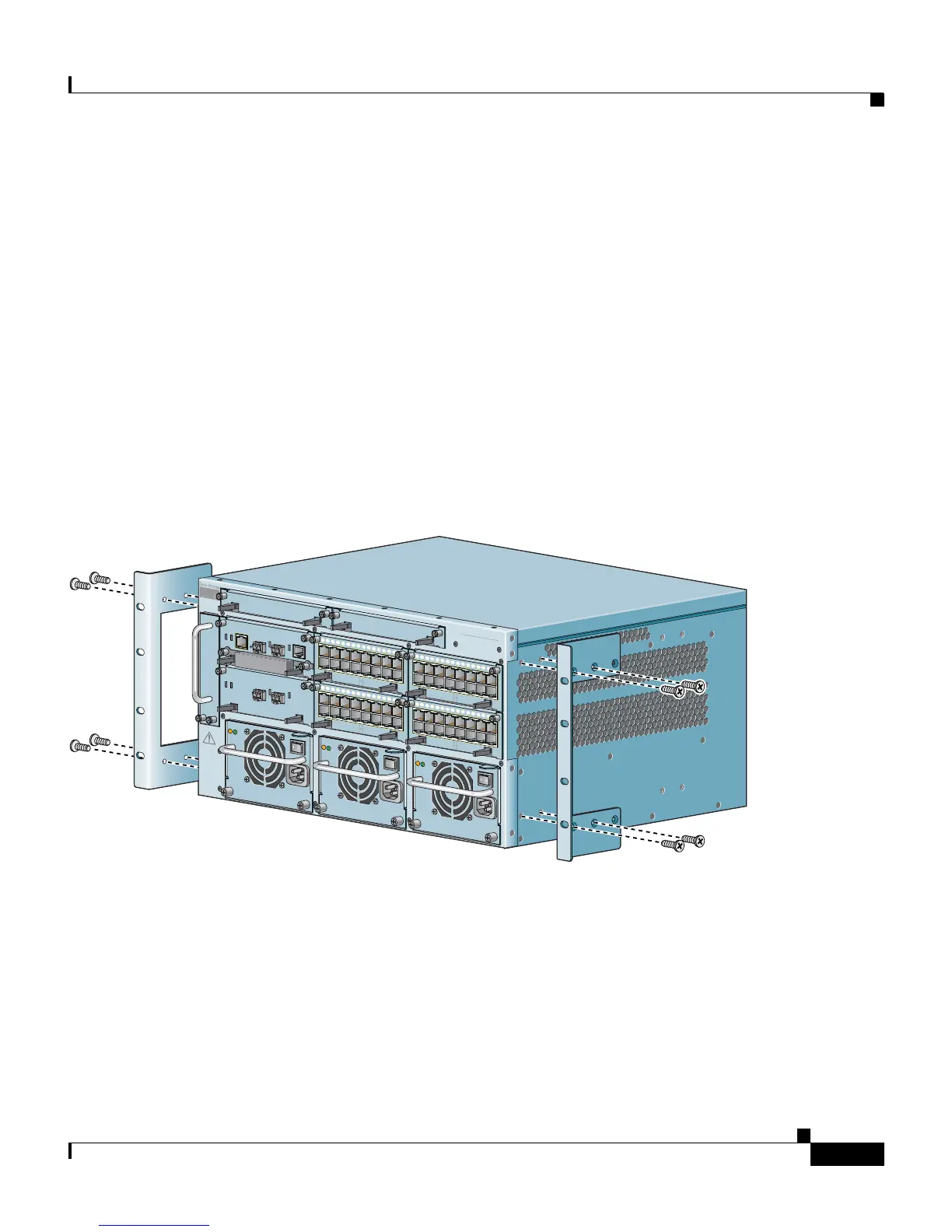
Before you rack-mount the CSS 11506 chassis, determine whether to front-mount
or mid-mount the CSS chassis in the rack. The mounting brackets are preinstalled
in the front-mounted position on the chassis, as shown in Figure 1-4. They are
ready for installation in the equipment cabinet, as described in the
“Rack-Mounting the CSS 11506 Chassis” section. To mid-mount the mounting
brackets to the chassis, proceed to the “Mid-Mounting the CSS 11506 Mounting
Brackets” section.
Figure 1-4 Front-Mounting Position of the CSS 11506 Mounting Brackets
This section covers:
• Mid-Mounting the CSS 11506 Mounting Brackets
• Rack-Mounting the CSS 11506 Chassis
CISCO 11500
SERIES
CONTENT SERVICES SWITCH
CSS506-SM
CSS506-SM
1
2
3
4
5
6
PS1
PS2
PS3
7
DISCONNECT ALL
POWER SOURCES
BEFORE SERVICING
C
A
U
T
IO
N
8
59540
CSS5-10M-2GE
Gigabit Ethernet
GE 1
GE 2
LINK
LINK
STATUS
1
2
4
5
15
1
4
13
1
2
11
1
0
9
8
7
6
3
CSS5-10M-16FE
DPLX
16 Fast Ethernet
DPLX
LINK
LINK
1
2
4
5
1
5
1
4
1
3
12
1
1
1
0
9
8
7
6
3
CSS5-10M-16FE
DPLX
16 Fast Ethernet
DPLX
LINK
LINK
CSS5-SCM-2GE
System Control
DUPLEX
LINK/ACT
MANAGEMENT
10BASE-T
SLOT 0
SLOT 1
GE 1
GE 2
LINK
LINK
STATUS
PCMCIA
CONSOLE
1
2
4
5
15
1
4
13
12
11
10
9
8
7
6
3
CSS5-10M-16FE
DPLX
16 Fast Ethernet
DPLX
LINK
LINK
1
2
4
5
15
1
4
13
1
2
1
1
10
9
8
7
6
3
CSS5-10M-16FE
DPLX
16 Fast Ethernet
DPLX
LINK
LINK
100-240V
~
5A 50-60 Hz
AC
OK
DC
OK
100-240V
~
5A 50-60 Hz
AC
OK
DC
OK
100-240V
~
5A 50-60 Hz
AC
OK
DC
OK









 To Next Page