Chapter 2 Cabling and Troubleshooting the CSS
Cabling the CSS 11503 and CSS 11506 Modules
2-22
Cisco 11500 Series Content Services Switch Hardware Installation Guide
78-16421-01
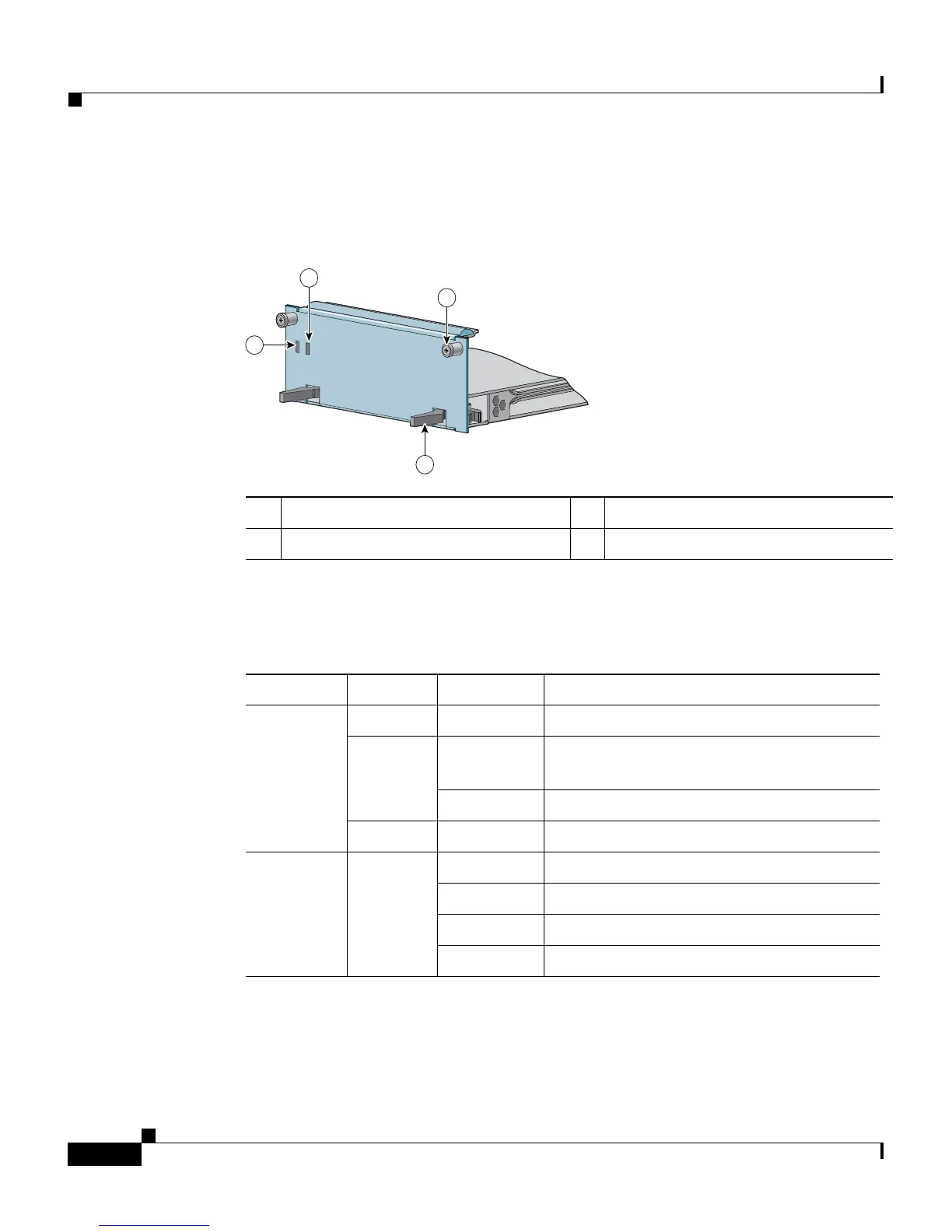
Figure 2-9 illustrates the SSL module front panel LEDs.
Figure 2-9 SSL Module LEDs
Table 2-6 describes the LEDs.
1 Bicolor status LED (green and red) 3 Spring-loaded screw (one of two)
2 Amber status LED 4 Ejector (one of two)
59537
CSS5-SAM
Session Accelerator
STATUS
CSS5-SAM
Session Accelerator
STATUS
1
2
3
4
Table 2-6 SSL Module LED Descriptions
LED Name Color State Indicates
Status
(left)
Green Solid The module is ready.
Red Solid The module failed the power-up self test
during the boot process.
Slow blink The module failed.
No color Off The module failed and has no power.
Status
(right)
Amber Fast blink The module is running power-up self test.
Slow blink The module is offline and active.
Solid The module is online and not active.
Off See the left status LED for indication.









 To Next Page