2-31
Cisco 11500 Series Content Services Switch Hardware Installation Guide
78-16421-01
Chapter 2 Cabling and Troubleshooting the CSS
Connecting the Power Cord
To connect the CSS 11503 DC power supply to a power source:
1. At the rear of the chassis, ensure that the CSS power switch is in the O (off)
position.
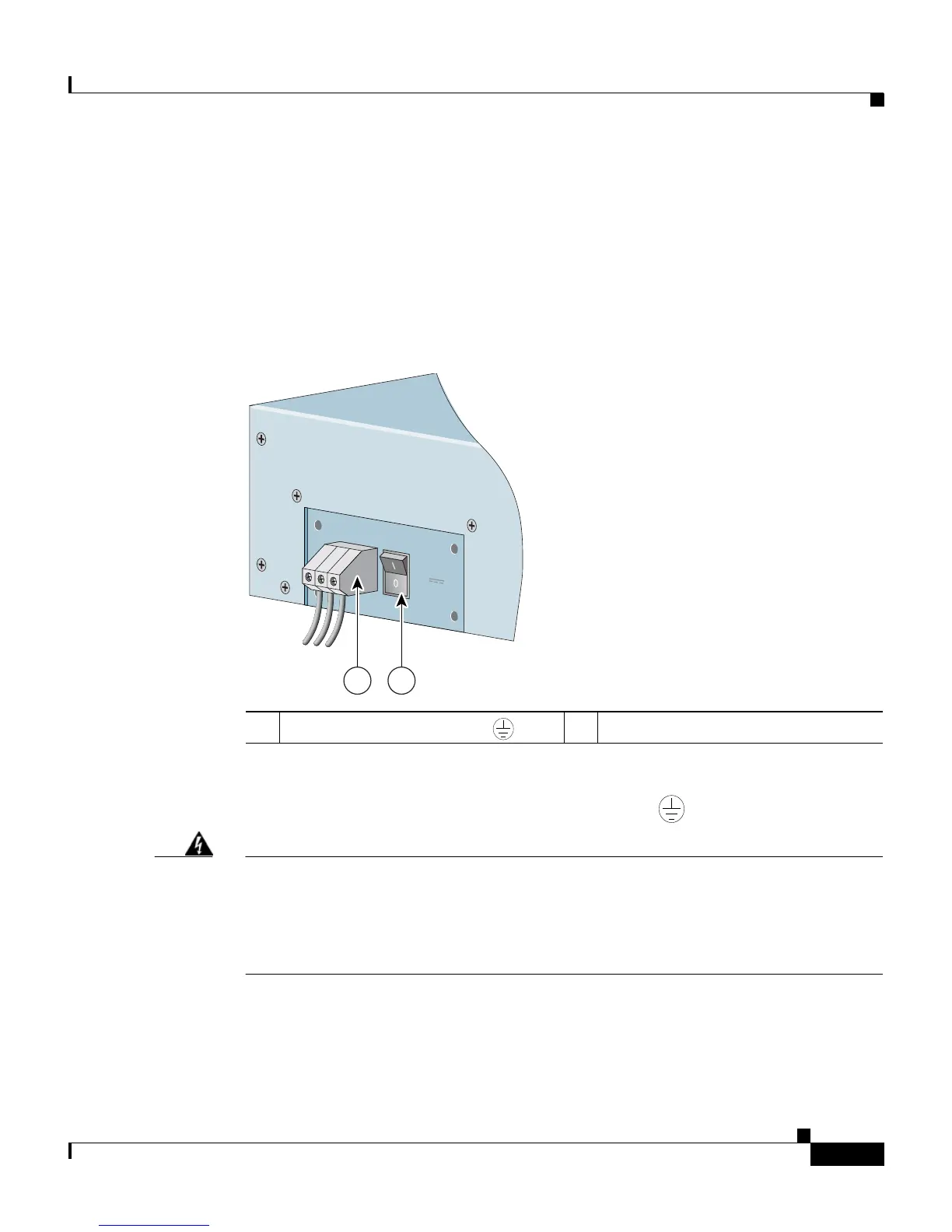
2. Locate the DC terminal block on the rear of the chassis as shown in
Figure 2-13.
Figure 2-13 Location of the CSS 11503 DC Power Supply Connectors
3.
Using a flat-head screwdriver, loosen the captive screws on the three DC
connectors (labeled from left to right, –, +, and , respectively).
Warning
Before installing a wire, ensure that the polarity of the DC connections is
correct. Reversed polarity causes damage to the DC power supply and can
create a dangerous shock hazard.
Do not consolidate the end of a conductor by soft soldering prior to installation.
4. Install the wires into the appropriate connector. Make sure that the
non-insulated part of each wire is 9 mm (0.35 inches) in length.
1 Terminal block (–, +, and ) 2 Power switch
59544
-48/-60V
9.0A,430VA
1 2









 To Next Page