Chapter 2 Cabling and Troubleshooting the CSS
Cabling the CSS 11503 and CSS 11506 Modules
2-14
Cisco 11500 Series Content Services Switch Hardware Installation Guide
78-16421-01
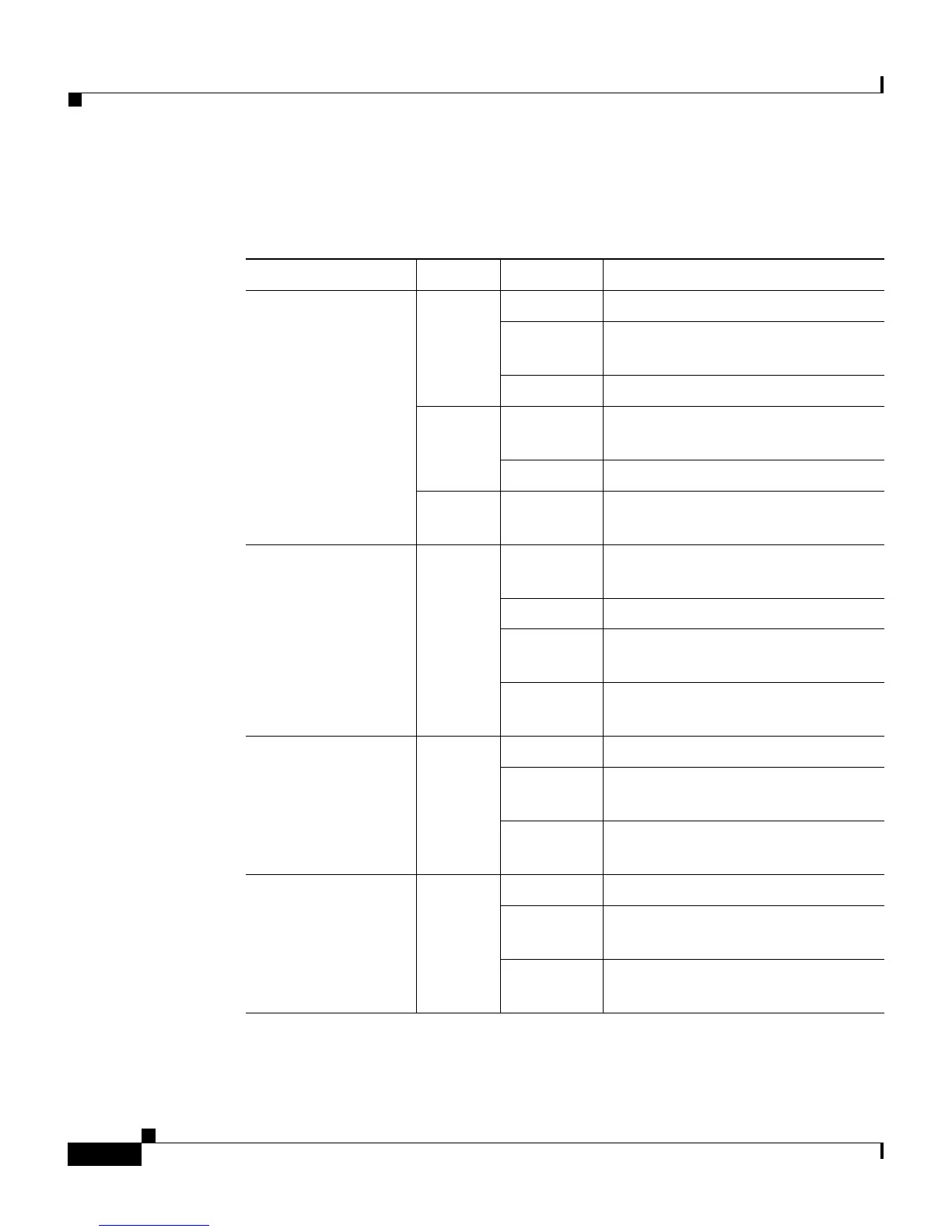
Table 2-2 describes the SCM LEDs and their indications.
Table 2-2 Switch Control Module LED Descriptions
LED Name Color State Indicates
Status (left) Green Solid The module is ready.
Var ia ble
blink
Disk activity is occurring.
Slow blink Another CSS module failed.
Red Solid The module failed the power-up
self test during the boot process.
Slow blink The module failed.
No color Off The module failed and has no
power.
Status (right) Amber Fast blink The module is running power-up
self test.
Slow blink The module is offline and active.
Solid The module is online and not
active (passive SCM).
Off See the left status LED for
indication.
Link/Act
for the Ethernet
Management Port
Green Off There is no link.
On The link is established but there is
no activity.
Blinking The link is established with
transmit or receive activity.
Link
for each Gigabit
Ethernet Port
Green Off There is no link.
On The link exists and
synchronization is achieved.
Blinking The link is established with
transmit or receive activity.









 To Next Page