2-33
Cisco 11500 Series Content Services Switch Hardware Installation Guide
78-16421-01
Chapter 2 Cabling and Troubleshooting the CSS
Connecting the Power Cord
Connecting a CSS 11506 AC Power Cord
To connect the AC power cord to each power supply in the CSS 11506:
1. At the front of the supply, ensure that the CSS power switch is in the O (off)
position.
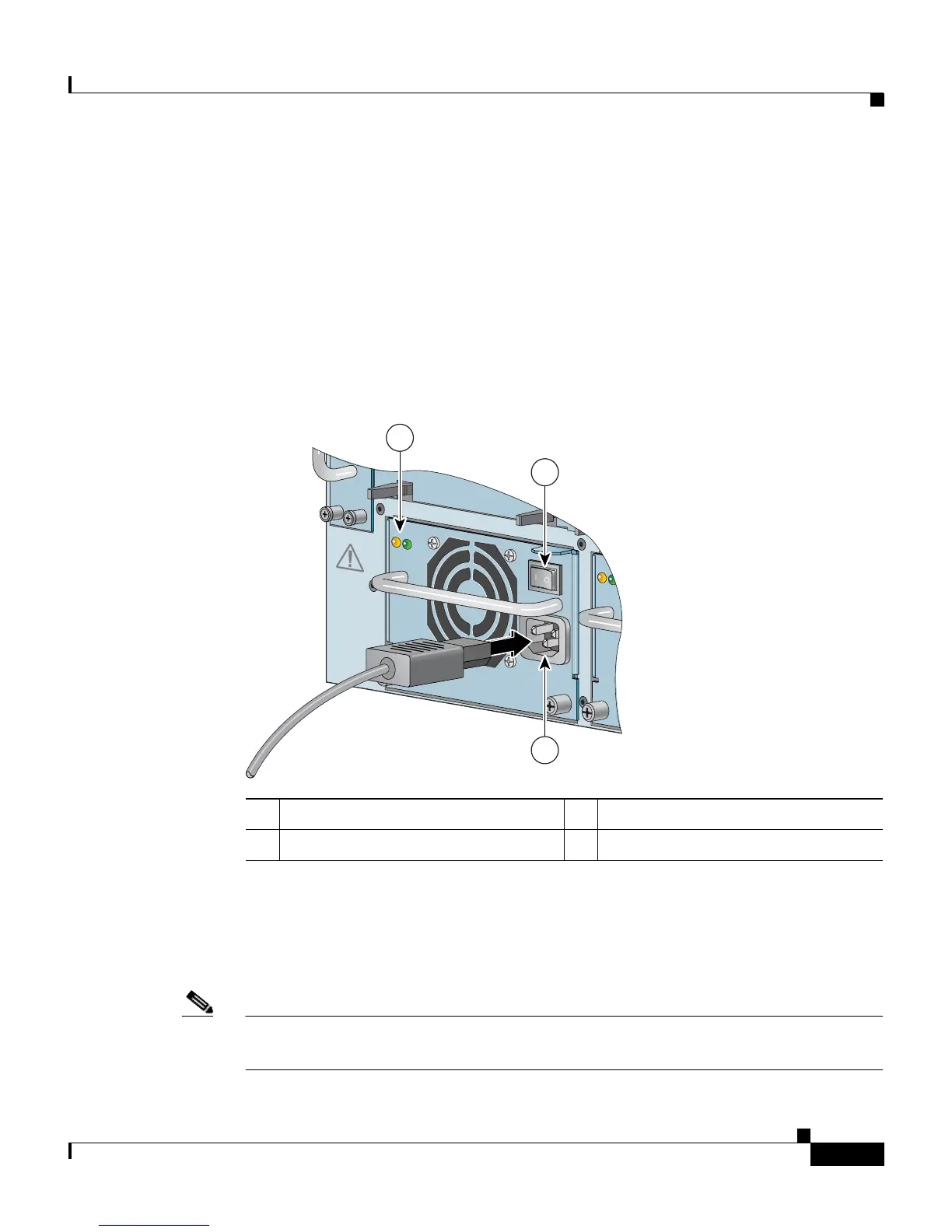
2. Plug the AC power cord connector into the power connector, as shown in
Figure 2-14.
Figure 2-14 Connecting a CSS 11506 AC Power Cord
3.
Plug the power cord into a dedicated 3-wire grounding receptacle.
4. Repeat steps 1 through 3 for each power supply.
5. See the “Powering Up the CSS” section to power on the CSS.
Note The CSS 11506 power supplies are autosensing for voltage and frequency, and
they require no additional modifications.
1 Power supply LEDs 3 AC power connector
2 Power switch
CSS5-10M-2GE
Gigabit Ethernet
GE 1
GE 2
LINK
LINK
1
2
4
3
CSS5-10M-16FE
1
2
3
4
5
6
PS1
PS2
PS3
7
DISC
ON
NEC
T ALL
PO
W
ER SO
URCES
BE
FO
RE
S
ERVICING
CAUTION
8
100-240V
~
5A 50-60 Hz
AC
OK
DC
OK
AC
OK
DC
OK
100-240V
~
5A 50-60 Hz
AC
OK
DC
OK
59545
3
1
2
CSS5-10M-2GE
Gigabit Ethernet
GE 1
GE 2
LINK
LINK
1
2
4
3
CSS5-10M-16FE
1
2
3
4
5
6
PS1
PS2
PS3
7
DISC
ON
NEC
T ALL
PO
W
ER SO
URCES
BE
FO
RE
S
ERVICING
CAUTION
8
100-240V
~
5A 50-60 Hz
AC
OK
DC
OK
AC
OK
DC
OK
100-240V
~
5A 50-60 Hz
AC
OK
DC
OK
59545
3
1
2









 To Next Page