27 Copyright © 2024 Cisco Systems, Inc. All rights reserved.D15519.02 | 2024 JANUARY | Cisco Room Kit EQX Installation Guide
6.3. Connect the PSU cables
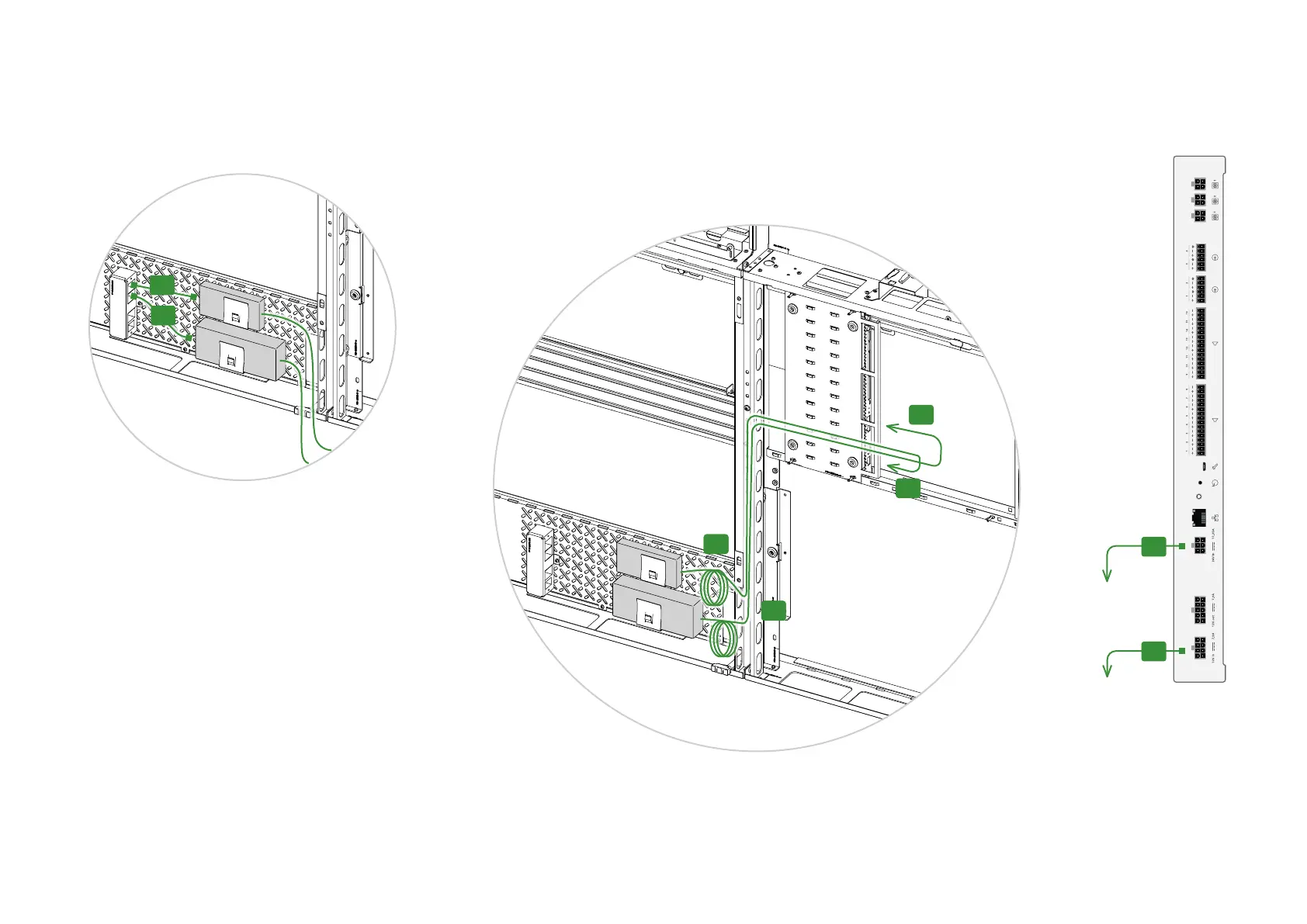
1. Connect the PSUs to the power strip:
• D4 for the 24 V PSU
• D5 for the 12 V PSU
D4
D5
2. The 24 V PSU (the largest one) has a power switch.
Switch it to ON.
3. Guide the cables as shown in the illustration, and connect
the PSUs to the amplifier:
• D2 for the 24 V PSU
• D3 for the 12 V PSU
Coil and strap (with velcro) excess cable close to the
PSUs, see illustration.
Amplifier
To 24 V PSU
D3
D2
To 12 V PSU
D3
D2
D3
D2
D3
D2


 To Next Page