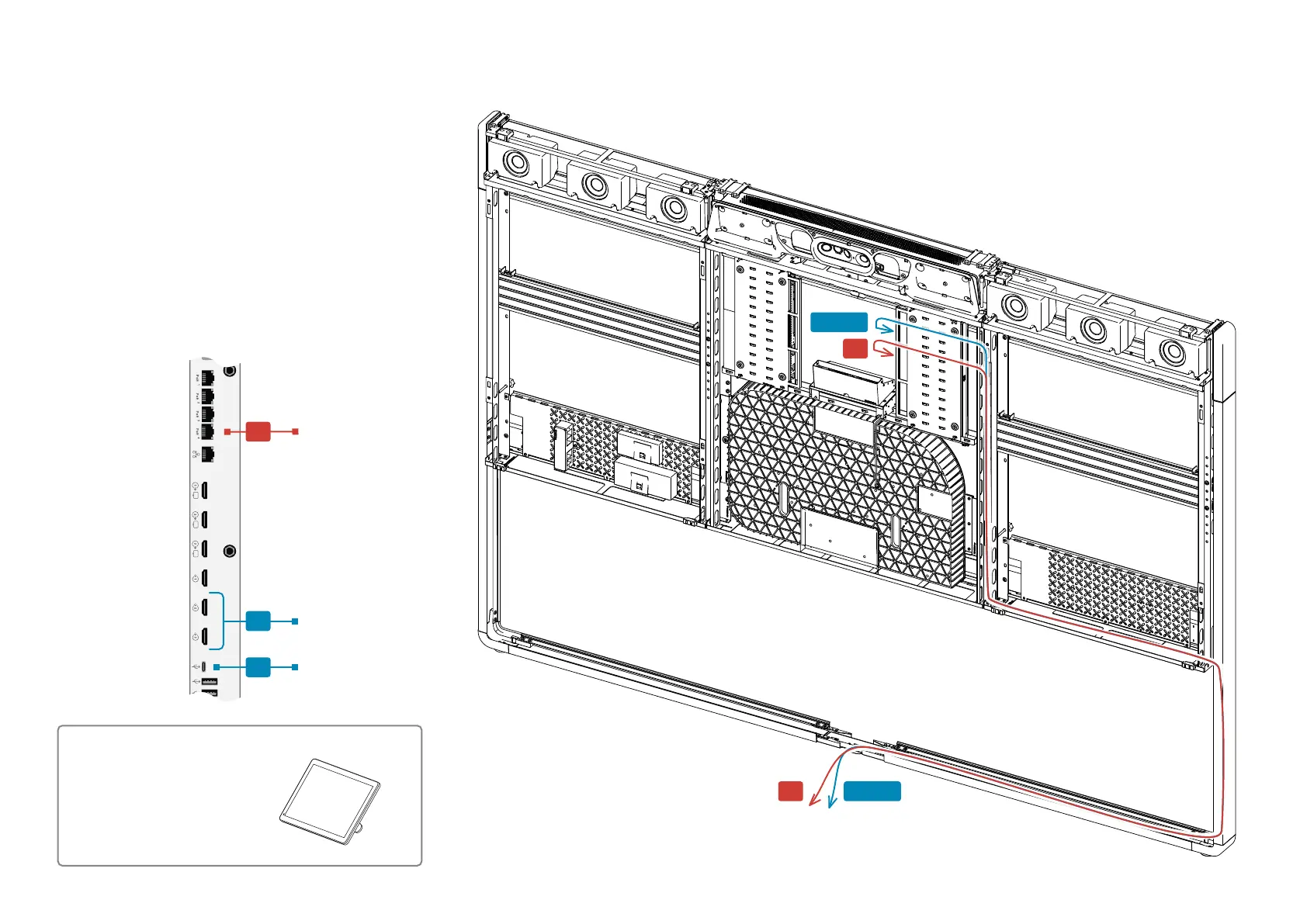
E5 or E6
Toward table
E4
E4
E5 or E6
47 Copyright © 2024 Cisco Systems, Inc. All rights reserved.D15519.02 | 2024 JANUARY | Cisco Room Kit EQX Installation Guide
Room Navigator:
• Connect the Room Navigator to the codec (E4).
Or alternatively, if you have connected an Ethernet switch
by the table as described for digital microphones in step
16, you can choose to connect the Room Navigator (E4)
to this switch instead of to the codec. This alternative in
not shown in the wiring diagram.
Presentation cable:
• Connect one or more presentation cables to the codec.
You may use HDMI (E5) or USB-C (E6).
• Use the regular cable routes when leading the cables
toward the table.
17. Connect the Room Navigator and presentation cables
Room Navigator
1x Room Navigator
(Box: Navigator)
Codec
E6
E4
E5


 To Next Page